


In starting Thunderbird, the profile I used was accidentally deleted....how do I restore that?

My profile used in starting Thunderbird was accidentally deleted. How can I restore that and recover all the previous emails and email addresses that were there?
Wšě wotmołwy (6)

How did it come to be deleted? Please be detailed and specific.
What is your operating system?
If it wasn't deleted to the system Recycle Bin and if you don't have a backup copy, that information may be lost for good. If it was an IMAP account, most or all the messages may still be available there. Local folders may or may not be recoverable.
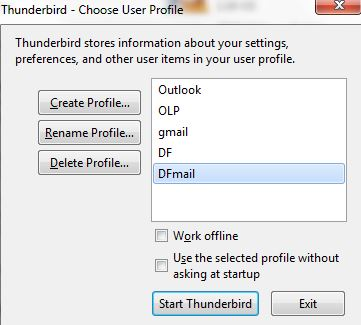
When thunderbird starts, I have several options to select. Two of them were the same so I deleted one of those and since they both used the same profile I have lost all of the email info that was there. It is not in the recycle bin so where would the deleted file be placed???
Operating system is Windows 7
rfaurot said
When thunderbird starts, I have several options to select. Two of them were the same so I deleted one of those and since they both used the same profile I have lost all of the email info that was there. It is not in the recycle bin so where would the deleted file be placed???
I would be curious about how you came to have the same profile listed twice! It can be done, as I just found out, but you have to contort pretty hard to do it! But it really doesn't matter at this point. It is what it is, as they say.
When you delete a profile through Profile Manager, which I think is what you did according to your description, you get the warning, "Deleting a profile will remove the profile from the list of available profiles and cannot be undone. You may also choose to delete the profile data files, including your settings, certificates and other user-related data. This option will delete the folder “C:\Users\lxxxxxx\AppData\Roaming\Thunderbird\Profiles\xxxxxxx” and cannot be undone. Would you like to delete the profile data files?" And as it says, deleting it this way bypasses the Recycle Bin and cannot be undone.
But! depending on whether you answered the above question "Yes" or "No" there's a possibility that the old profile is still there, just not listed. To find out, start up a File Explorer window and in the address bar type %APPDATA% . This will take you to the folder that contains personalizations for many Windows programs, including Thunderbird. You will see a Thunderbird folder on the right - enter it, and then enter the Profiles folder. Here you will find one or more profiles. Inspect the contents each one of these, and you may be able to tell from the file dates-and-times whether one is actually a copy of your missing Profile.
Please let us know what you find. Screen shots of the Profiles folder might be helpful. Then we can advise you on how to re-integrate an unlisted profile back into Thunderbird.
I don't want to be overoptimistic. If you truly deleted the profile from the computer and you don't have a backup copy, you're probably out of luck. But let's keep our fingers crossed for now.
I did not get the warning you refer to....did not get any warnings at all. When I click on one of the profiles it just goes straight to the Thunderbird page with no questions asked such as shown on the attachment. I had tried to set up another email account using the same profile as the one I was using. Decided that was not what I wanted so I deleted the new one not knowing it would also delete everything in the one I had been using and there were no warnings.
Please show us the contents of your Profiles folder as I described above. A screen shot should suffice.