


Whenever I start Thunderbird, Calendar asks to authenticate with my google account
Greetings all!
Thunderbird version is 1.52.0
Since this morning (8:00 CET) I have to enter password for my google calendar every time I start Thunderbird. No matter what authentication options I choose, calendar manager keeps asking me to authenticate. "Don't ask again" is turned on. Gmail is set up as OAuth for both incoming and outgoing servers, and it works fine.
Things I've tried since:
- Removed legacy connection in password manager, when I was using IMAP to connect to Gmail - Revoked OAuth permission from google account for Calendar and from Thunderbird password manager - Unsubscribed from calendars and added them again after restarting Thunderbird
I don't know what more to do. Also, I don't know what happened, really, as it worked properly last night.
Wšě wotmołwy (6)

Wubrane rozrisanje
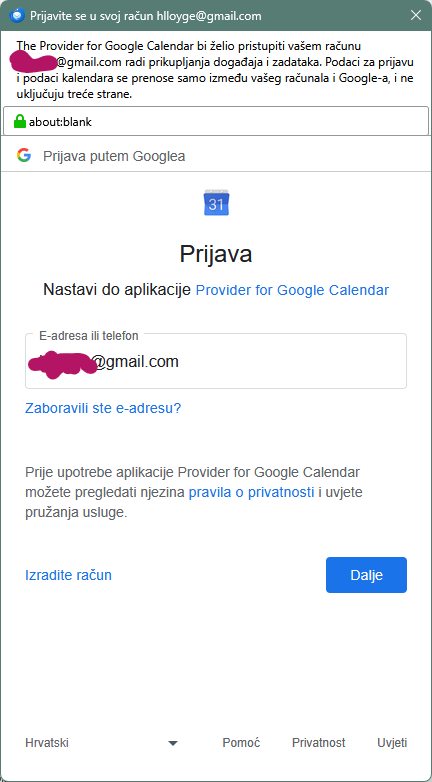
The authentication pop-up is triggered by the 'Provider for Google Calendar' add-on. What happens when you click 'Next'? I suppose you'd have to successfully complete the authentication for the pop-up to stop. Therefore, was the authentication ever successful?
Unless you really need tasks for your calendar, you could also use CalDAV to connect to your Google Calendar. In that case no add-on is needed.
Yes, the process completes successfully. I enter password, authenticate via mobile phone, and it's successful, I get calendar entries. But after I close Thunderbird and start it again, the same procedure starts.
But I totally forgot it was add-on. I think I installed it because I couldn't add new things into calendar otherwise with Thunderbird.
OK, it's really not Thunderbird's problem, but add-on problem. Thank you for pointng it out.
I've removed the add-on, and re-added the google calendar following the official how-to:
https://support.mozilla.org/kb/using-lightning-google-calendar
It works now. Thanks, christ1.
Wot christ1 změnjeny

I appreciate that this looks to be a problem for the add-on, but there's no current way of raising a bug there as far as I can see. If there is a way, please advise! But what's Caldav? Sorry if I ought to have been told this with my mother's milk but will it enable me to accept and respond to Teams invitations? If not, then I remain in the same quandary as noted by the question owner.
what's Caldav?
CalDAV is the protocol a Calendar client uses to talk to a Calendar server. It's built-in to TB, hence there is no need for an add-on. The flip side is, Tasks are not supported with a Google Calendar.
will it enable me to accept and respond to Teams invitations?
I'm not sure, but you can give it a try.
For any more questions you may want to start a new topic for your problem.
Wot christ1 změnjeny
I ran into this problem too. I have removed the 'Provider for Google Calendar' add-on, and have added the Google calendars via Thunderbird's built-in functionality. That works for calendar events, but I no longer have access to Google Tasks from within Thunderbird. (That functionality was provided by the 'Provider for Google Calendar' add-on.)