


Unable to receive new emails even after deleting old messages.

How to receive new emails
Wšě wotmołwy (20)
How many messages does your Inbox folder contain? Any error message when Thunderbird tries to download emails? Have a look on the error console via Help > Developer Tools > Error Console
How many messages does my Inbox folder contain? It says 4 new but the are not shown. Any error message when Thunderbird tries to download emails? Yes, it says I need to delete some message...I did that but new ones still wont download.
I guess that the warning you get is "There is not enough disk space to download new messages". R-click on the Inbox folder > Properties > General : which is the number of messages and which is the size on disk?
right clickedon the inbox and went to properties and clicked repair folder and now ALL my messges are gone.
I did not ask you to repair the Inbox folder. I asked "which is the number of messages and which is the size on disk?" in Properties? Is this a POP or an IMAP account?
Clicking "Repair Folder" does neither delete the folder nor the messages it contains. Did you have a look in your Trash folder whether it contains your missing messages? Can't you reply to my question whether your email account is a POP or an IMAP account?
In reply to the following: Mapenzi May 29, 2026, 3:15:29 AM
Clicking "Repair Folder" does neither delete the folder nor the messages it contains. Did you have a look in your Trash folder whether it contains your missing messages? Can't you reply to my question whether your email account is a POP or an IMAP account?
I greatly appreciate your efforts to assist me. I do not know if my email account is POP or IMAP. How can I tell?
When I did click repair, everything in all my inboxes ere deleted. They are not in my trash.
I fear I have lost all my imbox messages.
I will try anything,
Judy Robinson
Move your mouse pointer to the upper right corner, click on the ("Hamburger") ≡ app menu button and select "Account Settings"; this will open a new tab. In the left pane of Account settings tab identify your account, click on Server Settings and note the "Server Type" (see image)
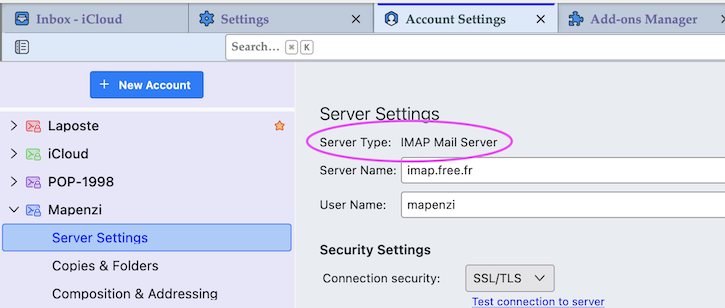
IMAP, thank you! Now DO NOT compact any folders in case Thunderbird prompts you to do.
The following steps are very important to keep a chance to retrieve your Inbox messages: • in Thunderbird go to menu Help > Troubleshooting Information > Profile Folder > Open Folder, then quit Thunderbird • your profile folder "xxxxxxxx.default-release" (or similar name) is now displayed in your Windows Explorer: copy the profile folder to some repertory, e.g. your desktop • in the copied profile folder open the ImapMail folder; it may contain one or several subfolders of the type "imap.xxx.xx" • if you have only one account open the "imap.xxx.xx" subfolder and take a screen shot of its contents; take care that file sizes appear in the screen shot or at least note the size of the INBOX file.
If you have more than one email account in your Thunderbird installation please tell me
thank you so much. I will try these steps tomorrow. Yes, I also have dcramp@midmaine.com but it won't load. Will I be able to recover my emails?
I can't say it now, I first have to wait for your reply after those steps....
The Thunderbird menu bar is hidden by default. Consult this article to enable it https://support.mozilla.org/en-US/kb/display-thunderbird-menus-and-toolbar#thunderbird:win11:tb151
thank you once again for your patience. I am unable to find the Thunderbird menu bar and becoming overwhelmed and frustrated with trying to correct this problem. Perhaps I should consider discontinuing using Thunderbird. I really like the problem but without someone to discuss this with by phone, I feel like I am not making progress. Judy
correcting my sentence. I really like the program - Thunderbird, but without someone to discuss this with by phone, I feel like I am not making progress. Judy Would it be possible to discuss this by phone? Judy
@Judy, I've seen that you have opened a new thread here https://support.mozilla.org/en-US/questions/1584960 in which you say that your problematic email account uses an IMAP server. Please continue here in your old thread, otherwise communication gets chaotic.
Go to the menu Help > Troubleshooting Information > Profile Folder > Open Folder, then quit Thunderbird. Now in Windows Explorer (or file manager?) you'll see your Thunderbird profile folder named somewhat like "xxxxxxxx.default-release" (or similar). Make a copy of this profile folder and keep it on the desktop of your PC. Open the copy of the profile folder, go to ImapMail subfolder and open it. In ImapMail probably you'll see two account folders of the type "imap.xxx.xx". Identify the "imap.xxx.xx" account folder which corresponds to your problematic account and take a screen shots of its contents, showing folders, files, date and file size.
I apologize and did not realize I had started a new thread. My email as you can imagine, is very mixed up right now, as I am receiving in on the website of https://mail.otelco.net/tuxedo/?_task=mail&_mbox=INBOX.Spam since my Thunderbird is messed up. Also, I must tell you that I only have a small window of time each day to dedicate to solving this problem with your help. YOU HAVE BEEN MOST HELPFUL AND I APPRECIATE IT GREATLY. Please give me some time today to follow your latest steps to the best of my ability. Judy - more later.