


Import contacts from a CSV file

I exported my contact list from Outlook to a CSV file. I then cleaned up the file to delete all the columns I am not using and now have only first name, last name, email address. When I import contacts from this CSV file, I only see the first name and email address in the address book. How do I display both first and last names and sort on last names?
Wšě wotmołwy (6)
This works. It's more steps, but it works. - create a single email address in the addressbook, populated with all the fields that you would normally use. - then, export that addressbook to csv - now, open in a spreadsheet and review the top row for column names. - next, load your outlook csv in spreadsheet and adjust to match the sample that you downloaded. - save as csv with comma-delimited. - this csv should now import with the column names that work.
Question: important, really. When you import the csv, do you see a prompt that shows the columns available and how to match? Please see attached screenshot. My concern is that the intent of that prompt is to allow users to adjust column names. If you are not seeing it, then we may have a bug. thank you
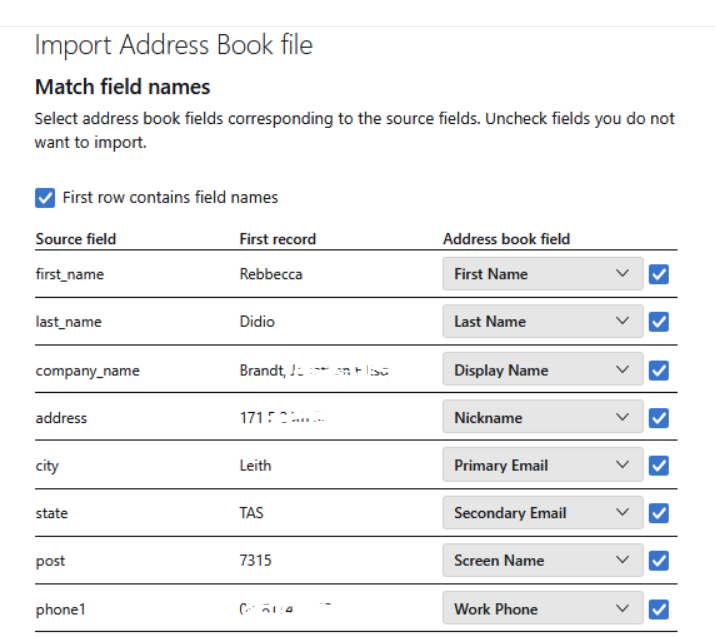
I set the headings the same as in the Thunderbird exported file. Didn't work. It only brought in last names this time.
Puzzling. Would you be willing to open your csv in spreadsheet, delete all but two entries, change personal info as desired, and save back to comma-delimited csv? I am trying to figure this out and cannot duplicate, as I have no Outlook-created csv. If you wouldn't mind, email to me at davidthunderbird at gmx dot com. that won't solve your issue, but may help figure this out. Others have used my suggested steps with success, so I am wondering if there is a new issue I haven't found yet. Thank you. And, if you use Excel, please include the version used, as I have been told that early versions were untrustworthy in this task.
I got it to work and show first and last names. But the list is not in any alphabetical order by either first or last names.
I see only one signature place. I use 3 different ones and format them in HTML.
Ken
there is an icon to the right of the search bar on addressbook pane. click that to adjust sort order of addressbook.
If you use multiple signatures, see 'account settings' click the account name in left side bar then, in right side, enter default sig. and slightly below is a button to manage identities. click that to create additional sigs then, when composing a message, the dropdown menu for FROM will let you pick the desired sig.
When I click the icon next to the search bar it shows to sort in alphabetical order. However, I notice several sets of sorted names. Some are displayed like f-name l-name, and others like ' f-name l-name'. I don't know where these come from. I will have to look at the csv file.
Can't spend any more time on this today. I'll get back to you.
Thanks, Ken