


Thunderbird address book import not allowing mapping

Thunderbird import not allowing to map fields on CSV import. Can't import properly without Mapping fields?
Wšě wotmołwy (16)
There is some allowance, but I agree it can be challenging. try this:
- enter one good email address with fields you normally use into thunderbird' addressbook
- click the three dots to the right of addressbook name and export in csv format. This will be your template
- open that export into a spreadsheet program
- note the top row. this shows the columns as thunderbird expects them to be
- open your exported outlook csv into spreadsheet and adjust columns to match, including the top row.
- save as csv
- import into thunderbird
I am not going to use excel to remap. Thunderbird needs to allow the remap on THUNDerbird. I saw it work and all I need is for the remap to be allowed on the Thunderbird import!!!
Allow the mapping page as a option help Please. or at least explain why it was disallowed since I did see it on an import but I didn't have a proper file to import at that time.
ghbgiest said
I am not going to use excel to remap. Thunderbird needs to allow the remap on THUNDerbird. I saw it work and all I need is for the remap to be allowed on the Thunderbird import!!!
Well it is good for you that is does then.
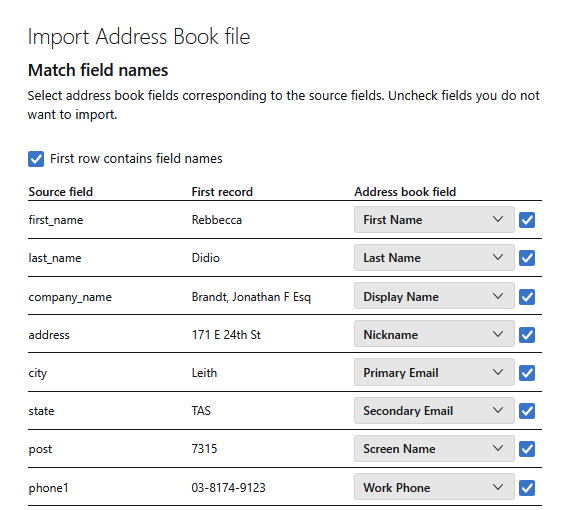
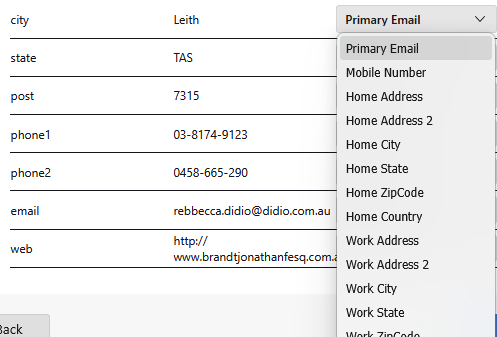
Just as an aside you were suggested to use a spreadsheet as that is actually a more convenient way to do things with CSV files. Personally unless you have the latest and greatest from Microsoft it will make something of a hash of your CSV files because in is only in the last few releases Microsoft have finally started treating unicode text as real text (it was the default in Windows XP). Older Excel "imported" and "exported" it and made a mess in the process. LibreOffice which is free has always been able to do this without the mess part. That was why my 2013 blog post was specific in relation to spreadsheet to use. https://thunderbirdtweaks.blogspot.com/2013/03/importing-csv-files.html
Well you just showed exactly what I need but Thunderbird is not giving me this as an option. I've tried lots of differing examples but none came up with this option! "Match field names". The import address book file is not coming up as an option it's just starting the process without giving this option. I am using the File and going through all the prompts and goes straight to starting!!! There needs to be an option to pick the Mapping! before Starting!!! !
The following is screens taken from the daily development version. As I use the ESR version that allowed me to check if someone had managed to break the import since the ESR was released. Apparently not.
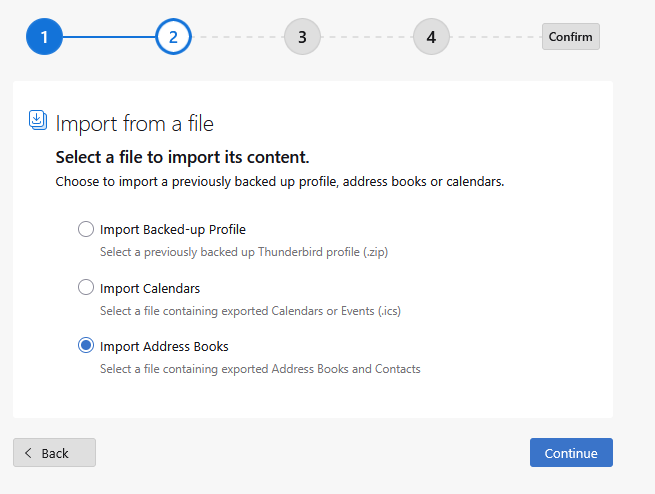
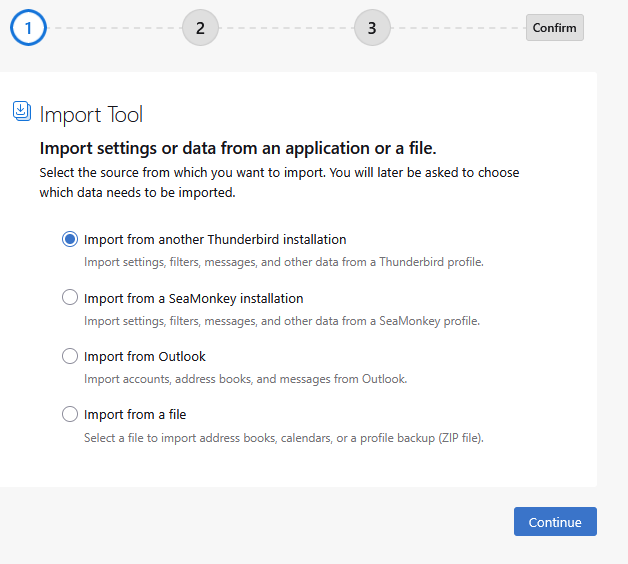 First there is the default import.
You modify it to import from a file as that is what you have.
First there is the default import.
You modify it to import from a file as that is what you have.
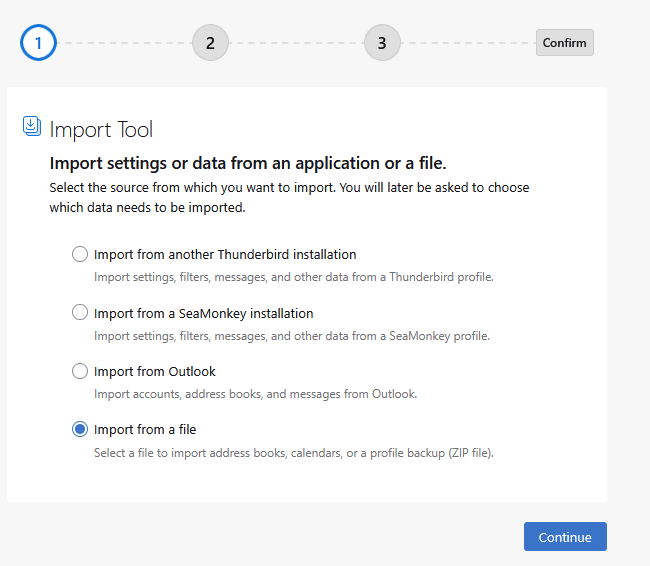
Then you identify you want to import an address book file.
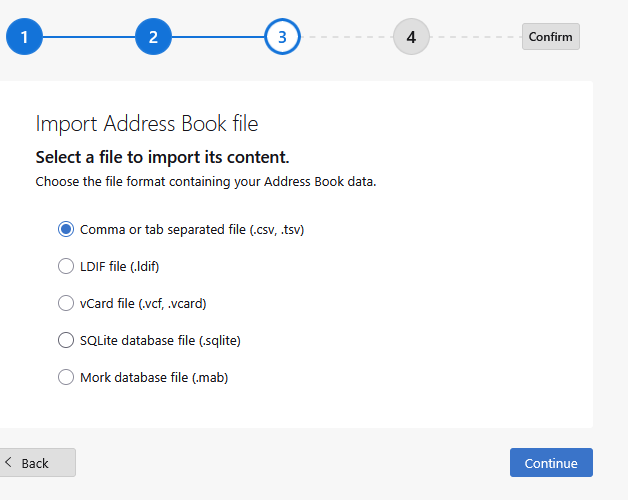
Then because we are importing a comma separated file we select this
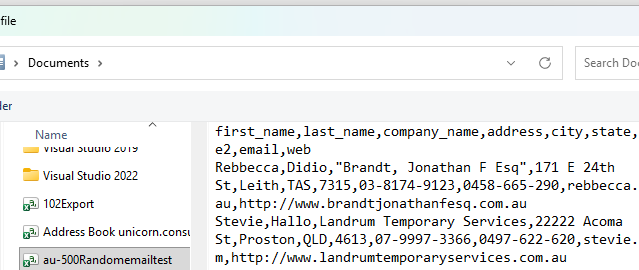
Then I select the file to import
The very next thing I see is this from my initial post.
Yet you say you do not get that, so I leave it with you. Where exactly is this import process breaking down. My personal feeling will be in the quality or lack thereof of the data in the CSV file. Which was exactly where David was going.I am happy to look at that data if you want to email it to me.
An observation: to test this, I created an export csv and then imported it. No prompt, the process went immediately. Then, I opened the csv in a spreadsheet (NOT excel) and deleted the top row and saved again as csv. This time, on import, thunderbird showed to prompt screen to assign columns. This isn't a complete test, but my inference is that thunderbird assumes the columns are correct if there is a top row in the csv.
To the original poster, if interested, use a spreadsheet to remove the top row and resave as comma-delimited and see if thunderbird lets you assign the columns. I respect you prefer that thunderbird do this without an intervening spreadsheet; my suggestion is only to assist in resolving this early for you. Good luck.
I might as well wait till the Mozilla Programmers add the option to all import options. It's the only sure way. software shouldn't guess what is needed.
By the way I am only the "tip of the Iceberg" of the people trying to get off MS Outlook ( cost & security concerns ). If you don't make it easy to transfer address book info, then I and thousands of others will bypass Thunderbird for easier transitions. You better ask yourselves on who making these weird decision that make Thunderbird harder to use and why are they doing it? There is a lot of corruption in all American endeavors; open software is no different.
That's rather harsh...."a lot of corruption in all American endeavors.' and rather broad brush. By that statement, you have already passed judgment that Thunderbird developers are corrupt. You make that statement, yet also ask for support. Seriously, if that is your belief, I honestly suggest you investigate TheBat, as it is not American-made and it's a fine client. There is also eM Client and Mailbird, two satisfactory and successful email clients, but they're not free if you have several accounts. Making such judgmental statements such as yours makes for few friends. This is a volunteer-supported site, no decision-makers, no coders. Just volunteers. As for helping Outlook users, I've done a lot of that in past year or more, and biggest issue for many is transferring their PST files. As far as management decisions, Mozilla is unique in that they have millions of users, and only 3% contribute. With that, there is no immediate revenue with new users, only development effort. If you would like to make a recommendation that will be reviewed, Please go to connect.mozilla.org and select the IDEAS topic and make your suggestion there.
Sorry I may be thinking broadly, not just the Computer industry. I worked in the Computer industry. And I'm old and I've seen the corruption. The word corruption is bothering you. Thinking that all "volunteers are "pure at heart" is the real problem, I see. Making it hard to transfer address books is at the heart of this discussion. Your dismissing the point of making any CSV "file" from any Mail app, including off Phones and any device easy to do by Thunderbird is the problem of "open Source" Thunderbird. I would bet it used to be easy even for newbies. Did you really think someone in the computer industry is going to start by saying Thunderbird volunteers should be commended BUT I am looking for a solution that benefits Thunderbird and not just me. Not a work around. I'll wait. I have donated. I like Thunderbird. Your dismissing the point of making any CSV "file" from any Mail app, including off Phones and any device easy to do by Thunderbird is the problem of "open Source" Thunderbird. Please try to keep the discussion on the problem. It behooves Thunderbird to make transferring data easy.
I was keeping the discussion on the problem; it was you who decided to shift the discussion to corruption of American endeavors. And the possible bug in the CSV import is not a condemnation on open source, as bugs exist in other products. You are quick to pigeon-hole an issue into a broader category, losing sight of the issue. We have concluded that Thunderbird does not, at this time, properly import your addresses. With that, there is no need to pursue this. On a positive note, I will file a bug report to have this investigated.
ghbgiest said
I might as well wait till the Mozilla Programmers add the option to all import options. It's the only sure way. software shouldn't guess what is needed.I wish you a long life. You will almost certainly need it to await that expectation.
david said
An observation: to test this, I created an export csv and then imported it. No prompt, the process went immediately. Then, I opened the csv in a spreadsheet (NOT excel) and deleted the top row and saved again as csv. This time, on import, thunderbird showed to prompt screen to assign columns. This isn't a complete test, but my inference is that thunderbird assumes the columns are correct if there is a top row in the csv.
Did you see the images I posted David?
As you can see that file has an initial list of fields. It is however not the list Thunderbird generated. It is also undertaken on Windows 11 so if there is a bug it would have to be in the field list or the operating system.
Please post any bug link here as this is one of my areas of interest.
Did your import mess up the locations of the data it imported? or just proceeded as suggested in the source comment below successfully.
I see this comment in the import source. https://searchfox.org/comm-central/source/mailnews/import/modules/AddrBookFileImporter.sys.mjs starting at line 87
/**
  * Parse a CSV/TSV file to an array of rows, each row is an array of columns.
  * The first row is expected to contain field names. If we recognize all the
  * field names, return an empty array, which means everything is parsed fine.
  * Otherwise, return all the rows.
  *
  * @param {nsIFile} sourceFile - The source file to import from.
  * @returns {string[][]}
  */
I would therefore assume you have not encountered a bug in the non display of the field selector as the names export by Thunderbird should parse without issue.
I did try and export from outlook and the CSV file was as I sort of expected, garbage. But it is technically a CSV file. Like everything Microsoft they did not tell a lie.
Apart from exporting 66 fields of mostly blank information. It did not follow any real process of quoting text I could see, some things were, others were not. All over the place.
The unenclosed empty text fields and the general mismash of quoting was enough to trip up the Thunderbird CSV parser into placing the entire first record into the title field. So we are dealing with garbage out, garbage in almost certainly. I would suggest you make the failure to just ignore the unenclosed empty fields or strip the quotes as LibreCalc did the focus of your bug report. LibreOffice calc was not fooled and managed a successful import the text. Saving the data in LibreCalc out as CSV made for a successful import in Thunderbird. No editing in LibreCalc required, but the field associations were off and needed correction.