


duck duck go map extension
I realize I'm an old man with diminishing cognitive abilities, but y'all don't make this easy. I added the map extension, now how do I find it to use it? Why are there not icons like I had on Google?
Wšě wotmołwy (2)

Your going to have to get a trusted family member to help you with this as that is beyond the scope of Firefox browser user help.
First, in general, most browsers have a similar-looking "puzzle piece" button to manage add-ons, so I suggest starting there: Manage your extensions using the extensions button in the toolbar.
Is it this extension? https://addons.mozilla.org/firefox/addon/duckduckgo-maps/
That extension does not have a toolbar button, so on the Extensions button drop-down, it will have grayed text.
According to the listing I linked earlier, it automatically adds either a Google Maps or an OpenStreetMaps link/button above your search results, in the search results page. They have a large image here: https://addons.mozilla.org/user-media/previews/full/216/216276.png?modified=1622134171
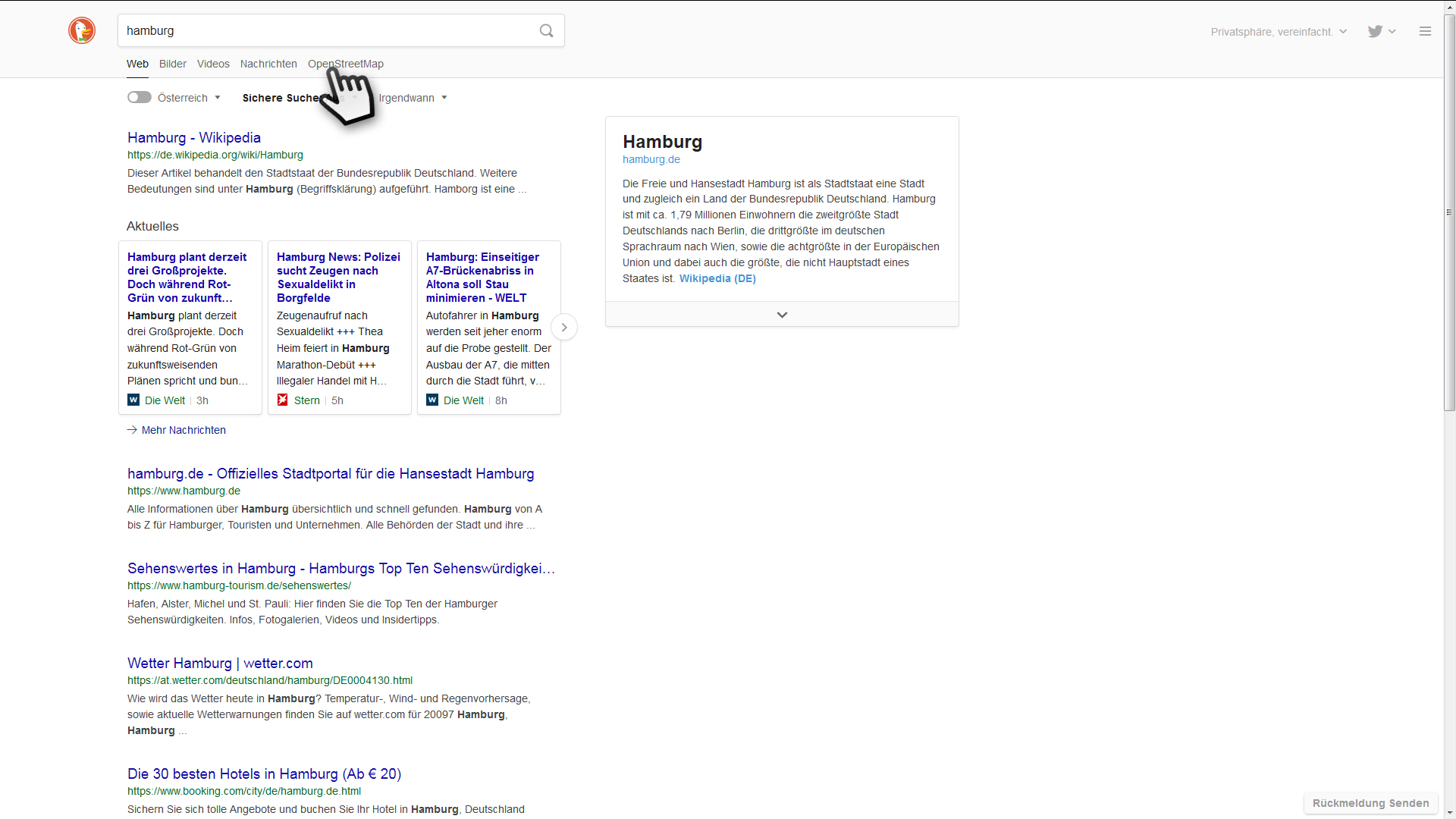
Can you find that in the page? If not, a possible issue that you are using a private window and didn't grant the add-on permission to run in private windows. To check on that, see the following article:
Extensions in Private Browsing
Any progress so far?