

Windows 10 reached EOS (end of support) on October 14, 2025. If you are on Windows 10, see this article.

Pomoc přepytać

Hladajće so wobšudstwa pomocy. Njenamołwimy was ženje, telefonowe čisło zawołać, SMS pósłać abo wosobinske informacije přeradźić. Prošu zdźělće podhladnu aktiwitu z pomocu nastajenja „Znjewužiwanje zdźělić“.

Dalše informacije
Archiwowany

Problem Importing addresses from a CSV

davidswoods60

I have a CSV file from Outlook with addresses I want to import into Thunderbird.

In an older version of Thunderbird I was able to match the fields in the CSV to the fields in the Thunderbird address book but in the latest version this seems to be missing - I was able to move the fields up/down to match before importing but this doesn't seem to be available (see attached screen shot). The import screen looks different with no way of moving fields up/down to match.

The drop down arrows on the fields on the right (the Thunderbird address fields) only show one field so I am not able to match them.

How do I match the fields to the CSV file so I can import my addresses/contacts.

Thanks
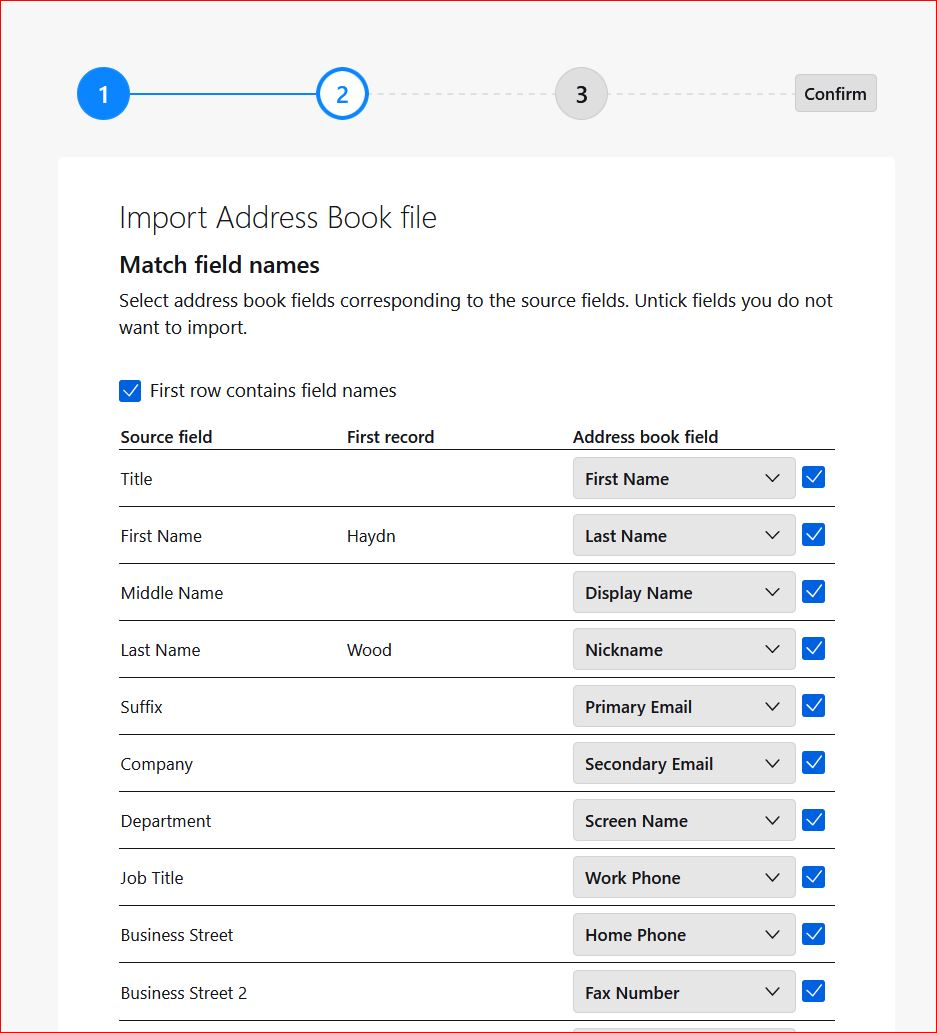
I have a CSV file from Outlook with addresses I want to import into Thunderbird. In an older version of Thunderbird I was able to match the fields in the CSV to the fields in the Thunderbird address book but in the latest version this seems to be missing - I was able to move the fields up/down to match before importing but this doesn't seem to be available (see attached screen shot). The import screen looks different with no way of moving fields up/down to match. The drop down arrows on the fields on the right (the Thunderbird address fields) only show one field so I am not able to match them. How do I match the fields to the CSV file so I can import my addresses/contacts. Thanks
Připowěsnjene fota wobrazowki

Wšě wotmołwy (1)

i have had success this way: - place at least one address manually in addressbook - then export it as csv - use the exported csv as a model for your outlook csv. I do this in a spreadsheet to align the columns and top row to match - once down, save as csv and it should import properly.