FORMATTING TOOLBAR IS GONE

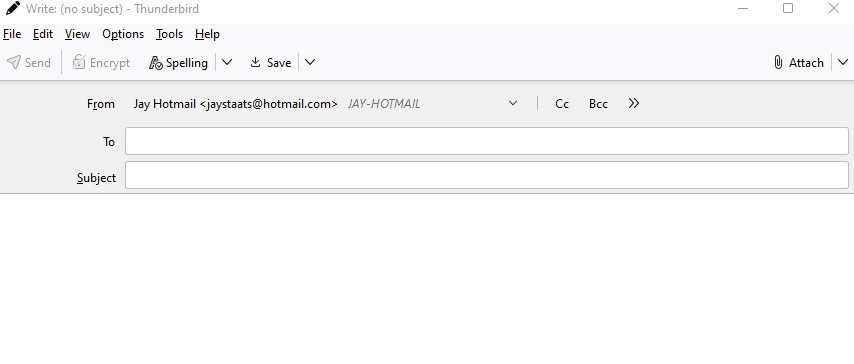
FORMATTING TOOLBAR IS GONE. Have checked FAQ, but there is no formatting toolbar. Worked ok prior. Have reinstalled. 102.11.0 Current. Submitted WRITE screenshot.
FORMATTING TOOLBAR IS GONE.
Have checked FAQ, but there is no formatting toolbar.
Worked ok prior.
Have reinstalled.
102.11.0 Current.
Submitted WRITE screenshot.
Wšě wotmołwy (3)
You picture shows the Write window for plain text messages, which omits the formatting toolbar. Switch the default to HTML format in Account Settings, or hold Shift when clicking Write, Reply or Forward.

I am on 102.15.1. I have HTML as default in settings. There is no formatting toolbar when I simply click Write or when I hold Shift and click Write. Are you on an earlier Version or is there something else wrong?
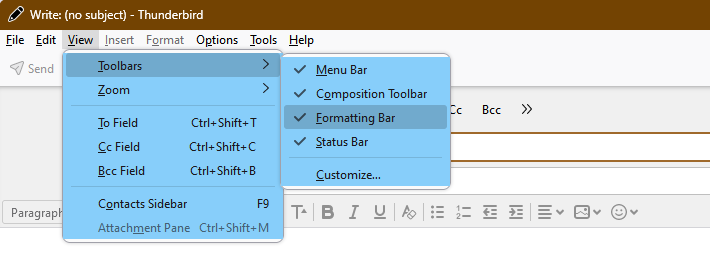
Enable the Formatting toolbar as in the attached picture.