


Downloading a file with Swedish letters in the file name corrupts exfat harddrive on macOS

Hi! I use Firefox daily as my primary browser and came a cross a very strange, but serious bug that is reproducible 100% of the time.
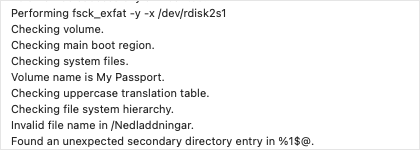
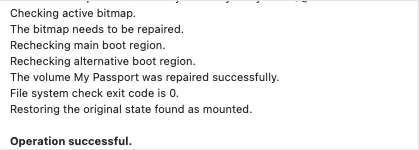
If I download a file that contains Swedish letters in the file name (åäö) to my external harddrive (exfat) I cannot access the file and the folder gets corrupted. First Aid in Disk Utility finds and fixes this (see attachment), but running the Disk Utility every time I download a file with Swedish letters in the file name is of course not a long term solution.
All points below are reproducible 100% of the time: If I download the file with Firefox to my external harddrive (exfat) the folder gets corrupted. If I download the file with Firefox to an external harddrive of another brand (exfat) the folder gets corrupted. If I download the file with Firefox to my internal harddrive (APFS) it works. If I download the file with Safari it works on both my internal and external harddrive.
To summarize, the exact combination that causes this error is Swedish letters, Firefox and exfat. Of course this bug might also affect other special characters, but I haven't had time to test that. Thanks in advance!
Wšě wotmołwy (2)
What do the other browser with those accented Swedish letters in a file name? Does it keep them or are they some how sanitized ? Are Unicode characters allowed for filenames on that drive as some file systems only support basic ASCII characters (a-z,0-7) ?
Safari doesn't change the filename whatsoever. Swedish letters show as they are supposed to.
Same goes for Firefox if I download to my internal drive (apfs).
I have lots of files with special characters including Swedish letters on my external drive.
As stated before it's just the unique combination of Firefox and all exfat drives that doesn't work.