


Recovering profile data after password problem
I had a problem with logging into my email provider after having changed the password I'd used there after... more than 20 years? After discussing this with folks familiar with TB and Juno, I was advised to create a new profile on TB, and copy the files from the original profile to the new one. However, when I next opened TB, the copied files (folders) did not appear in TB. What do I need to do so the old folders are found and displayed in TB?
Wšě wotmołwy (9)
First, it may be easier to keep current profile and work to fix the error. Assuming you're beyond that, I will assume the folders are in Local Folders in old profile? If so, the solution is to, from within TB, create 'dummy' folders in the new profile. Then, exit TB, and in File Explorer, copy the files and folders that were in Local Folders to the new profile. You should be prompted to overwrite the existing files. (NOTE: In creating the files and folders, do NOT use any suffix, such as sbd or msf. For example, if there is is recipes and recipes.msf, just create recipes in local folder. If there is family.sbd and family, just create a folder for family. ) That should do it. Spelling must be exact.
They are NOT in Local Folders. Should I move them there?
When you created the new password with Juno, did you remove the old one from Saved Passwords in TB Preferences, restart TB, enter the new password at the prompt, and check the box to have it stored in Saved Passwords?
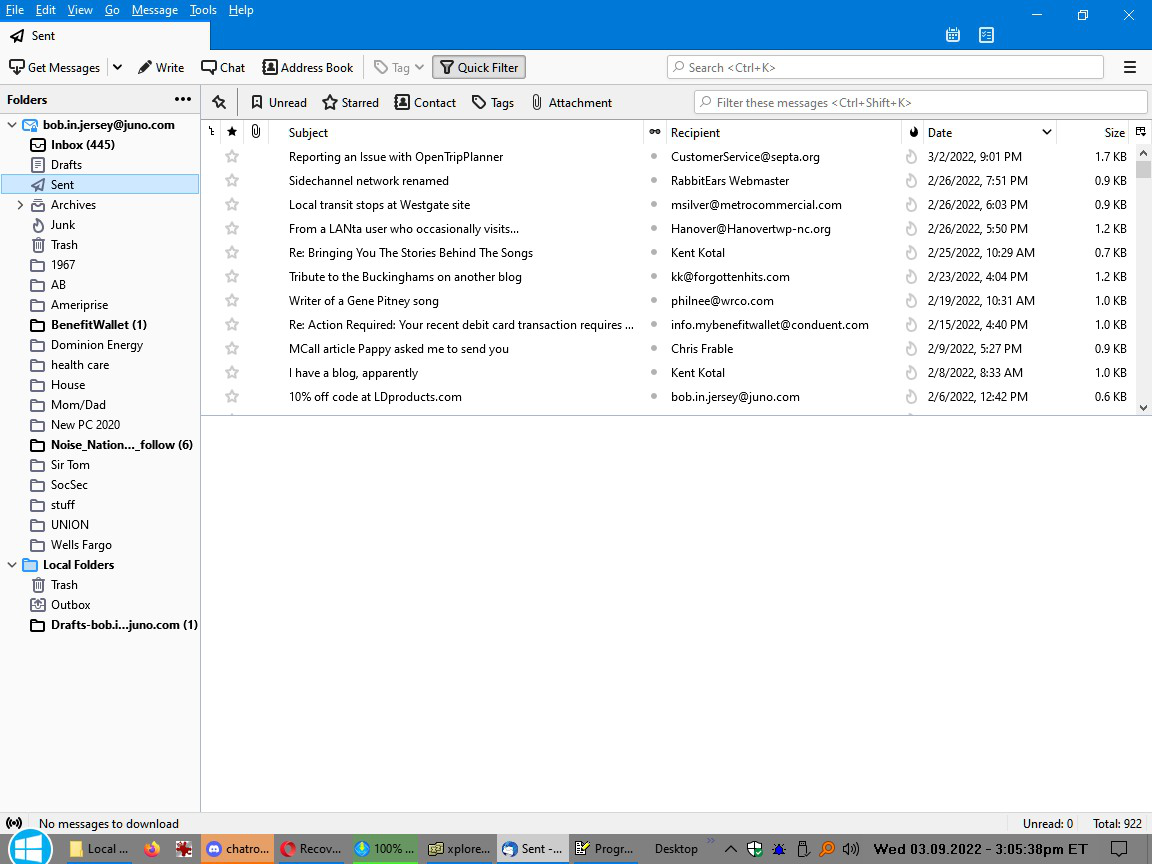
Better to tell me where they are now. I was making an assumption. Is this for a POP account? Can you show a screenshot of what the folders look like from main TB page?
@sfhowes: The proper password is there for pop.juno.com, but I think the same password should also be there for smtp.juno.com, but if it isn't working there, I imagine it wouldn't be.
@david: The folders (or more correctly, their contents) are in the pop.juno.com folder itself, after I moved the old ones to Local Folders. Yes, it really is a POP account. Now I still have to address the issues when I send messages... I can't even put them in the regular drafts folder; receiving them is working great.
Wot Bob Jersey změnjeny
I need something visual to understand your situation. Can you do a screenshot of TB with the old profile? Can you do a screenshot of the Mail folder? You said the files were not in Local Folders, yet it is a POP account. Knowing where they were makes it easier to help you restore them. You mentioned copying them, and knowing where they are now will simplify getting them to where you want them.
@sfhowes: Yes, I did, but only pop.juno.com is listed. The continual failure of smtp.juno.com (which I have notified Juno about) is leading to no such saving for that password.
@david. Yes it is a POP account. Screenshot coming when this site allows me to post them, I've no idea why it won't. The folders are now all in the Mail\pop.juno.com folder.
Wot Bob Jersey změnjeny
If there's no entry in Saved Passwords for smtp, you should be asked for the password the first time you send, and then checking the box in the prompt saves it. What are your settings? Juno suggests smtp.juno.com on 465, SSL/TLS, normal password, User Name = email address.
https://help.juno.com/support/email/tbird.html
The incoming is pop.juno.com, 995, SSL/TLS, normal password, User Name = email address.
I don't think there's a problem with your profile, unless it's very old and possibly has some obsolete password files blocking sending, but you can test by adding an account to a new profile, created in Help/More Troubleshooting, about:profiles. If the account sends and receives in the new profile, we can then worry about transferring data from the old profile to the new.
I went to settings for the SMTP server, changed authentication to normal password, and tried sending a message. Then I got a "not enough disk space" error (hilarious, as I have well over 200 gigs free. Unless they're referring to THEIR system...
EDIT: I tried adding my Yahoo to TB, and sent something out, which worked no problem. So where would these "obsolete password files" be?
Wot Bob Jersey změnjeny