


Windows 10 reached EOS (end of support) on October 14, 2025. If you are on Windows 10, see this article.

Pomoc přepytać

Hladajće so wobšudstwa pomocy. Njenamołwimy was ženje, telefonowe čisło zawołać, SMS pósłać abo wosobinske informacije přeradźić. Prošu zdźělće podhladnu aktiwitu z pomocu nastajenja „Znjewužiwanje zdźělić“.

Dalše informacije

Cannot open after the lastest update

  • 2 wotmołwje
  • 1 ma tutón problem
  • 87 napohladow
  • Poslednja wotmołwa wot submarina
  • Rozrisany

I updated my Mozilla today and, after I closed it the last time, it just won't let me reopen. It shows a warning window saying: "Firefox is already running, but is not responding. The old Firefox process must be closed to open a new window."

I even shutted down and restarted my laptop, but it keeps giving me this same message when I try to open Mozilla. I unistalled, reinstalled... still the same warning.

Tried both close and cancel buttons, none worked to change a thing, nothing happens.
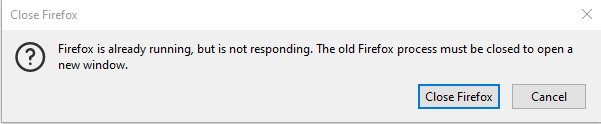
I updated my Mozilla today and, after I closed it the last time, it just won't let me reopen. It shows a warning window saying: "Firefox is already running, but is not responding. The old Firefox process must be closed to open a new window." I even shutted down and restarted my laptop, but it keeps giving me this same message when I try to open Mozilla. I unistalled, reinstalled... still the same warning. Tried both close and cancel buttons, none worked to change a thing, nothing happens.
Připowěsnjene fota wobrazowki

Wot submarina změnjeny

Wšě wotmołwy (2)

Wubrane rozrisanje

Thanks! I tried all of them, but it did no work until the last one (the part of deleting the parent.lock was impossible 'cause it kept saying I had the Firefox running and the doc was in use).

The Restore data from a locked profile" option worked after I deleted all the profiles and created a new one. Thanks again!!