TBsynch add on

I got a new desktop computer and would like to synch my address book from my old computer. Both are connected to the wifi. I have downloaded the TBsynch add on compatible with Thunderbird ver. 78. When I clic on the TBsynch icon at the top right of the email page, a screen showing tabs "account settings" "category settings" "community" and "help". What do I do next?
Wšě wotmołwy (3)

Which operating systems are you using? If you're on Linux: Why don't you just copy the folders in your home directory? I think Thunderbird is under .mozilla (not sure about that, I'm at my phone).
If you're on windows, there're special tools to export your data from one installation and import it at another one.
TBsynch is useful if you'd like to synchronize your contacts "all the time" with a Nextcloud for example.
I'm using Windows 10. My basic question is how do I use TBsynch.
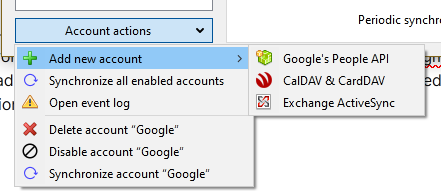
TbSync is for syncing with network calendars and contacts that are already set up with gmail, Yahoo, AOL, outlook.com etc. It won't sync address books between computers unless both are synced with a network provider. Click the Account Actions button at the bottom left of the TbSync window to add an account (see picture).