Windows 10 reached EOS (end of support) on October 14, 2025. For more information, see this article.

Pomoc přepytać

Hladajće so wobšudstwa pomocy. Njenamołwimy was ženje, telefonowe čisło zawołać, SMS pósłać abo wosobinske informacije přeradźić. Prošu zdźělće podhladnu aktiwitu z pomocu nastajenja „Znjewužiwanje zdźělić“.

Dalše informacije

Google Calendar will not print, even in Private Window.

  • 3 wotmołwy
  • 1 ma tutón problem
  • 22 napohladow
  • Poslednja wotmołwa wot Rehlyt

dalše nastajenja

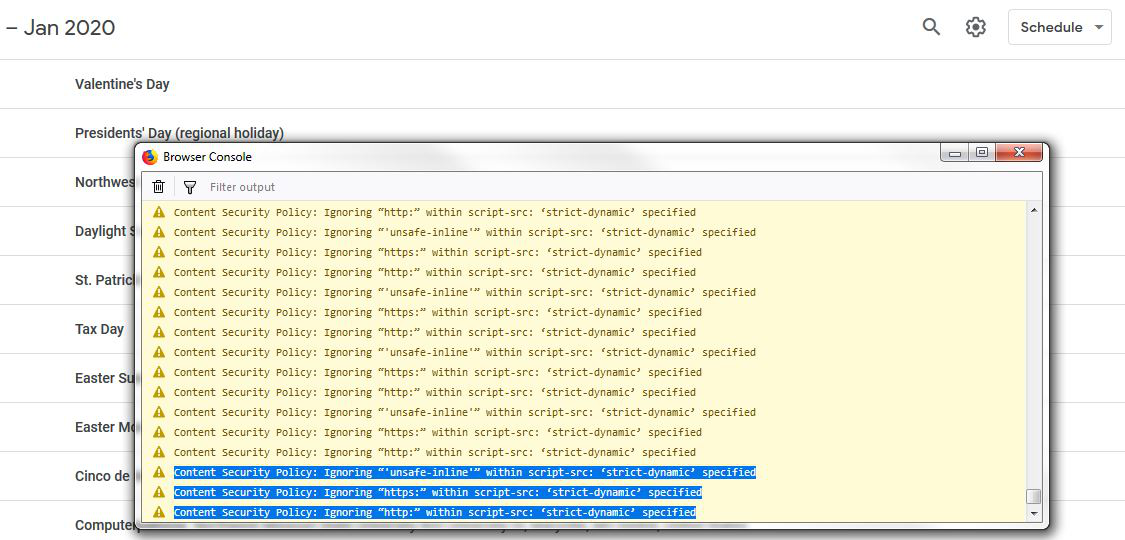
We can not get Google Calendar to print when we click the gear icon at the top and select print. The first dialogue box will pop up, but when we click print it does nothing. The log shows multiple lines of this:

Content Security Policy: Ignoring “'unsafe-inline'” within script-src: ‘strict-dynamic’ specified Content Security Policy: Ignoring “https:” within script-src: ‘strict-dynamic’ specified Content Security Policy: Ignoring “http:” within script-src: ‘strict-dynamic’ specified

How can we fix this? I have found no solution anywhere.

We can not get Google Calendar to print when we click the gear icon at the top and select print. The first dialogue box will pop up, but when we click print it does nothing. The log shows multiple lines of this: Content Security Policy: Ignoring “'unsafe-inline'” within script-src: ‘strict-dynamic’ specified Content Security Policy: Ignoring “https:” within script-src: ‘strict-dynamic’ specified Content Security Policy: Ignoring “http:” within script-src: ‘strict-dynamic’ specified How can we fix this? I have found no solution anywhere.

Wšě wotmołwy (3)

dalše nastajenja

Here is a screenshot.

dalše nastajenja

What if you tried Chrome?

dalše nastajenja

Yeah, it works fine in other browsers. That isn't the point. My back office prefers to use the Firefox browser, and I just find it surprising that Mozilla does not have a fix for this.