


How do I get rid of "search for" options in address bar dropdown
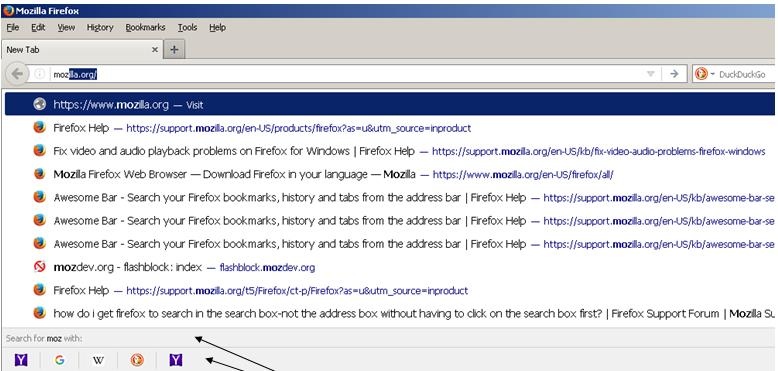
With Firefox 55, whenever I type something in the address bar I get the "Search with" options at the bottom of the drop down. For me, it is completely annoying. I never search with the address bar and have the "Show search suggestions in location bar" option unchecked. If I want to search, I'll use the search box.
Wot Craig D. Glasser změnjeny
Wubrane rozrisanje
- Open about:config in the URL bar and press enter/return.
- Enter browser.urlbar.oneOffSearches (or just search and find this preference) and double-click it to set its value to false.
Another way is to untick all search engines in the Options/Preferences, but they are valid for both the address bar and search bar, and you might want to keep them for the search bar.
Tutu wotmołwu w konteksće čitać 👍 23Wšě wotmołwy (2)

Wubrane rozrisanje
- Open about:config in the URL bar and press enter/return.
- Enter browser.urlbar.oneOffSearches (or just search and find this preference) and double-click it to set its value to false.
Another way is to untick all search engines in the Options/Preferences, but they are valid for both the address bar and search bar, and you might want to keep them for the search bar.
Thanks a bunch!