


Cant add password to calendar, so no sync

Hi,
I have multiple CalDAV and CardDAV calendars/addressbooks. I can only add the address of the calDAV/CardDAV server but not the username/password per account.
So it takes my default password, telling me no sync possible and that's it.
il like to add an username / password per CalDAV calendar / CardDAV addressbook (just as simple as in eM Client). How do i do that?
Regards,
Arjan
Wšě wotmołwy (3)
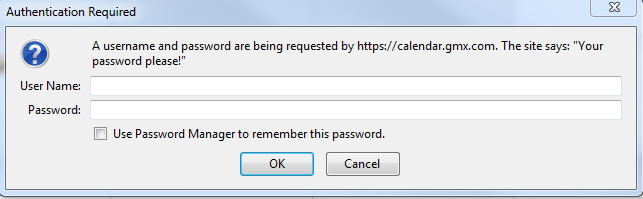
When I sync a cal-dav calendar I see the following dialog

It contins both a user name and password as well as an option to save the information to the password manager.
Hi Matt, I know but this doesn't solve it. I have multiple caldav and carddav accounts via Baikal, i.e. http://www.someisp.com/baikal/cal.php/calendars/user1/default http://www.someisp.com/baikal/cal.php/calendars/user2/default http://www.someisp.com/baikal/card.php/addressbook/user3/default http://www.someisp.com/baikal/card.php/addressbook/user4/default Each with a diffrent password. For the first account i got the same screen you posted. Nothing for the other 3. In the thunderbird passwordmanager is one account: "www.someisp.com (BaikalDAV)". This is used for all caldav and carddav accounts. meaning 3 wrong passwords.
So, if you do not save passwords and enter them as requested, they should work. Correct?