


Font size of title, menue, etc. depends on screen resolution, very tiny texts with new screen/new laptop

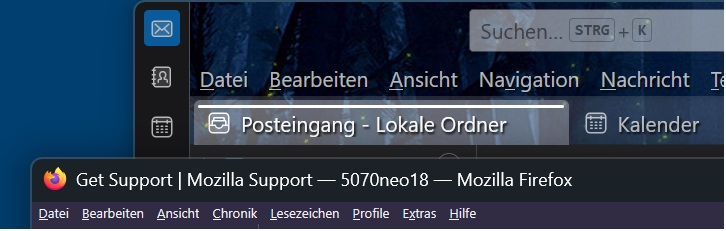
Is it really not possible to adjust the font size? I found no setting for that. I only can cheange the text size of webpages, but not for title or menueor other thing a the top of the firefox window. These are readable with thunderbird, but not with firefox after I changed to a new laptop with higher resolution. Size of elements should be measured in points, mm or inches an not in pixels, as pixel sizes are depending on HW. The attached image shows the comparison between thunderbird and firefox.
All Replies (2)
In general these menus follow your system Windows text sizing and accessibility options.
There's internal tricks how to confuse the high–resolution pixel math to inflate the UI if you're so inclined, but that could break in unexpected ways so I'd look into your Windows–level adjustments first.
Thank you for your response. I tried the windows settings, which affected thunderbird and other stuff, but not the firefox title, menue, ... I tried even about:config layout.css.devPixelsPerPx. without success. I tried everything which came to my mind also with firefox with default profile w/o add-ons or changed setting.