


how do I specify where to save downloads?

Firefox does not ask where to save downloads. They are simply saved automatically and then opened.,
1. I have no idea where a PDF was saved to when it opens.
2. When it is open (it opens in Foxit Reader), I can not delete the PDF. (aside: I consider this is flaw, but that is Foxit Reader's problem, not Firefox's. Or, is it really?)
I want downloads save to the same place ALWAYS or I want the option to ALWAYS specify where to save a download.
How do I achieve that goal?
All Replies (8)
Hi Joe, you can change your download settings by opening your menu, clicking on settings and then selecting "Downloads". You can change the folder where downloads are saved or change it to always ask there.
For more information, please take a look here: Where to find and manage downloaded files in Firefox
You, and that article as well, says NOTHING about the option "ask where to save files before downloading". (And, a search of that page for the word "ASK", yields only stuff about asking questions in the forum.)
I have that option selected. (see attached screen shot.) But, I am not asked. Instead the are always downloaded to, as shown in the screen shot, e:\videos\internet. And, I can't make the folder that shows the defaults download location BLANK. FF 152.0.5 Windows 10 Pro
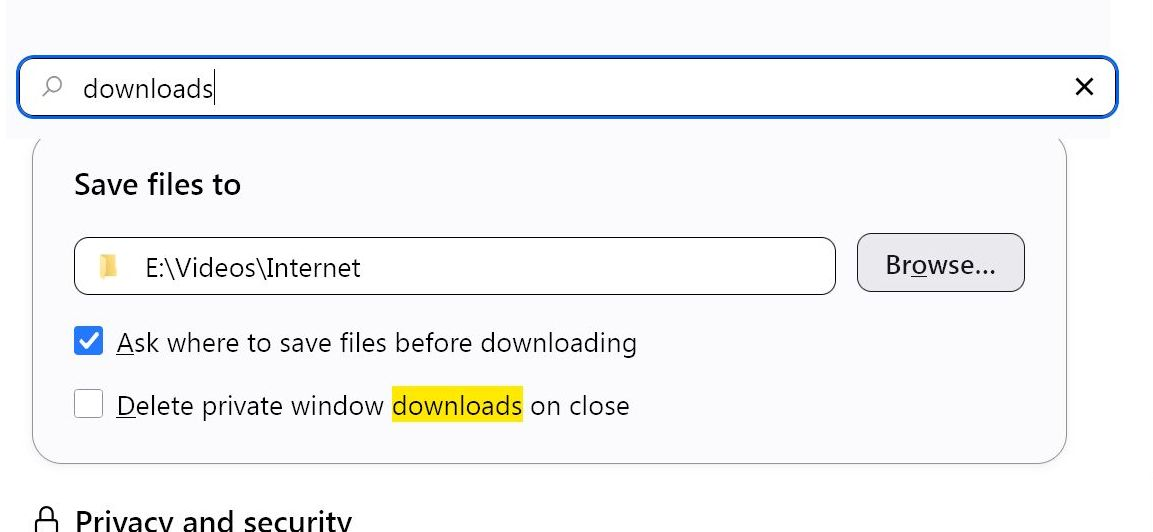
Hi
This support article should help:
https://support.mozilla.org/en-US/kb/change-firefox-behavior-when-open-file
Nope. doesn't help. That second article, from Paul, only talks about what to do with the file once it has been downloaded. And, for all MIME types that allow me, I have chosen the option to just save the file. But, I NEVER get asked to WHERE do I want the file saved.
Saying I want to say where I want the file saved each time may seem ridiculous, or like I'm just creating a lot of work for myself. In fact, I BELIEVE (can't verify) that long ago (but it should still work this way--it if would work at all) that FF remembers where I chose to save my LAST download and set that as the default (but changeable) folder for the current download.
That article I provided a link to walks you through how to set the save location for files when they are downloaded.
Like I said, I AM NEVER ASKED WHERE TO SAVE A FILE--that is, when I initiate a download.
Are you suggesting that I am supposed to 1. open settings, 2. find downloads section 3. change where to save file\ 4. brosw to the folder I want to save into
each time I download a file?
But, still, that would never ASK ME where to save the file. I would be TELLING where to save the file. And that scenario would be very tedious.
If I were simply asked where to save, Steps 1, 2 and 3 above would all get eliminated.
I have VERY thorough (extremely thorough) arrangement of folders in My Documents, as well as some other folders. A recipe, for example, may go into: MyDoc/cooking/recipes/main course/chicken/sauted chicken with muschrooms. Many folders have even more subfolders.
Joe P द्वारा सम्पादित
Yeah,
In addition to going Tools -> Settings -> Downloads and setting "Ask where to save files before downloading" under the "Save Files to" heading, you also need to go into Tools -> Settings -> Downloads and set the Action for the types of downloads (Applications/Content Type) to "Always Ask" for those types you want it to. If it's set to just Save File then it just saves it in whatever the download directory you've set is.
Down below the list of applications, also select "Ask whether to open or save files" instead of just Save files for unknown types.
This is what works for me anyway to have it always ask where to save files that I want it to ask for.
Is this specific to PDFs, or exactly attachments that have set their handler to open in any app?
"Choose another PDF viewer to use by default or set Firefox to always ask" Note: When you choose another PDF viewer to use by default in Firefox, or if you set Firefox to always ask you what to do with PDF files, any PDF files you open will also be saved to your Downloads folder (see Where to find and manage downloaded files in Firefox).''