How to put Firefox on a diet?

I've been using Firefox for a while, and while there are many things I like about it, it has always been a resource hog. In the past I could get around this by just killing Firefox in Windows Resource Manager and restarting, but ever since getting a new computer an upgrading to Windows 11, it's gotten worse. Every couple of days my computer freezes for 10 or more minutes, I'm having to do a hard reboot ever few days, and I'm even bluescreening about twice a month. I'm pretty sure Firefox is the culprit because killing it will usually resolve the issue.
I'm wondering if there is some way to put Firefox in a sandbox so it does not consume nearly all available memory and other computer resources. It is by far the biggest consumer of resources on my system and I do not want to dedicate 4GB+ of memory to an app that is just showing a couple of web pages and playing YouTube videos.
चुने गए समाधान
I challenge you to try another browser and open the same amount of windows and tabs and see what amount is ram is being used. Just boot into windows and don't open another app and see what amount is used. You bought a workstation for a reason. ;-)) Now mark this as resolved and get back to work.
Operating System: openSUSE Leap 15.6 KDE Plasma Version: 5.27.11 KDE Frameworks Version: 5.115.0 Qt Version: 5.15.12 Kernel Version: 6.4.0-150600.23.81-default (64-bit) Graphics Platform: X11 Processors: 16 × AMD Ryzen 7 PRO 6850HS with Radeon Graphics Memory: 62.1 GiB of RAM Graphics Processor: AMD Radeon Graphics Manufacturer: HP Product Name: HP EliteBook 865 16 inch G9 Notebook PC System Version: SBKPFV3
संदर्भ में यह जवाब पढ़ें 👍 0All Replies (20)
Hello, Here are some ways you can troubleshoot Firefox taking large amounts of memory and having problematic issues.
Simple fixes: 1. Restart Firefox & Computer: Fully close Firefox and restart your PC to clear temporary issues. 2. Update Firefox: Ensure you have the latest version for performance improvements. 3. Use Troubleshoot Mode (Safe Mode): Restart Firefox in this mode (extensions/themes disabled) to see if the problem stops. If it does, an add-on is the culprit. Menu > Help > Troubleshoot Mode. 4. Disable/Remove Problematic Extensions: If Troubleshoot Mode helps, re-enable extensions one-by-one to find the memory hog. 5. Disable Hardware Acceleration: Go to about:preferences#advanced and uncheck "Use hardware acceleration when available"
If these solutions don't work, you can try doing these : 1. Minimize Memory Usage (Type about:memory in the address bar, click "Minimize memory usage")
2. Clear Cache (Settings > Privacy & Security > Cookies and Site Data > Clear Data (clear cache))
3. Adjust Content Processes (Type about:config, search dom.ipc.processCount, and set it to 1 to limit processes) -Can slow down Firefox
4. Refresh Firefox (Menu > Help > More Troubleshooting Information > Refresh Firefox).
dessertdish द्वारा सम्पादित
"Use hardware acceleration when available" is no longer listed on the advanced preferences page. Is there another way to disable it?
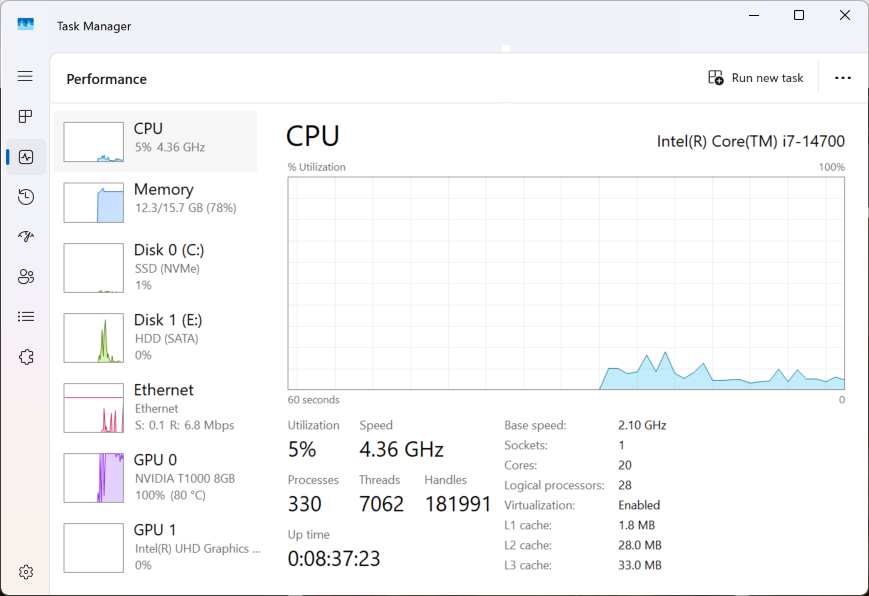
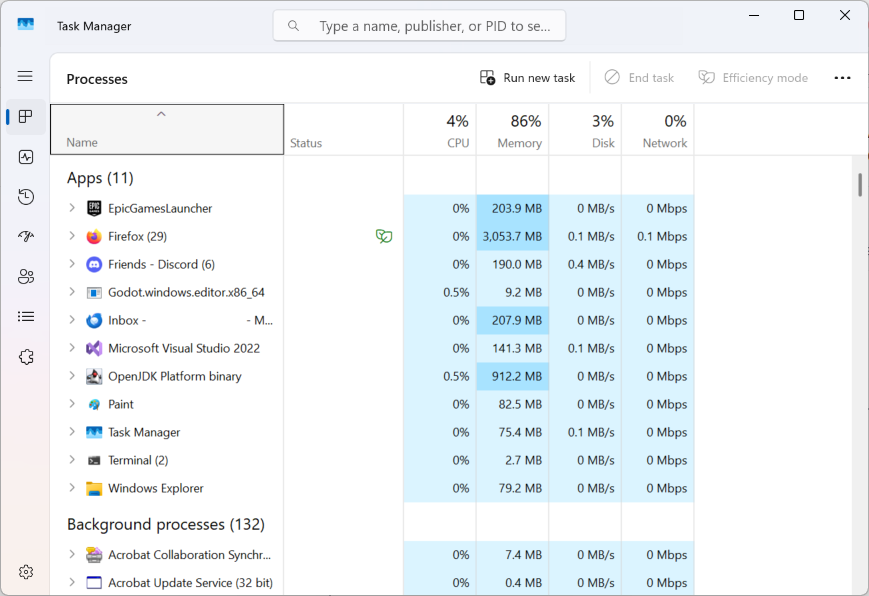
Just curious, but could you post a screenshot of the performance tab in task manager?
Firefoxis using 3GB at the moment, but I've seen it higher. On my old system, it could go up to 6GB. On my new system, I think the issue seems to be more issues related to graphics drivers.
Mark McKay द्वारा सम्पादित
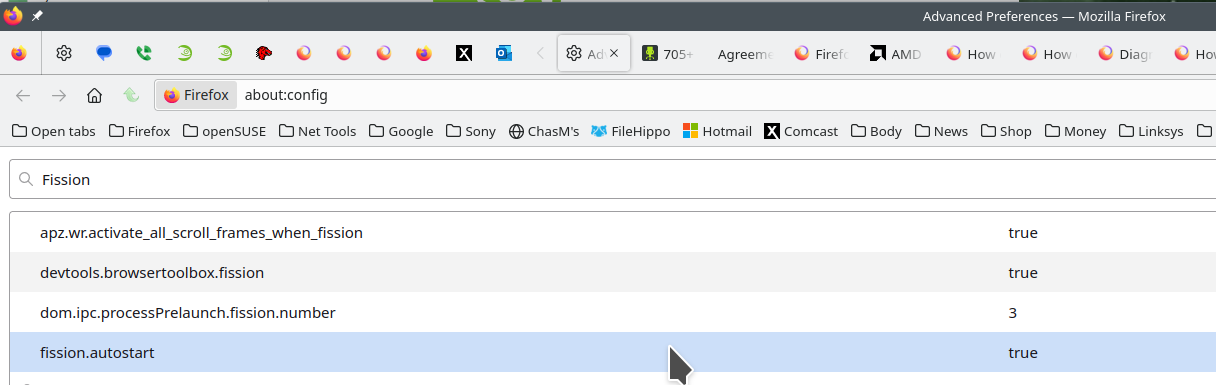
I would recommend maxing out your memory. Just booting into windows probably takes up 8gigs of ram Then you have security software from Microsoft and maybe another 3rd party app, plus all the other apps you're running. The more memory the better, but there is a process in Firefox called FISSION. Many users complain about resources and several processes running.
Firefox's Project Fission:
Introducing Firefox’s new Site Isolation Security Architecture https://hacks.mozilla.org/2021/05/introducing-firefox-new-site-isolation-security-architecture/
Firefox's Project Fission: better security and more processes https://www.ghacks.net/2019/02/07/firefoxs-project-fission-better-security-and-more-processes/
Enable Fission in Firefox https://www.ghacks.net/2020/09/20/you-can-try-firefoxs-site-isolation-feature-fission-in-nightly-now/
Change how many processes multi-process Firefox uses https://www.ghacks.net/2016/02/15/change-how-many-processes-multi-process-firefox-uses/
jonzn4SUSE द्वारा सम्पादित
You have a nice cpu and graphics card, but IMHO you need more memory to multitask in todays world of BIG APPS. What the make and model of your computer?
Maybe more memory would be a good idea.
I've got a Dell Precision 3680 Workstation.
Windows 11 (build 26200) - Multi-window, 2 monitors - OpenGL 3 (Compatibility) - NVIDIA T1000 8GB (NVIDIA; 32.0.15.8142) - Intel(R) Core(TM) i7-14700 (28 threads) - 15.69 GiB memory
Mark McKay द्वारा सम्पादित
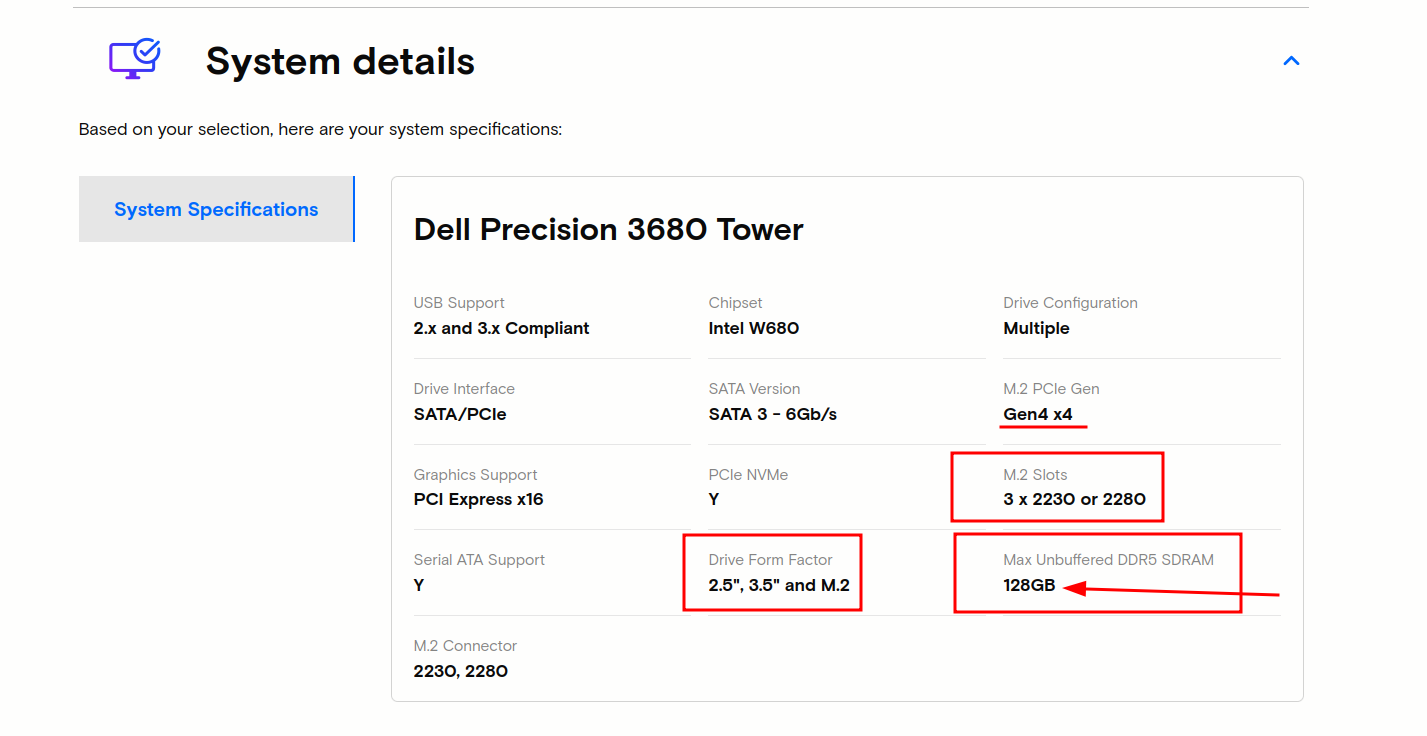
Have a look. Not saying buy ram from this company, but just showing you what your tower can hold. see screenshot https://www.crucial.com/compatible-upgrade-for/dell/precision-3680-tower#accordion-system-details-item
Drivers: https://www.dell.com/support/product-details/en-us/product/precision-t3680-workstation/drivers
This is a common complaint we get here, but more memory will help the system perform for years to come.

Thanks. I don't really know much about what to pick when it comes to memory. The prices here are a lot better than the ones on Dell's website, and they are bigger too. But I'm not sure what will be compatible with my system and what the different technical numbers mean aside from the number of GB. Would you know of any kind of guide that could explain it?
16GB may still be more than enough with 32GB being most you should need unless you are doing serious gaming on 1440p or higher and 64GB is still overkill overall.
Also DDR RAM prices have gone WAY up especially in the US in last months due to tariffs and the huge demand for AI use.
How much RAM do you REALLY need - https://www.youtube.com/watch?v=a4PKeC02HnA
Looking at the apps in your task manager screenshot, are you dev? You should have a enough ram so that you're not concerned about the browser using 3gigs of ram. James posted a link to a good video about ram amounts. You need to find your comfort zone. Looks like your tower can use DDR5 or 4. You can allow crucial site to scan your system and it will tell you exactly what you have and the max amount it can hold. Dell has a nice site with guides, but you would need to ensure that if and when you buy memory that they are the same speed and preferably from the same manufacture.
Anyway, shop around for the best price and May the Schwartz be with you. ;-)) We'll leave the light on for ya.
Since you mentioned Crucial. Micron announced its decision to exit the Crucial consumer business, including the sale of Crucial consumer-branded products including RAM. Micron will continue Crucial consumer product shipments through the consumer channel until the end of fiscal Q2 (February 2026). They would rather make their money on the AI-driven growth.
This does not help with consumer RAM supply and prices.
Yes, I am a dev. I don't know a lot about hardware, though. I bought a Dell because it was the brand every place where I've ever worked has used. Now that I'm watching some videos about RAM. I was talking with one of their sales agents earlier, and I think they recommended entirely the wrong type of RAM. In any case, it seems a lot more expensive than what other websites are offering. I suppose I should learn to build my own PC.
Its possible your Dell Precision 3680 Workstation can have ECC or non-ECC RAM to add to the confusion.
That's why I mention running the scan from that Crucial site and it will tell you what you currently have. Look at the cpu on Intel site. see screenshot https://www.intel.com/content/www/us/en/products/sku/236781/intel-core-i7-processor-14700-33m-cache-up-to-5-40-ghz/specifications.html
I would also recommend going with DDR5 for faster speeds.
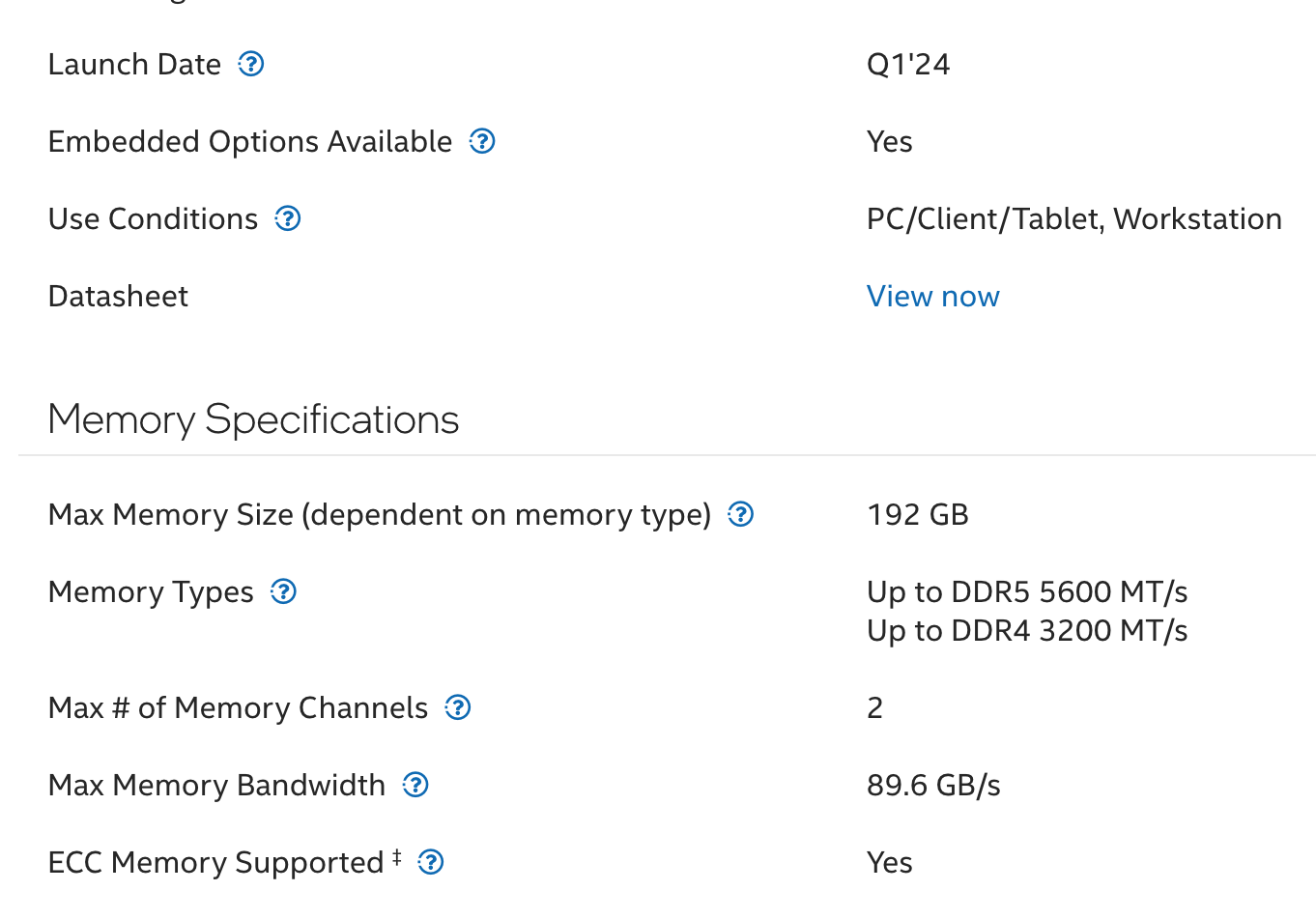
jonzn4SUSE द्वारा सम्पादित
You should also consider stepping up your monitor game. https://www.youtube.com/watch?v=oCK1quecQyA
I have this that I got on ebay for half price new. https://www.hp.com/us-en/shop/pdp/hp-e45c-g5-dqhd-curved-monitor

jonzn4SUSE द्वारा सम्पादित
Would a new monitor help things? Right now I have a new 4k monitor and a >10 year old 1k monitor.