


Adding Gmail account to thunderbird

It fails to set up Gmail as a second A/c.
चुने गए समाधान
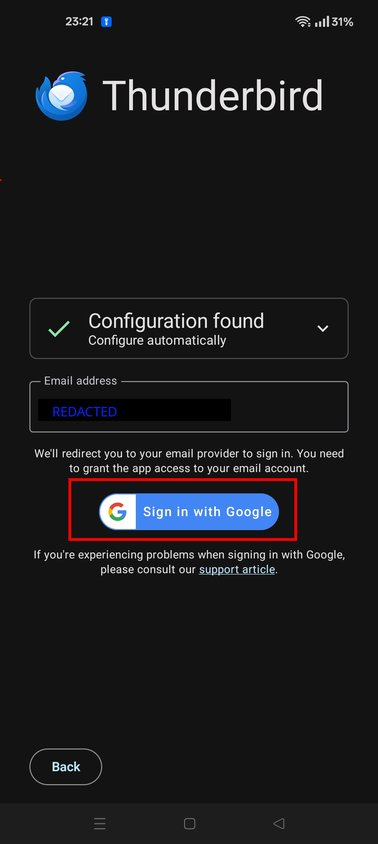
On the screen displaying "configuration found" is a button that says sign in with google (Screen shot 1). When you press that, it should take you to a sign in with google web view.
1. You login to your gmail account here. 2. Grant Thunderbird for Android access to your email account.
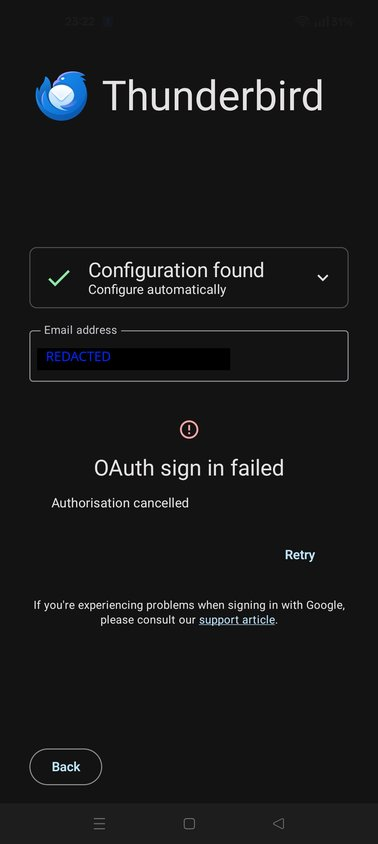
On successful completion, the app will finish setting up and download your emails. If the account login is not completed or cancelled, the error screen you describe is shown (Screen shot 2).
Q? Do you see the google sign in screen presented and complete the setup or does it immediately jump to the oAuth sign in failed screen?
संदर्भ में यह जवाब पढ़ें 👍 0All Replies (7)

Hi Richard
I believe Kimberly's link is for Thunderbird desktop where as your question was placed in Thunderbird for Android section.
If your issue is indeed for the mobile app, can you advise what app version your using and provide a screen shot or details of any error message provided. This will help us support you better.

Thanks for your reply and sorry for my delay in answering.
Thunderbird on Fairphone 4: Android Ver 11.1, based on K-9 Mail Thunderbird on Windows 11 PC: Version 144.0.1 (64-bit)
Hoping this will help.
Hi info13170
Thanks for the version information.
Are you having difficulty adding gmail as a second account on your phone or desktop computer?
The difficulty is only with the mobile phone.
I sent the info about the PC just in case it might have some bearing on the issue.
When trying to add Gmail to my Thunderbird email client I get as far as 'Configuration found'. I then add my Gmail email address, then 'Continue', then wait for Gmail to send confirmation. That fails and 'OAuth sign in failed. Authorization canceled' is displayed.
Looking at 'Incoming server settings', I notice that Authentication is prefilled with OAuth 2.0. Also, 'Client certificate' is prefilled with 'None' if the 'Auto-detect IMAP namespace' is prefilled.
Advice I've looked at online seems not to address this problem.
चयनित समाधान
On the screen displaying "configuration found" is a button that says sign in with google (Screen shot 1). When you press that, it should take you to a sign in with google web view.
1. You login to your gmail account here. 2. Grant Thunderbird for Android access to your email account.
On successful completion, the app will finish setting up and download your emails. If the account login is not completed or cancelled, the error screen you describe is shown (Screen shot 2).
Q? Do you see the google sign in screen presented and complete the setup or does it immediately jump to the oAuth sign in failed screen?
Thanks for your continued support but your suggestion just wouldn't play. But I seem to have sorted it in another way. Because both accounts have been working well for some time on my PC, I thought I would root around for extra settings within Thunderbird on the PC and found 'export settings to Android'. A QR code appeared with 'scan to get link' (as far as I remember it). So now the Android is showing both accounts, as required.