

This thread was archived.
Please ask a new question if you need help.

अभिलेखित
XULRunner error -

Our organization recently upgraded everyone from standard Firefox to Firefox ESR 115
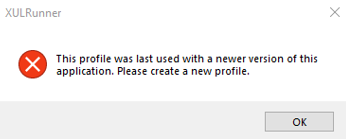
Several users continually get the following error:
XUL Runner
"This profile was last used with a newer version of this application. Please create a new profile.
Users are getting the error even after a new profile has been created.
We have tried uninstalling Firefox both through the Control Panel and using IO Bit uninstaller but the issue persists.
All users are running Windows 10 22H2 64 Bit
Our organization recently upgraded everyone from standard Firefox to Firefox ESR 115
Several users continually get the following error:
XUL Runner
"This profile was last used with a newer version of this application.
Please create a new profile.
Users are getting the error even after a new profile has been created.
We have tried uninstalling Firefox both through the Control Panel and using IO Bit uninstaller but the issue persists.
All users are running Windows 10 22H2 64 Bit
All Replies (1)
You can check the compatibility.ini file in a profile to see what Firefox version and installation path last used the profile.