


Incoming mail not showing sender's font and color

A friend of mine sends me his emails that have a blue font. But, I receive them with a different font and in black. I cannot figure out how to change the options so that I can again see the email's intended font and color the way I use to. Also, do I use Unicode or Western and which one of these should be chosen? Thank you for any and all help.
carol
All Replies (3)
Are you viewing the messages in HTML or Plain Text? View > Message Body as > Original HTML
These are the settings I'm using.
Tools > Options > Display > Formatting tab click on 'Advanced' button note: Font control select; 'allow messages to use other fonts'
See image below.
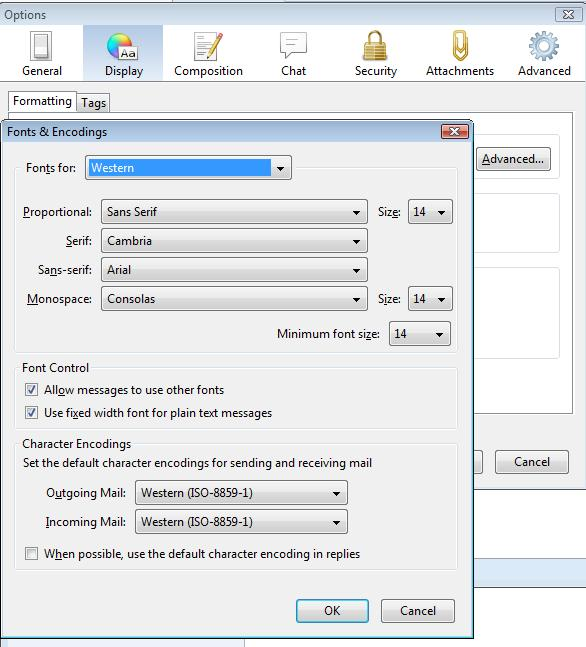
I am still having problems setting all of the options to the way they use to be. With your example above, is that exactly what you use?
I changed mine to what you have but even though I have the font set to size 16, it is still very small. I have not received an email from my friend that 'writes' in blue so not sure that has been fixed.
Thank you for any more info that you might be able to give to me as I am annoyed with myself that these settings changed after a new hard drive was installed.
I have tried what you have suggested but I am still not seeing the font and font color how the email sender is using it. I do see on my phone and iPad the font and color he has chosen but not on my PC. I am becoming frustrated as I cannot seem to get my email settings back the way they should be. Obviously, I am not doing something correct. Hoping that someone will be able to help me with this and I thank you in advance.
carol