


Why has Firefox taken away the option of saving a bookmark to a specific folder? in English

Why have you taken away the option of saving a bookmark to a specific folder? Now when I save a bookmark it just gets added to the end of the list. These people must learn to not fix something which is not broken. They should just go back to the previous system.
השתנתה ב־ על־ידי raccy1
כל התגובות (12)
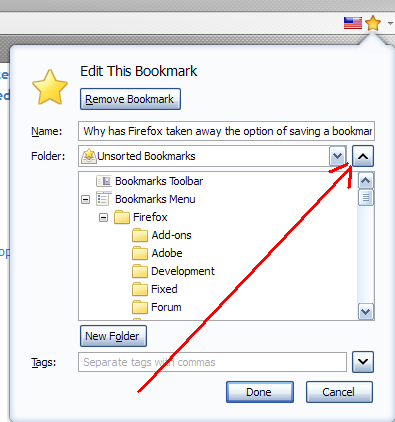
Click the arrow I've indicated in the screenshot to get the list of folders. You can also create a new folder from there. You have to click the star twice by the way.
השתנתה ב־ על־ידי Xircal
That page, which you indicate, is on the Bookmark page. I want to add a page to my bookmarks, on a specific page. In the old Firefox I had the option, right at the time of saving the bookmark, to select a folder when saving. Now, with this new version, I do not have that option.
Why do they change something which was working so well? I guess I'll go back to I.E.
I can save a bookmark anywhere I want in Firefox by selecting the appropriate folder from the list. It's just a matter of scrolling down to where it's located.
I don't understand what it is you want to do?
Thank you for your reply, Xircal. I also could do as you say - until I upgraded to the latest version. Now, when I click "Bookmark This Page". I do not get the selection of folders as I previously did. That is the problem.
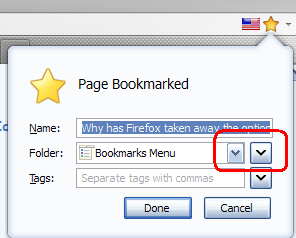
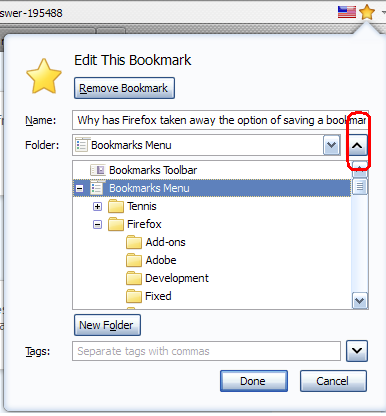
OK, here are two screenshots. You'll get the one on the left when you click "Bookmark This Page". I've ringed the two dropdown arrows in that one.
Now then, if you click the right of those two arrows, you'll get the the menu you see in the second screenshot on the right (or should do).
If you don't, then try running Firefox in Use Troubleshoot Mode in Firefox. If it functions properly in that configuration, then one of your add-ons is the culprit.
Hi again,
You are showing the screenshots which I would get before the upgrade.
Now, when I click "Bookmark This Page", I do not get anything. That dropdown containing "Bookmark This Page" disappears and is not replaced by anything.
I did not change anything, other than "upgrading", and I am sorry I did that.
OK, understood.
Can you do the following please.
- Click the Firefox button. click Help, then Restart with Add-ons disabled.
- In the menu which appears, checkmark "Reset toolbars and controls".
- Click the button: "Make changes and restart".
Then try and bookmark a page again.
Hello,
I did as you said and I lost the complete menu bar. I managed to get it again but I still get the same results - no indication to send the bookmark to a specific location.
Are you also using the latest version of Firefox?
Yes, I have v4.0.1
You can get the Menu Bar back by right clicking a blank part of the Tab bar and then click Menu Bar at the top. But I guess you already discovered that.
You might have a locked places.sqlite file. See: http://kb.mozillazine.org/Bookmarks_history_and_toolbar_buttons_not_working_-_Firefox
Thanks a lot for your attention, but I have spent enough time on this now.
As I said, I did not make any changes other than upgrading Firefox. That upgrade seems to have caused the problem.
I do not get any enjoyment trying to reprogram my computer.
I'll just use I.E.
Thanks again,
Ray
No bookmarking functionality in version 3 was removed in version 4 that I am aware of. Add Bookmark Here ² would improve the bookmarking (star) dialog and a lot morel.
To add additional bookmarking features to make bookmarking to a folder easier, I would recommend that you install the Add Bookmark Here ² extension and some notes on setting the options for the extension.
But to really work with bookmarks, read the following article:
- Sorting and rearranging bookmarks - Firefox - MozillaZine Knowledge Base
Suggest installing extensions: SortPlaces, Go Parent Folder, Show Parent Folder, Add Bookmark Here2, Multiple Tab Handler, Stay-Open Menu. and the styles: Scrollbar Menu and Context Menu. - May be interest to those really into bookmarks: Counts - Counting bookmarks history links and other data - Firefox - MozillaZine Knowledge Base
All of the extensions mentioned in the article work in 4.0.1 and in 3.6.*, and additional information on those extensions and installation options can be found on my Firefox Customization (Notes) webpage.
Another possible cause is a problem with the file places.sqlite that stores the bookmarks and the history.