


Nefarious notifications via Mozilla or at least pruportedly from Mozilla.

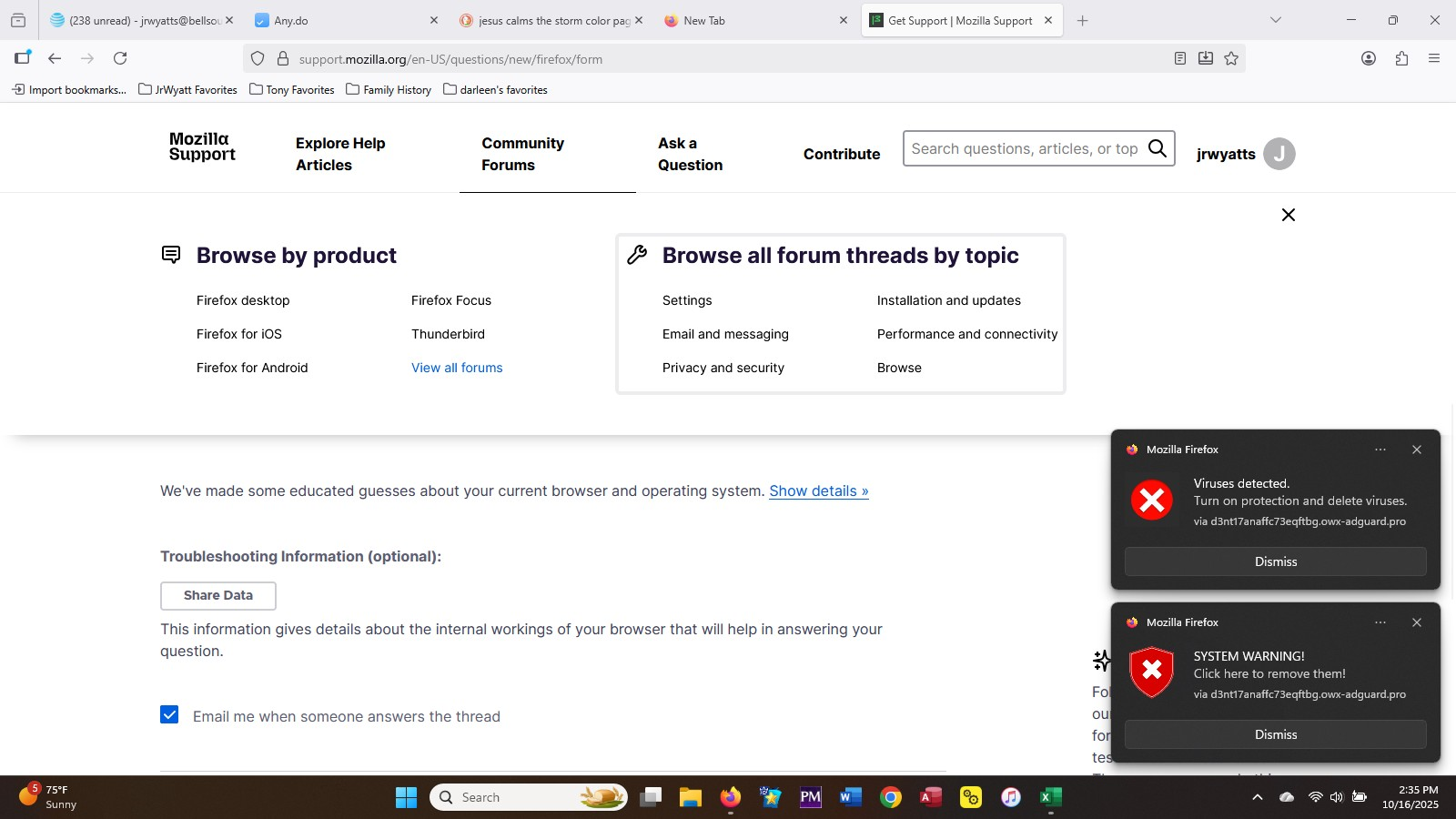
Running Windows 11. Receiving notifications from Firefox that indicate system warnings and viruses found. I have run several scans using Norton and there are no viruses. This notification is enticing me to click to remove the errors, which seems to clearly be a phishing scam, but I have never seen this as a notification from my browser as opposed to an email. When I try an option to "disable notifications", Norton blocks it due to it being identified as a dangerous "blacklist URL". I can't find a mozilla setting to block this.
The URL is long but what I can see is the following. via d3nt17anaffc73eqftbg.owx-adguard.pro
פתרון נבחר
As a first step, see the support article Web Push notifications in Firefox -- check the "How do I revoke Web Push permissions for a specific site?" section.
If that doesn't stop them, you might have a rogue extension installed. You can view, disable, and often remove unwanted or unknown extensions on the Add-ons page. Either:
- click the Extensions button (puzzle piece) on the toolbar > Manage Extensions
- Ctrl+Shift+a (Mac: Command+Shift+a)
- "3-bar" menu button (or Tools menu) > Add-ons
- type or paste about:addons in the address bar and press Enter/Return
In the left column of the Add-ons page, click Extensions. On the right side, find the "Manage Your Extensions" heading.
If there is at least one extension before the next heading -- "Recommended Extensions" -- please continue:
Then cast a critical eye over the list below that heading. Any extensions Firefox installs for built-in features are hidden from this page, so everything listed here is your choice (and your responsibility) to manage. Anything suspicious or that you just do not remember installing or why? If in doubt, disable (or remove). For your privacy and security, don't let mystery programs linger here.
Any improvement?
Note: Sometimes extensions can frustrate access to this page. In that case, first restart Firefox in its Troubleshot Mode and then try again. See: Use Troubleshoot Mode in Firefox -- Open, not Refresh.
Read this answer in context 👍 1כל התגובות (4)
Hi
Do you have Adguard Pro installed in either Firefox or Windows?
פתרון נבחר
As a first step, see the support article Web Push notifications in Firefox -- check the "How do I revoke Web Push permissions for a specific site?" section.
If that doesn't stop them, you might have a rogue extension installed. You can view, disable, and often remove unwanted or unknown extensions on the Add-ons page. Either:
- click the Extensions button (puzzle piece) on the toolbar > Manage Extensions
- Ctrl+Shift+a (Mac: Command+Shift+a)
- "3-bar" menu button (or Tools menu) > Add-ons
- type or paste about:addons in the address bar and press Enter/Return
In the left column of the Add-ons page, click Extensions. On the right side, find the "Manage Your Extensions" heading.
If there is at least one extension before the next heading -- "Recommended Extensions" -- please continue:
Then cast a critical eye over the list below that heading. Any extensions Firefox installs for built-in features are hidden from this page, so everything listed here is your choice (and your responsibility) to manage. Anything suspicious or that you just do not remember installing or why? If in doubt, disable (or remove). For your privacy and security, don't let mystery programs linger here.
Any improvement?
Note: Sometimes extensions can frustrate access to this page. In that case, first restart Firefox in its Troubleshot Mode and then try again. See: Use Troubleshoot Mode in Firefox -- Open, not Refresh.
Thanks to both of you. I have not intentionally installed anything of this nature and I don't find Adguard Pro in my list for Windows. Not aware of anything established in Firefox. I am going to follow the suggestion of the other responder and let you know. Appreciate the support.
I followed the steps in the referenced support article and found the website on the list of permissions. I have a suspicion what might have triggered it, but bottom line is it is gone and I now know where to look for any future issues.
Really appreciate the spirit of collaboration from both responders.