


How to resize bookmarks side bar v63+

My bookmarks side bar is too wide and I would like to make it narrower. I have tried a few userchrome.css things but none work correctly. It looks like there is a frame or something behind the sidebar so when it narrows the frame is still there anyway. I am trying to get a little more size to my main view panel BUT I also like to leave the bookmarks side bar displayed at all times.
Thank you
פתרון נבחר
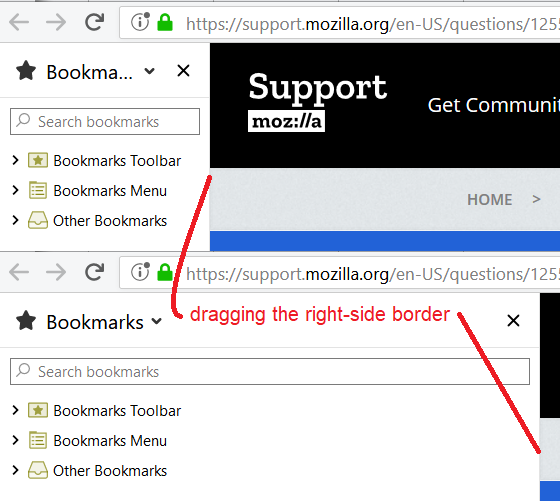
Hi rexlan, I'm attaching a screenshot showing the minimum and maximum width when I drag the separator line:
<center> </center>
Is your minimum wider than mine, or still too wide? There probably is a CSS way to override the minimum in that case, but I haven't researched it myself. A good site to get advice on CSS hacks, if you don't get one here, is:
https://www.reddit.com/r/FirefoxCSS/
Edit: in case you are wondering, the coloring of the icons is from this section of my site: https://www.userchrome.org/what-is-userchrome-css.html#colorbookmarkfolder
Read this answer in context 👍 0כל התגובות (2)
פתרון נבחר
Hi rexlan, I'm attaching a screenshot showing the minimum and maximum width when I drag the separator line:
<center></center>
Is your minimum wider than mine, or still too wide? There probably is a CSS way to override the minimum in that case, but I haven't researched it myself. A good site to get advice on CSS hacks, if you don't get one here, is:
https://www.reddit.com/r/FirefoxCSS/
Edit: in case you are wondering, the coloring of the icons is from this section of my site: https://www.userchrome.org/what-is-userchrome-css.html#colorbookmarkfolder
השתנתה ב־ על־ידי jscher2000 - Support Volunteer
Thanks for the reply ... yes I did drag it as far as possible already and should have noted that in the original post.
I will look at the other place you suggested too - thank you.
I have spent a lot of time on this but no success so far. This was given on the Reddit forum as suggested and it works perfect.
- sidebar-header,
- sidebar {
 min-width: 10px !important;
 max-width: unset !important;
}
השתנתה ב־ על־ידי rexlan