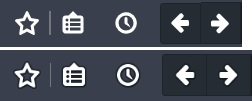
How to get buttons shadow back in Firefox 55

Since Firefox update to 55, the buttons shadow disappear from toolbar, how do I get it back? Like the picture, up is 55, down is before. If there is no way to get it back, I vote that, hope developer will get it back.
השתנתה ב־ על־ידי matif
כל התגובות (4)
You posted from Win10, while I'm using Win7 and don't see that difference between my Firefox 55 installation and an older version that I also have installed.
It could be a difference between the default theme between Win10 and Win7, but in your screenshots I am seeing a bit of what looks like a faint graphic section that I wonder about the cause. Do you happen to be using a light-weight theme (called Personas years ago when they first appeared in Firefox) ?
the-edmeister said
You posted from Win10, while I'm using Win7 and don't see that difference between my Firefox 55 installation and an older version that I also have installed. It could be a difference between the default theme between Win10 and Win7, but in your screenshots I am seeing a bit of what looks like a faint graphic section that I wonder about the cause. Do you happen to be using a light-weight theme (called Personas years ago when they first appeared in Firefox) ?
Thanks for reply. Yes, I'm using light weight theme in Win 10. This one: https://addons.mozilla.org/en-US/firefox/addon/light-bubbles/
How about with that theme disabled?
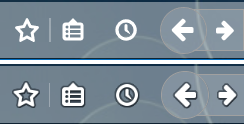
If I disable it shows dark icon, I can't see different between 55 & 54, if I use official Dark theme, it shows like below picture. The point is if I use a theme which not very dark, the shadow will make white icons clearer and beautiful.