


extensions dont display their dropdown windows properly

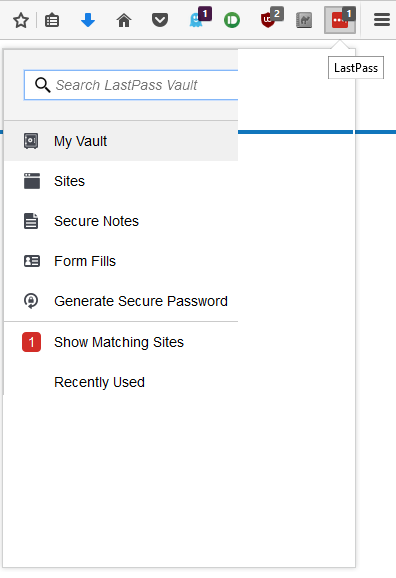
Last Pass, Camelcamelcamel, and several other extensions dont display properly. I'm not sure if the picture attached properly but basically the windows edge displays but only 1/4 of the content inside shows _________________ |------------ | |------------ | |------------ | <- the drop downs look like this | | | | | |
it doesnt compress the information - its just not shown and usually the background shows through
כל התגובות (3)
uploading the image again
Start Firefox in Safe Mode to check if one of the extensions ("3-bar" menu button or Tools -> Add-ons -> Extensions) or if hardware acceleration is causing the problem.
- switch to the DEFAULT theme: "3-bar" menu button or Tools -> Add-ons -> Appearance
- do NOT click the "Refresh Firefox" button on the Safe Mode start window
I'm on the default theme and I've tried disabling every extension individually and restarting the browser with no effect.
Unfortunately - Safe Mode disables my extensions, so i can't test the issue that way