


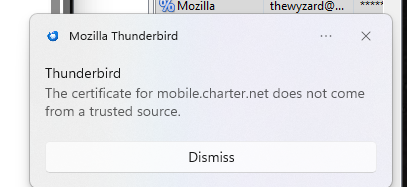
The certificate for mobile.charter.net does not come from a trusted source.

I am using Thunderbird 151.0.1 (64-bit), and I get the "trusted source" message in a pop-up every time Thunderbird checks for email. There is only an option to Dismiss presented. My account name changes color to red and has a red triangle with an exclamation mark displayed. I went to Settings > Privacy & Security > Security > Certificates > Manage Certificates and looked at all the certificates listed in the Certificate Manager > Authorities (which is the only section with anything listed) and don't see anything from mobile.charter.net. I can go to SPECTRUM.NET (Charter) and view my email with no problems. I'm at a loss as to be able to view my email in Thunderbird.

All Replies (3)

What version of TB and OS?
Thunderbird 151.0.1 (64-bit), Windows 11 Pro, updated to 2026-06 Security Update (KB5094126) (26200.8655).

Same problem. Same version of Thunderbird. Windows 11 Pro. This literally happened overnight. Everything was fine Monday night and all screwed up when I logged on Tuesday morning. I can receive email on my Iphone. I can receive email from Outlook. I can use web email. The only place I CAN'T get email is Thunderbird. Which makes me think Thunderbird is the problem. Please investigate.