


raspberry pi open search in new tab does not work even after "Open links in tabs instead of new windows" is checked and "browser.search.openintab" is set to true
I have a Raspberry Pi 4b with a 64bit 4 core Arm CPU and 8GB ram. It is currently using Debian Trixie with the Xfce4 desktop.
I installed Firefox, and went through the setup. I made sure that in settings -> general the "Open links in tabs instead of new windows" is checked. I also set the about:config "browser.search.openintab" is set to true. My default search engine is DuckDuckGo.
Firefox will not open any search in a new tab. It opens them in the search results tab only. I have an x86-64 notebook and an x86-64 desktop running Xubuntu that are using the same settings, and they function properly.
Am I missing something? Is this a peculiarity to the arm version of Firefox? Is there another setting specific the Raspberry Pi or arm Firefox that I have to change?
Cheers!
All Replies (2)
Zaɓi Mafita
Please see attached img.
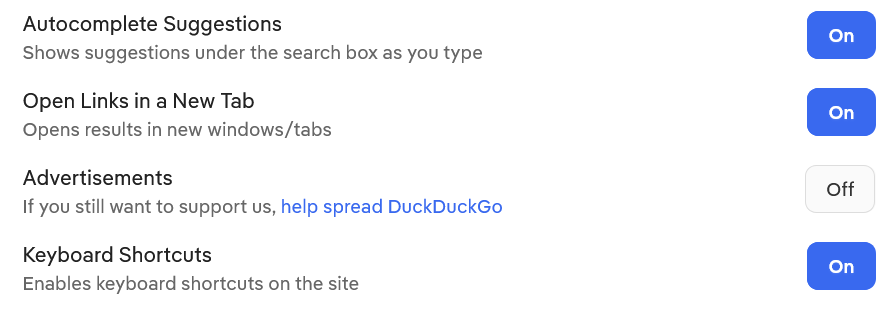
Thank you.
It took a while for me to find the switch. I use Firefox as my home page. It finally clicked in to go to the DuckDuckGo web site.
The odd thing is that I do not remember setting it on my notebook or desktop. Old age is creeping up on me, I guess!
Cheers!