


Login to Outlook tells me the password is wrong. [was Thunderbird keeps changing my password]

I'm using Thunderbird on Windows 11 with my Outlook email account. I can receive email, but when I try to send an email, it tells me the password is wrong.
[moderator note, the following is unrelated] When I check the password in the Privacy and Security settings, Thunderbird has changed the password to a long string of letters, numbers, and symbols. I enter the correct password, but it keeps changing back to the incorrect password. I have tried deleting and re-adding the account. I have also uninstalled and reinstalled Thunderbird. Same result.
An gyara daga Wayne Mery
All Replies (4)
You're also at https://www.reddit.com/r/Thunderbird/comments/1p6qm12/thunderbird_keeps_changing_my_password/
> Thunderbird has changed the password to a long string of letters, numbers, and symbols.
That's likely not a password but rather an oauth token (and so misleading to be saved in "passwords"), as you see here:
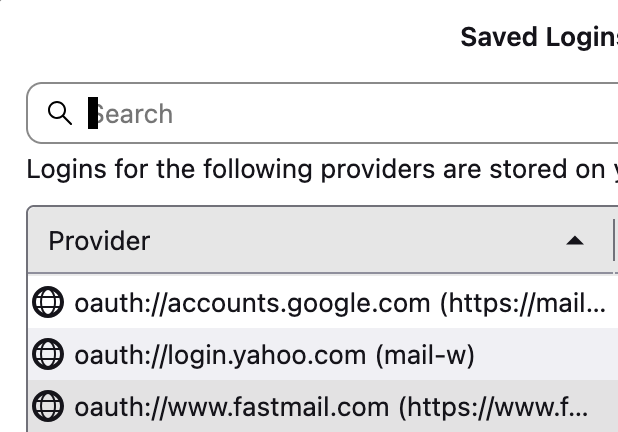
An gyara daga Wayne Mery
I suggest this to clean out and retry: - click to settings>privacy&security - click saved passwords and then show passwords - then, highlight the rows for that one account (normally two) and delete them
What Wayne was referring to is that many email providers now place a security app code in place of the password for better security. Unlike passwords, they cannot be copied to another PC for the same account. Outlook first prompts for the 'real' password and only sets the app password after confirming.
Now that you have removed current data, see if you can now access the account.
In addition to the info mentioned by david, also note - check the following.
Microsoft account email addresses are called 'aliases'. Whatever password you use to access Microsoft Accountis the password to set for your email addresses. The email address which you have got set up as 'primary' is the only email address you can use to send emails via a Third party client like Thunderbird.
So if you have two email addresses eg: name@hotmail and name@outlook but outlook email address is primary, then the hotmail email address can only send using the outlook email address. So in Account Settings you would need to set the hotmail account to use the smtp of outlook account. Then for the Account Settings for hotmail, set up to use a 'Reply-to' and enter the hotmail address. This then means the replies should end up in the correct account.