


Why is Firefox browser crashing when I attempt to login to an HTTPS website?

Since 28-Aug-2015 when I attempt to open secure banking HTTPS websites Firefox crashes. Other people have experienced the same issue in the last 24 hours.
Something is wrong!
All Replies (8)
hello, could you provide your latest few submitted crash reports? please enter about:crashes into the location bar, copy the latest few report ids from there starting with bp- & paste them here into a forum reply. this will give us a better understanding what may be triggering those crashes.
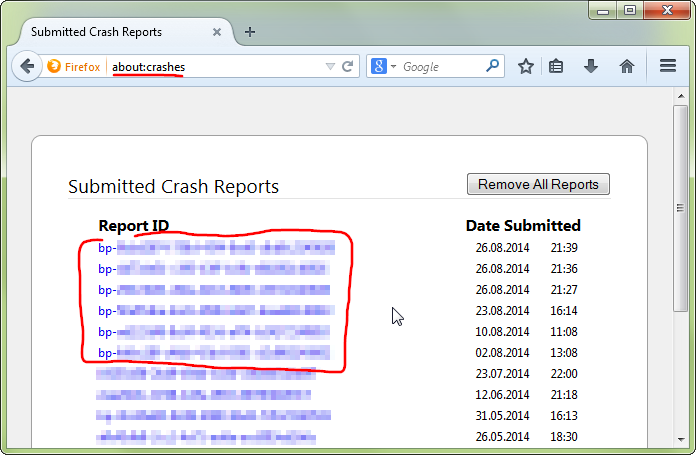
Thank you for the reply. I proceeded to enter about:crashes into the location bar as you suggested and this is what comes up:
Submitted Crash Reports
No crash reports have been submitted.
The browser window disappears when I attempt to login, but yet it is not calling that a crash.
What could be happening?
An gyara daga lucash15
then let's try another thing :)) could you go to the firefox menu ≡ > help ? > troubleshooting information, copy the contents of that page and paste them here into a reply on the forum? maybe this can give us a clue what is going on...
Application Basics
Name: Firefox Version: 40.0.3 Build ID: 20150826023504 Update Channel: release User Agent: Mozilla/5.0 (Windows NT 6.3; WOW64; rv:40.0) Gecko/20100101 Firefox/40.0 Multiprocess Windows: 0/1 (default: false)
Crash Reports for the Last 3 Days
All Crash Reports
Extensions
Name: Ghostery Version: 5.4.7 Enabled: true ID: firefox@ghostery.com
Name: PointGrab Version: 0.1 Enabled: false ID: PointGrab@PointGrab.com
Name: Skype Click to Call Version: 7.4.0.9058 Enabled: false ID: {82AF8DCA-6DE9-405D-BD5E-43525BDAD38A}
Graphics
Adapter Description: Intel(R) HD Graphics Adapter Drivers: igdumdim64 igd10iumd64 igd10iumd64 igdumdim32 igd10iumd32 igd10iumd32 Adapter RAM: Unknown Asynchronous Pan/Zoom: none Device ID: 0x0a06 Direct2D Enabled: true DirectWrite Enabled: true (6.3.9600.17999) Driver Date: 3-16-2015 Driver Version: 10.18.14.4170 GPU #2 Active: false GPU Accelerated Windows: 1/1 Direct3D 11 (OMTC) Subsys ID: 00000000 Supports Hardware H264 Decoding: true Vendor ID: 0x8086 WebGL Renderer: Google Inc. -- ANGLE (Intel(R) HD Graphics Direct3D11 vs_5_0 ps_5_0) windowLayerManagerRemote: true AzureCanvasBackend: direct2d 1.1 AzureContentBackend: direct2d 1.1 AzureFallbackCanvasBackend: cairo AzureSkiaAccelerated: 0
Important Modified Preferences
accessibility.typeaheadfind.flashBar: 0 browser.cache.disk.capacity: 358400 browser.cache.disk.filesystem_reported: 1 browser.cache.disk.smart_size.first_run: false browser.cache.disk.smart_size.use_old_max: false browser.cache.frecency_experiment: 1 browser.download.importedFromSqlite: true browser.download.manager.alertOnEXEOpen: true browser.places.smartBookmarksVersion: 7 browser.search.useDBForOrder: true browser.sessionstore.upgradeBackup.latestBuildID: 20150826023504 browser.startup.homepage: |https://startpage.com/ browser.startup.homepage_override.buildID: 20150826023504 browser.startup.homepage_override.mstone: 40.0.3 dom.apps.reset-permissions: true dom.mozApps.maxLocalId: 1001 dom.mozApps.used: true extensions.lastAppVersion: 40.0.3 font.internaluseonly.changed: true gfx.direct3d.last_used_feature_level_idx: 0 media.gmp-eme-adobe.lastUpdate: 1437746187 media.gmp-eme-adobe.version: 12 media.gmp-gmpopenh264.lastUpdate: 1433273386 media.gmp-gmpopenh264.version: 1.4 media.gmp-manager.buildID: 20150826023504 media.gmp-manager.lastCheck: 1440793060 network.cookie.prefsMigrated: true network.predictor.cleaned-up: true places.database.lastMaintenance: 1440278323 places.history.expiration.transient_current_max_pages: 104858 plugin.disable_full_page_plugin_for_types: application/pdf plugin.importedState: true plugin.state.java: 2 print.printer_Brother_MFC-7220_USB_Printer.print_bgcolor: false print.printer_Brother_MFC-7220_USB_Printer.print_bgimages: false print.printer_Brother_MFC-7220_USB_Printer.print_colorspace: print.printer_Brother_MFC-7220_USB_Printer.print_command: print.printer_Brother_MFC-7220_USB_Printer.print_downloadfonts: false print.printer_Brother_MFC-7220_USB_Printer.print_duplex: 1515870810 print.printer_Brother_MFC-7220_USB_Printer.print_edge_bottom: 0 print.printer_Brother_MFC-7220_USB_Printer.print_edge_left: 0 print.printer_Brother_MFC-7220_USB_Printer.print_edge_right: 0 print.printer_Brother_MFC-7220_USB_Printer.print_edge_top: 0 print.printer_Brother_MFC-7220_USB_Printer.print_evenpages: true print.printer_Brother_MFC-7220_USB_Printer.print_footercenter: print.printer_Brother_MFC-7220_USB_Printer.print_footerleft: &PT print.printer_Brother_MFC-7220_USB_Printer.print_footerright: &D print.printer_Brother_MFC-7220_USB_Printer.print_headercenter: print.printer_Brother_MFC-7220_USB_Printer.print_headerleft: &T print.printer_Brother_MFC-7220_USB_Printer.print_headerright: &U print.printer_Brother_MFC-7220_USB_Printer.print_in_color: true print.printer_Brother_MFC-7220_USB_Printer.print_margin_bottom: 0.5 print.printer_Brother_MFC-7220_USB_Printer.print_margin_left: 0.5 print.printer_Brother_MFC-7220_USB_Printer.print_margin_right: 0.5 print.printer_Brother_MFC-7220_USB_Printer.print_margin_top: 0.5 print.printer_Brother_MFC-7220_USB_Printer.print_oddpages: true print.printer_Brother_MFC-7220_USB_Printer.print_orientation: 0 print.printer_Brother_MFC-7220_USB_Printer.print_page_delay: 50 print.printer_Brother_MFC-7220_USB_Printer.print_paper_data: 1 print.printer_Brother_MFC-7220_USB_Printer.print_paper_height: 11.00 print.printer_Brother_MFC-7220_USB_Printer.print_paper_name: print.printer_Brother_MFC-7220_USB_Printer.print_paper_size_type: 0 print.printer_Brother_MFC-7220_USB_Printer.print_paper_size_unit: 0 print.printer_Brother_MFC-7220_USB_Printer.print_paper_width: 8.50 print.printer_Brother_MFC-7220_USB_Printer.print_plex_name: print.printer_Brother_MFC-7220_USB_Printer.print_resolution: 1515870810 print.printer_Brother_MFC-7220_USB_Printer.print_resolution_name: print.printer_Brother_MFC-7220_USB_Printer.print_reversed: false print.printer_Brother_MFC-7220_USB_Printer.print_scaling: 1.00 print.printer_Brother_MFC-7220_USB_Printer.print_shrink_to_fit: false print.printer_Brother_MFC-7220_USB_Printer.print_to_file: false print.printer_Brother_MFC-7220_USB_Printer.print_unwriteable_margin_bottom: 0 print.printer_Brother_MFC-7220_USB_Printer.print_unwriteable_margin_left: 0 print.printer_Brother_MFC-7220_USB_Printer.print_unwriteable_margin_right: 0 print.printer_Brother_MFC-7220_USB_Printer.print_unwriteable_margin_top: 0 privacy.sanitize.migrateFx3Prefs: true security.disable_button.openCertManager: false storage.vacuum.last.index: 1 storage.vacuum.last.places.sqlite: 1438540410
Important Locked Preferences
JavaScript
Incremental GC: true
Accessibility
Activated: false Prevent Accessibility: 0
Library Versions
NSPR Expected minimum version: 4.10.8 Version in use: 4.10.8
NSS Expected minimum version: 3.19.2 Basic ECC Version in use: 3.19.2 Basic ECC
NSSSMIME Expected minimum version: 3.19.2 Basic ECC Version in use: 3.19.2 Basic ECC
NSSSSL Expected minimum version: 3.19.2 Basic ECC Version in use: 3.19.2 Basic ECC
NSSUTIL Expected minimum version: 3.19.2 Version in use: 3.19.2
Experimental Features
does an update of your graphics driver make a difference? this should be the right link for your system: https://downloadcenter.intel.com/download/25232/Intel-Iris-Iris-Pro-and-HD-Graphics-Driver-for-Windows-7-8-8-1-64bit
in case this doesn't solve the issue try to disable hardware acceleration in the firefox menu ≡ > options > advanced > general as well (that setting will take a restart of the browser to take effect).
Thank you for your reply. I completed both of your recommendations and the problem still persists.
If it helps I have to have a USB token to login to the banking website, and it needs JAVA.
An gyara daga lucash15
hmm, sorry - if these crashes leave no trace at all then it will be hard to debug :-/
if it's a reproducible issue at a particular site, then you could file a bug for this problem at bugzilla.mozilla.org.
Try to boot the computer in Windows Safe Mode with network support (press F8 on the boot screen).
- http://www.bleepingcomputer.com/tutorials/how-to-start-windows-in-safe-mode/
- http://www.7tutorials.com/4-ways-boot-safe-mode-windows-10
Do a malware check with several malware scanning programs on the Windows computer.
Please scan with all programs because each program detects different malware. All these programs have free versions.
Make sure that you update each program to get the latest version of their databases before doing a scan.
- Malwarebytes' Anti-Malware:
http://www.malwarebytes.org/mbam.php - AdwCleaner:
http://www.bleepingcomputer.com/download/adwcleaner/
http://www.softpedia.com/get/Antivirus/Removal-Tools/AdwCleaner.shtml - SuperAntispyware:
http://www.superantispyware.com/ - Microsoft Safety Scanner:
http://www.microsoft.com/security/scanner/en-us/default.aspx - Windows Defender:
http://windows.microsoft.com/en-us/windows/using-defender - Spybot Search & Destroy:
http://www.safer-networking.org/en/index.html - Kasperky Free Security Scan:
http://www.kaspersky.com/security-scan
You can also do a check for a rootkit infection with TDSSKiller.
- Anti-rootkit utility TDSSKiller:
http://support.kaspersky.com/5350?el=88446
See also:
- "Spyware on Windows": http://kb.mozillazine.org/Popups_not_blocked