

Avoid support scams. We will never ask you to call or text a phone number or share personal information. Please report suspicious activity using the “Report Abuse” option.

Learn More
Open

Built-in VPN stuck on "Get started" after successful sign-in (Firefox 159.0.1, Iran)

anitaghafuri27

Hi,

I'm trying to use Firefox's built-in VPN, but I can't turn it on.

Details: - Firefox version: 159.0.1 (64-bit), up to date - OS: Windows 11 - Location: Iraq - Mozilla account: signed in successfully (I see "Signed in successfully!" on accounts.firefox.com)

Problem: After signing in, the VPN panel in the toolbar still shows "Try Firefox's built-in VPN" with a "Get started" button. When I click it, I'm asked to sign in again and end up in a loop. I can never turn the VPN on.

What I checked: - about:policies shows "The Enterprise Policies service is inactive." - I manually set browser.ipProtection.enabled to true in about:config (the VPN button only appeared after this).

I noticed that Iran is not on the list of supported regions in your help article "Unable to find the built-in VPN in Firefox." Is this the reason it doesn't work for me? If so, are there plans to make the built-in VPN available in Iraq? If not, could you tell me what else might be causing this loop?

Thank you.
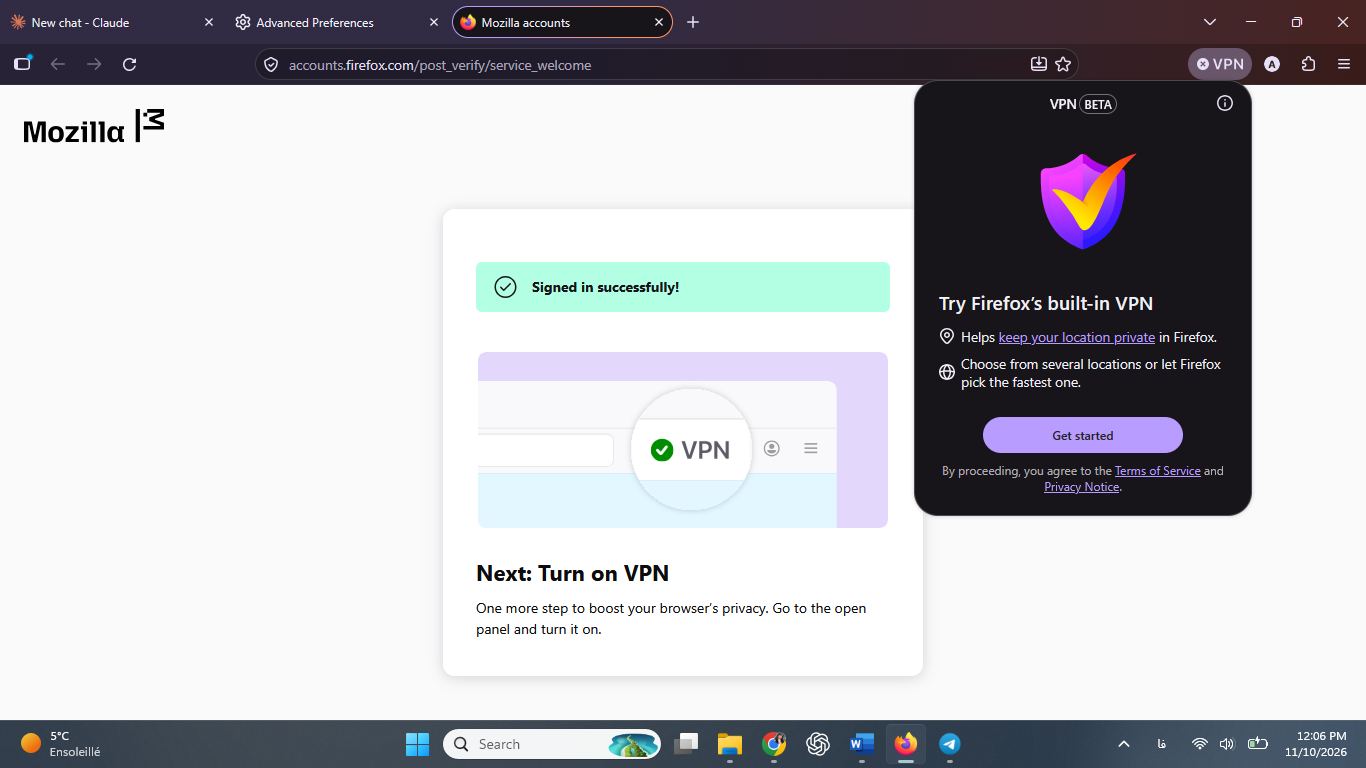
Hi, I'm trying to use Firefox's built-in VPN, but I can't turn it on. Details: - Firefox version: 159.0.1 (64-bit), up to date - OS: Windows 11 - Location: Iraq - Mozilla account: signed in successfully (I see "Signed in successfully!" on accounts.firefox.com) Problem: After signing in, the VPN panel in the toolbar still shows "Try Firefox's built-in VPN" with a "Get started" button. When I click it, I'm asked to sign in again and end up in a loop. I can never turn the VPN on. What I checked: - about:policies shows "The Enterprise Policies service is inactive." - I manually set browser.ipProtection.enabled to true in about:config (the VPN button only appeared after this). I noticed that Iran is not on the list of supported regions in your help article "Unable to find the built-in VPN in Firefox." Is this the reason it doesn't work for me? If so, are there plans to make the built-in VPN available in Iraq? If not, could you tell me what else might be causing this loop? Thank you.
Attached screenshots

You must log in to your account to reply to posts. Please start a new question, if you do not have an account yet.