


firefox sync account open but no "add a device" button in window

I've opened a firefox sync account and logged in on primary computer. I can access a pull-down menu titled "manage account" but the only options shown in the pull-down menu are: view quota, change password, my recovery key and reset sync.
Where is the "add a device" button?
Ñemoĩporã poravopyre
Android OS > Settings > Accounts > Firefox Sync > Pair a new Device
Emoñe’ẽ ko mbohavái ejeregua reheve 👍 7Opaite Mbohovái (6)
Add a Device is a function for setting up Sync on a new device (one that isn't already set up with Sync).
https://support.mozilla.org/en-US/kb/add-a-device-to-firefox-sync
https://support.mozilla.org/en-US/kb/find-code-to-add-device-to-firefox-sync
Thanks for the reply. I'm obviously missing something. I've set up a sync account on my primary computer. I've installed firefox on my tablet and copied the codes provided for the tablet. When I go back to my primary computer, go to Mozilla Home and press on the "sync" button I don't see a "pair a device" link or an "add a device" button. I'm now going to try to add the tablet using the "advanced setup" option in the tablet browser. If that works I won't worry about not being able to add the device from my primary computer.
for me it looks like this:
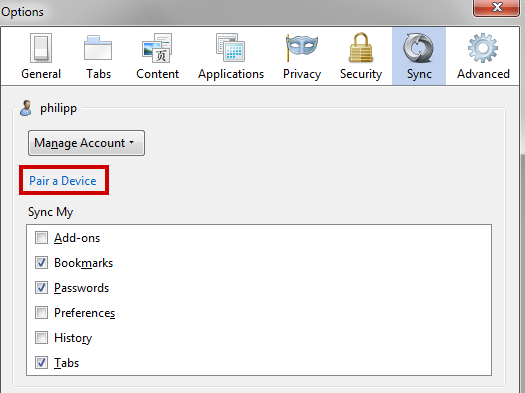
That's exactly how my window looks. Thanks for highlighting the bit that I couldn't seem to find before. Thanks to both of you for helping.
If I want an Android to sync with my Laptop how do I find the button on the Android to generate a code for my W8.1 laptop. Maybe I have the wrong version (not BETA) on the Android?
Also when I open Ff. I only get the menu not the browser page on my phone and a 'no mobile version for this page', statement when I go to the Home page!
Ñemoĩporã poravopyre
Android OS > Settings > Accounts > Firefox Sync > Pair a new Device