


Oĩporãmava
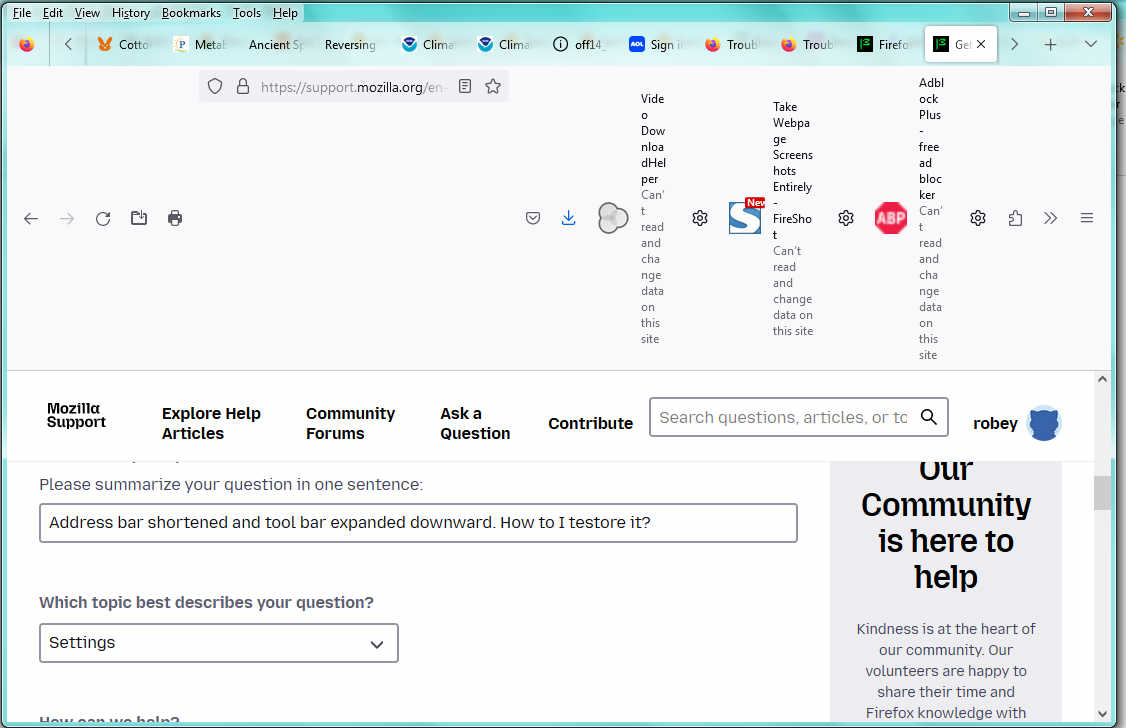
Address bar shortened and tool bar expanded downward. How to I testore it?

Using Firefox 115.38esr, the menu bar disapeared but I got it back but at the same time the tool bar expanded downward, showing more detail about each tool and the address bar shortened. How to I restore it?
Using Firefox 115.38esr, the menu bar disapeared but I got it back but at the same time the tool bar expanded downward, showing more detail about each tool and the address bar shortened. How to I restore it?
Opaite Mbohovái (1)
Ñemoĩporã poravopyre
Hello,
You can restore your toolbar layout by right-clicking an empty space on the toolbar, and click customize toolbar. After that, Click Restore Default Set to restore back to original.
Next, you can try troubleshooting by going to Help>troubleshoot mode > and click restart. If it fixes, it is most likely a theme or addon caused the issue.