


Firefox 88.0.1 asks to choose laucher for .jnlp while is already selected in the settings

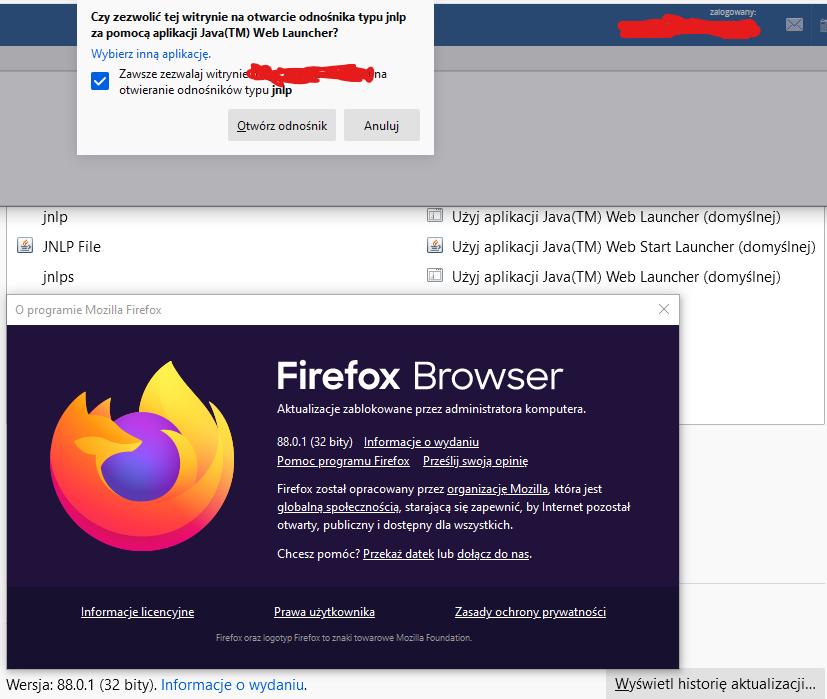
So far we have used version 83.0 and when properly configured, it starts our web program without any problems. Now we update to Firefox version 88.0.1 and on each computer and each user the first login to our program stops the message in which we have to choose the program to run .jnlp files. There was no such problem on version 83.0, the default JWS in Firefox settings opened these files. However, in version 88.0.1 we get an additional question about the laucher of .jnlp files, even though it is set in the settings.
So far we have used version 83.0 and when properly configured, it starts our web program without any problems. Now we update to Firefox version 88.0.1 and on each computer and each user the first login to our program stops the message in which we have to choose the program to run .jnlp files. There was no such problem on version 83.0, the default JWS in Firefox settings opened these files. However, in version 88.0.1 we get an additional question about the laucher of .jnlp files, even though it is set in the settings.
Opaite Mbohovái (3)
Hi
Firefox 88 is over a year old, have you tried using the most recent version, Firefox 106?
Check:
- about:config => browser.download.skipConfirmLaunchExecutable = true
cor-el powiedział
Check:
- about:config => browser.download.skipConfirmLaunchExecutable = true
Good try, but it doesn't work for me. Message is still appearing.