


Firefox can't read files anymore, opens an infinite amount of tabs instead
Whenever I try to read a file (usually a PDF) on Firefox, NUMEROUS new tabs (displaying a white screen instead of the file in question) keep opening up (after just a single click), until I close the window or click the "Home" button. It's not that unbearable of course because I can open my PDFs with another browser/software but still, it's annoying. What could I do to stop it ? thx for your assistance :)

Opaite Mbohovái (5)
Ñemoĩporã poravopyre
Hi axel.dian,
- Click on menu icon.
- Click on options.
- In left pane you will see General options, Click on it.
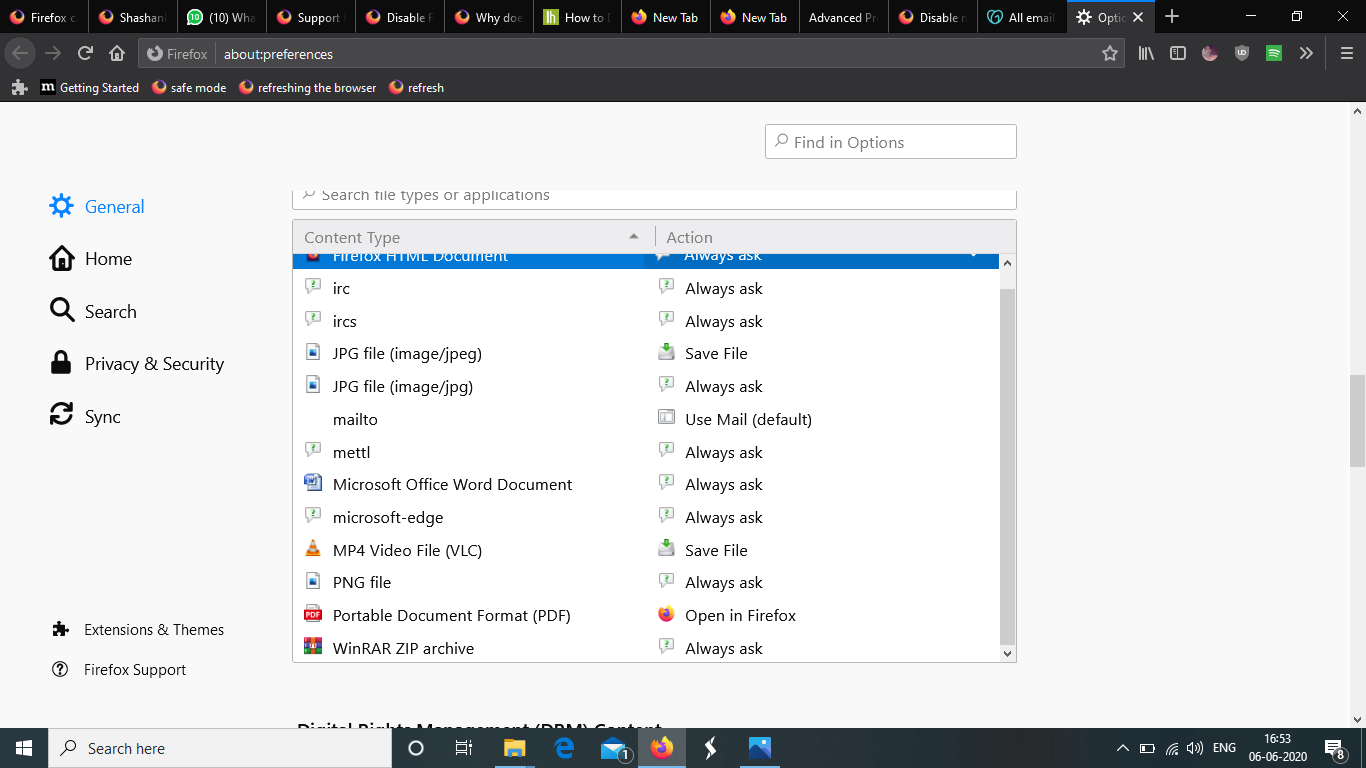
- In this menu, you will find Applications options.
- Choose Open in Firefox For Portable Document Format(PDF) as shown in screenshot.
Hope it helps. Thank You.
Hello..
For now, I suppose the workaround is to open the FDF externally (i.e., in Reader or Acrobat and not the plugin).
You can search for known bugs relating to FDFs, or file a new report, in Bugzilla .
Make sure you have selected "Preview in Firefox" "Open in Firefox" for Portable Document Format (PDF) files to use the builtin PDF Viewer and not merely the Firefox application.
- Options/Preferences -> General -> Applications
- https://support.mozilla.org/en-US/kb/change-firefox-behavior-when-open-file
You get tabs opening endlessly if you select Firefox as the application to handle a file when you get an "Open with" dialog.
See also:
Moambuepyre cor-el rupive
For now, I suppose the workaround is to open the FDF externally (i.e., in Reader or Acrobat and not the plugin).
You can search for known bugs relating to FDFs, or file a new report, in Bugzilla.
Thank you so much cor-el and Shashank Shekhar, you solved my problem !