


I upgraded to Quantum, but now getting to my bookmarks is a convulted process. Why?

I have upgraded to Quantum, and technically my bookmarks are there, but I used to be able to click on the Bookmarks icon and see all of my saved links, including folders. Now I have to click on the "View history, saved bookmarks, and more" icon, then click on "Bookmarks", then click on "Bookmarking Tools", then click on "View Bookmarks Sidebar". Then when I click on the link I want I have to close the sidebar again because I don't want to see it all the time. Why, oh WHY, is this now a much more complicated process than it used to be??? Is there an easy way to change this?
Ñemoĩporã poravopyre
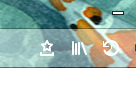
I found the solution. This morning I went in again to Customize under the three horizontal lines, and found the Bookmarks button. i'd swear it wasn't there yesterday. It looks like a star sitting in a tray. Problem solved.
Emoñe’ẽ ko mbohavái ejeregua reheve 👍 34Opaite Mbohovái (3)
They supposedly got extensive feedback from "real users" about their UI changes. No "real user" I know of wants something they use a lot to be buried in menus. At least keep the icon in the "customize" menu for those of us that don't like the new changes and take a more logical approach to browsing.
Moambuepyre hey.toast rupive
Ñemoĩporã poravopyre
I found the solution. This morning I went in again to Customize under the three horizontal lines, and found the Bookmarks button. i'd swear it wasn't there yesterday. It looks like a star sitting in a tray. Problem solved.
Thank you, I have NOT been using Firefox because of this.... great find! Why in the WORLD would they hide the bookmarks!?