


every time I right click in mozilla browser, mozilla crashes and I have to restart the browser

every time I right click in mozilla browser, mozilla crashes and I have to restart the browser
Opaite Mbohovái (2)

Start Firefox in Safe Mode {web link} by holding down the <Shift> (Mac=Options) key, and then starting Firefox.
A small dialog should appear. Click Start In Safe Mode (not Refresh). Is the problem still there?
While still in Safe Mode,
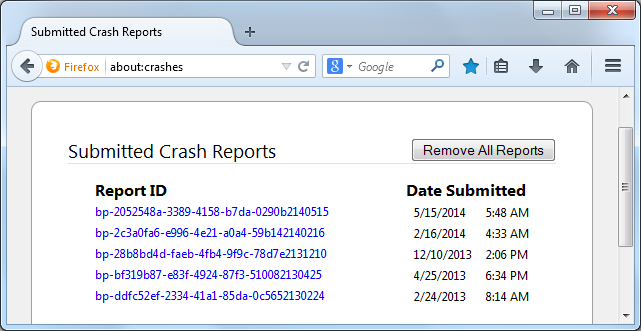
In the address bar, type about:crashes<enter>.
Note: If any reports do not have BP in front of the numbers/letters, click it to submit them.
The crash report is several pages of data. We need the report numbers to see the whole report.
Using your mouse, mark the most resent 7 - 10 crash reports, and copy them. Now go to the reply box and paste them in.
For more help on crash reports, see; https://support.mozilla.org/en-US/kb/firefox-crashes-asking-support +++++++++++++++++++++++ If you can't get Firefox to open, you will have to do this the hard way.
https://support.mozilla.org/en-US/kb/mozillacrashreporter Open the file browser / explorer on your computer. Note: You may have to enable Show Hidden Folders / Files. Enter this in the address bar;
Windows: %APPDATA%\Mozilla\Firefox\Crash Reports\submitted Win 7/Vista: C:\Users\<username>\AppData\Roaming\Mozilla\Firefox\Crash Reports\submitted Win XP/2000: C:\Documents and Settings\<username>\Application Data\Mozilla\Firefox\Crash Reports\submitted
Mac OS: /Users/<username>/Library/Application Support/Firefox/Crash Reports/submitted Linux: /home/<username>/.mozilla/firefox/Crash Reports/submitted
Copy the most recent 5-7 File Names in the folder. Post the information in the reply box.
Separate Security Issue: Update your Flash Player Note: Windows users should download the ActiveX for Internet Explorer. and the plugin for Plugin-based browsers (like Firefox).
Note: Windows 8 and Windows 10 have built-in flash players and Adobe will cause a conflict. Install the plugin only. Not the ActiveX.
Flash Player Version: Version 27.0.0.170
https://get.adobe.com/flashplayer/ Direct link scans current system and browser Note: Other software is offered in the download. <Windows Only>
https://get.adobe.com/flashplayer/otherversions/ Step 1: Select Operating System Step 2: Select A Version (Firefox, Win IE . . . .) Note: Other software is offered in the download. <Windows Only> +++++++++++++++++++ See if there are updates for your graphics drivers https://support.mozilla.org/en-US/kb/upgrade-graphics-drivers-use-hardware-acceleration