


Windows 10 reached EOS (end of support) on October 14, 2025. If you are on Windows 10, see this article.

Eheka Pytyvõha

Emboyke pytyvõha apovai. Ndorojeruremo’ãi ehenói térã eñe’ẽmondóvo pumbyrýpe ha emoherakuãvo marandu nemba’etéva. Emombe’u tembiapo imarãkuaáva ko “Marandu iñañáva” rupive.

Kuaave

Turning off the search functions when tyiping in adress bar

  • 3 Mbohovái
  • 1 oguereko ko apañuái
  • 62 Hecha
  • Mbohovái ipaháva Happy112
  • Moĩporãmbyre

When I was typing in the adress bar, I accidentally clicked something where it brought up all of these logos of the different ways I could search (Google, Bing, Wikipedia, etc.). What was the command that made that appear and how do I turn that off?
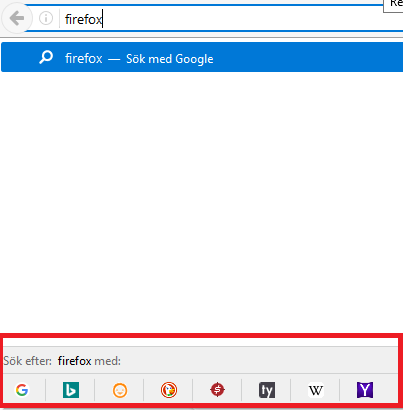
When I was typing in the adress bar, I accidentally clicked something where it brought up all of these logos of the different ways I could search (Google, Bing, Wikipedia, etc.). What was the command that made that appear and how do I turn that off?
Mba’erechaha japyhypyre oñondivegua

Ñemoĩporã poravopyre

HI   !

You can disable that feature :

Type in the address bar   about:config   (press Enter) (promise to be careful, if asked) Type and look for the preference : browser.urlbar.oneOffSearches and set its value to   false

Emoñe’ẽ ko mbohavái ejeregua reheve 👍 2

Opaite Mbohovái (3)

Ñemoĩporã poravopyre

HI   !

You can disable that feature :

Type in the address bar   about:config   (press Enter) (promise to be careful, if asked) Type and look for the preference : browser.urlbar.oneOffSearches and set its value to   false

Thanks! While I use Firefox regularly, it never comes to my mind about the existence of the "about:config" feature.

KalKent said

Thanks! While I use Firefox regularly, it never comes to my mind about the existence of the "about:config" feature.

Not everybody knows about it, and even then : you'd have to know which preference you need to look for ...... Glad you got rid of that nuisance, though  !