Windows 10 reached EOS (end of support) on October 14, 2025. For more information, see this article.

Eheka Pytyvõha

Emboyke pytyvõha apovai. Ndorojeruremo’ãi ehenói térã eñe’ẽmondóvo pumbyrýpe ha emoherakuãvo marandu nemba’etéva. Emombe’u tembiapo imarãkuaáva ko “Marandu iñañáva” rupive.

Kuaave

worng buttons

  • 2 Mbohovái
  • 1 oguereko ko apañuái
  • 28 Hecha
  • Mbohovái ipaháva cor-el

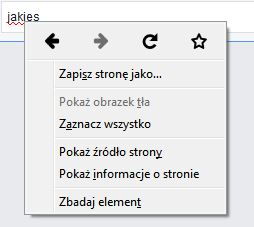
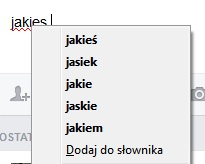
Before actualisation of adobe flash, when i write words wrong i can automaticly correct them by clicking right button of mouse. After click i can choose words from list of which word i can change. Now when i write word wrong, i see shown red line under wrong spelled word (that's good), i click right button on mouse to correct my spelling i can choose only "Go back" (page) or "Go forward" or " add to bookmarks". The problem is that i don't want to see all of that, i want to see list propositions of words that i can change. I hope you understand me.

I can send screen shots of that.

Before actualisation of adobe flash, when i write words wrong i can automaticly correct them by clicking right button of mouse. After click i can choose words from list of which word i can change. Now when i write word wrong, i see shown red line under wrong spelled word (that's good), i click right button on mouse to correct my spelling i can choose only "Go back" (page) or "Go forward" or " add to bookmarks". The problem is that i don't want to see all of that, i want to see list propositions of words that i can change. I hope you understand me. I can send screen shots of that.

Opaite Mbohovái (2)

Start Firefox in Safe Mode to check if one of the extensions (Firefox/Tools > Add-ons > Extensions) or if hardware acceleration is causing the problem.

  • Switch to the DEFAULT theme: Firefox/Tools > Add-ons > Appearance
  • Do NOT click the Reset button on the Safe Mode start window