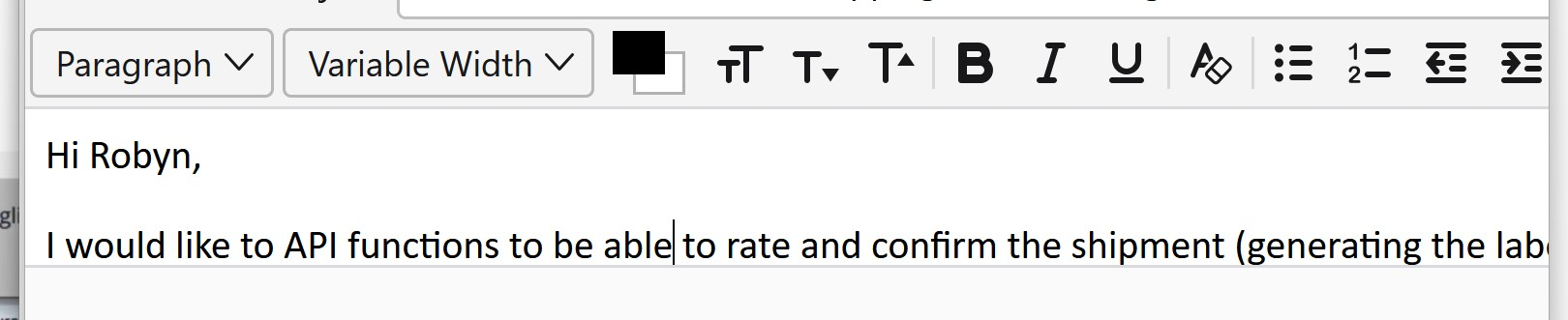
While composing, unable to see what I am type on the right when over the current window
When I compose a next message, anything I type exist the current window size (on the right) were disappear, until I press CTRL- to zoom out the scene. But when the same issue happened when I kept on typing. I.E. the content I was typing did not move to the next line. So that I could see what I was typing.
(example: the top line of this message, if my window is too big, I can only see upto 'the cur", then "rent window..." is out of the picture. I should move "current window.." to the next line). This is very frustrating when typing a long email. The only option I am using is the manually pressing 'Enter' for the new line.
When I compose a next message, anything I type exist the current window size (on the right) were disappear, until I press CTRL- to zoom out the scene. But when the same issue happened when I kept on typing. I.E. the content I was typing did not move to the next line. So that I could see what I was typing.
(example: the top line of this message, if my window is too big, I can only see upto 'the cur", then "rent window..." is out of the picture. I should move "current window.." to the next line). This is very frustrating when typing a long email. The only option I am using is the manually pressing 'Enter' for the new line.