


Purple Folders

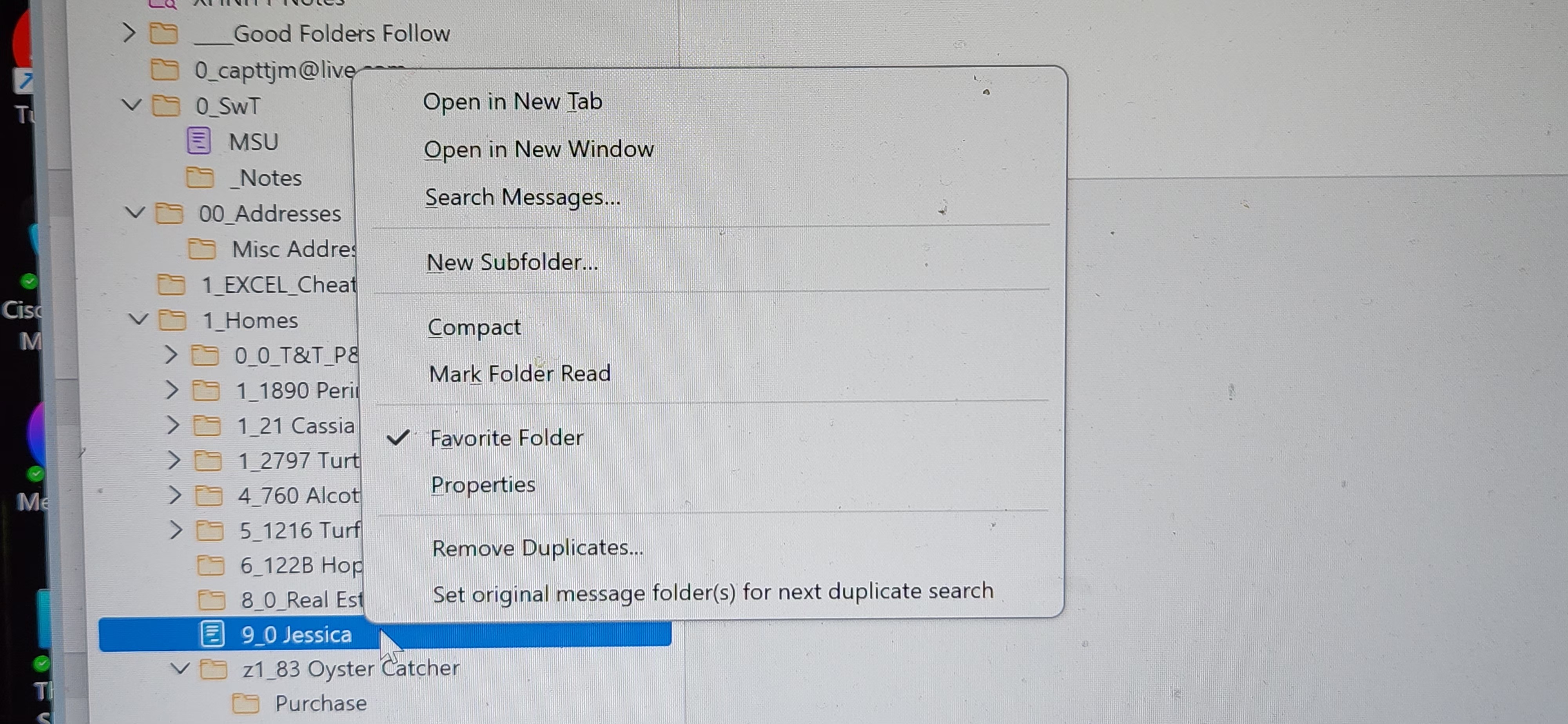
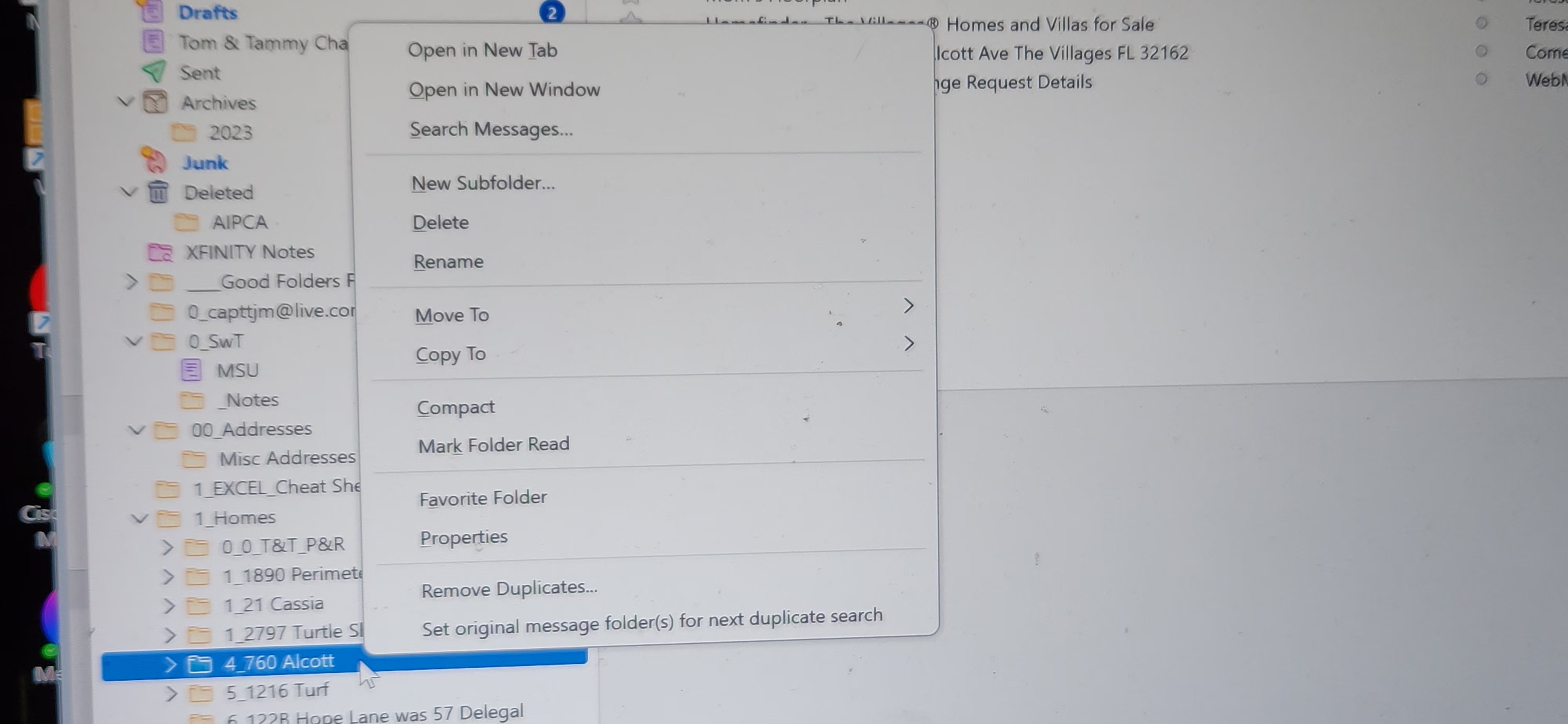
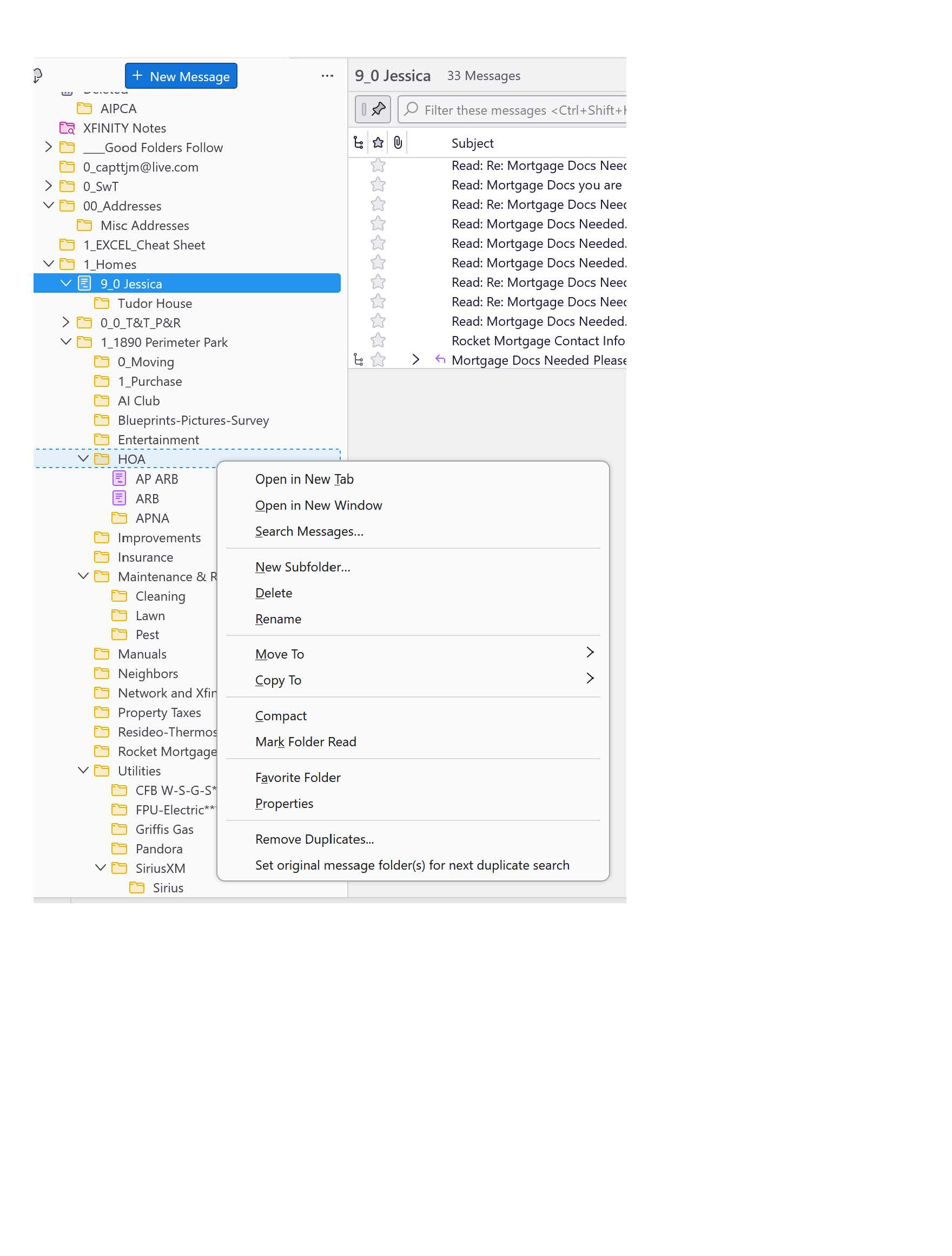
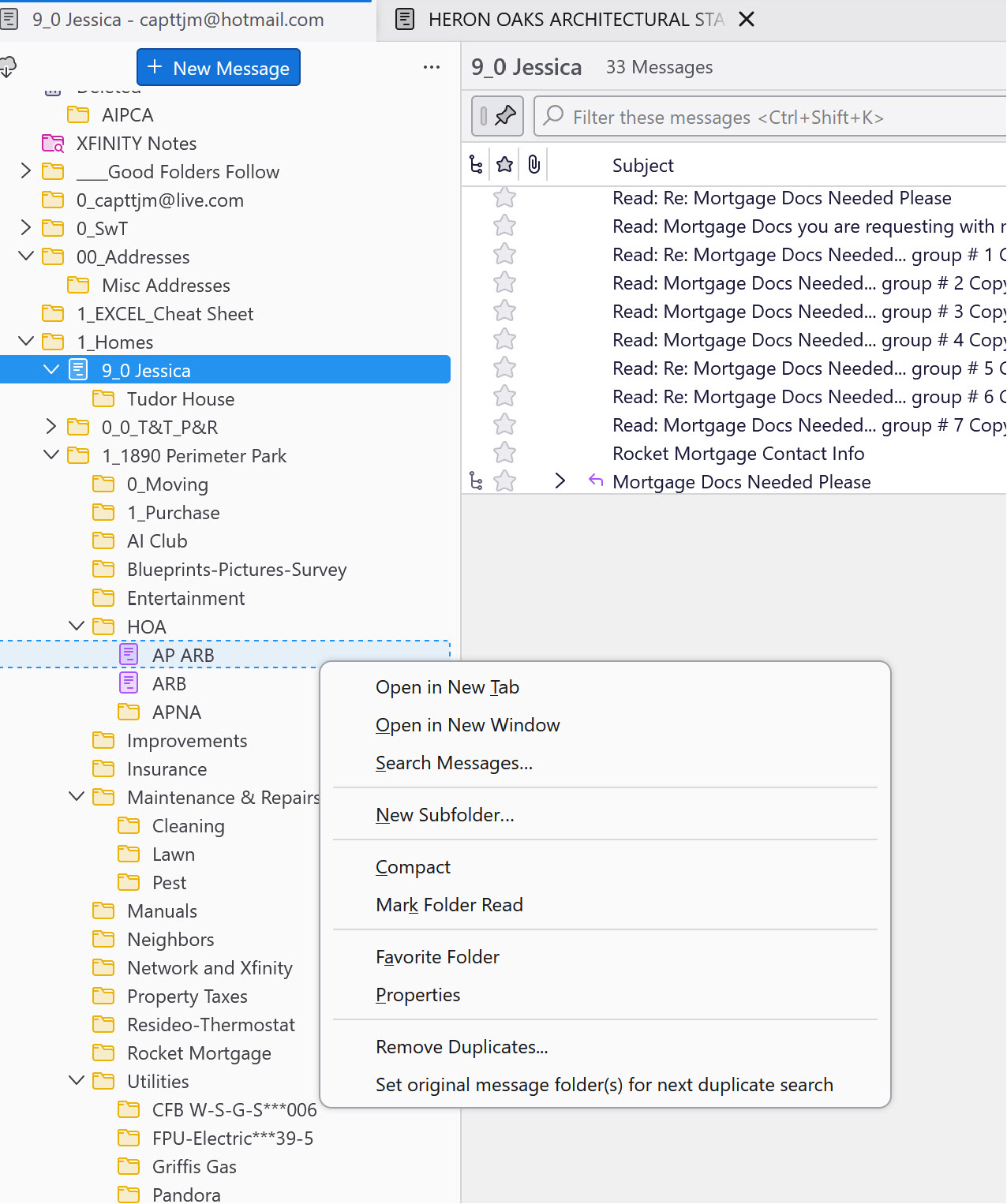
Support It seems a number of my file folders are corrupted. They show up as purple instead of the normal B&W. I say they are corrupted because, though I can still see them, as well as still put emails in and access the one in the folder, I lose the ability to do things specifically with the folders themselves. I'm attaching two screen shots
- 1 shows the normal folder.
- 2 shows the "Purple Folder" for comparison to normal.
On examination you can see some capabilities are not avaiable, i.e. DELETE, RENAME ect What causes this ? How can these "Purple Folder" be fixed? tx tom
Thomas J Meehan CAPTTJM@HOTMAIL.COM
Chosen solution
Matt Thank you... The add-on you suggested did give me the facility to turn off the DRAFT flag in the effected folders. It took me a while, after I downloaded the Add-On file, to figure out exactly how to add / apply it to Thunderbird. Most of the information I initially came across dealt with adding extensions to Firefox, not Thunderbird.
I finally found an article written by [Ryan Lee] the author of the extension to manage fold flags himself... <https://ryanlee.org/software/mozilla/thunderbird/folderflags/>
That article gave me the information I needed to be able to turn the DRAFT flag off and have the folders return to normal. Now as you noted earlier..., I'll have to be more observant and see if I can spot exactly what is causing the DRAFT flag to get turned on in the first place.
Thanks again for your assistance... This has been a learning experience for me. TX Tom
Ler a resposta no contexto 👍 2All Replies (8)
Have you attempted to rightclick and select the repair option?
Tried the repair option.. It doesn't do a thing.
I wish folks would learn to use their operating system to make a screen shot of information instead of taking a picture with their phone. Instructions from Microsoft on how to make a screenshot. https://support.microsoft.com/en-us/windows/use-snipping-tool-to-capture-screenshots-00246869-1843-655f-f220-97299b865f6b
Or Instructions on same from the Australian Government. https://www.esafety.gov.au/report/how-to-collect-evidence/how-to-screenshot-on-windows
I am not really understanding what you are asking because I am struggling with the images. But if you have a purple icon then it is most likely defined as a drafts folder in the copies and folders part of one of the account you have setup.
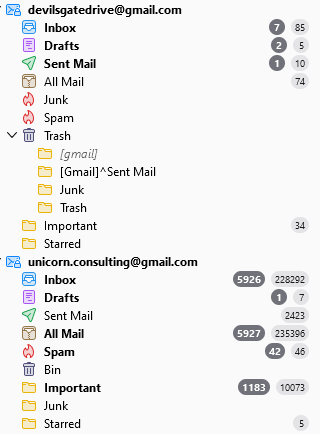
The image below shows the icon for a drafts folder as well as the similar coloured saved search icon. The detain on the icons is different.
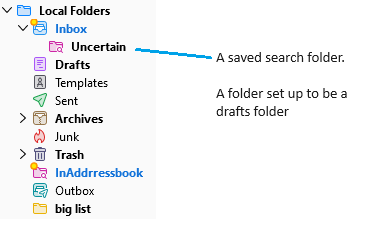
Your Xfinity notes is a saved search folder, so the content is generated on the fly by undertaking the original search each time the folder is opened.
Your folder MSU is defined as a drafts folder. Why your drafts folder for any account would be something other than a folder names Drafts I have no idea. But I did not set this stuff up. You might want to check account settings (for all accounts as the drafts folder can technically be any folder in Thunderbird, not just one in "this" account.
But as I said, I really am guessing as your images are hard to view or even open. Side by side is not possible at all. They are huge. SO I have provided some generic information on the colour icons Thunderbird uses.
Matt et al The reason I used a picture as documentation previously is because when I tried to capture an image of a pop-up menu, using the Snag-It app, the menu would disappear when I activated the app. The tutorial on the Snipping Tool you suggested gave me instructions on the sequence to follow to capture a pop-up menu. Thanks for pointing out the tutorial.
The Purple folder were all perfectly normal when created and were used for day/weeks before the change occurred. The change seems to occur after I add a new file to the folder or update a file in the folder. The major issue is once a normal folder is corrupted and shows up as purple it can no longer be moved, renamed or deleted.
The Properties Menu the Actions pop-up menu links to for both Normal and Purple folders has a "Repair Folder" action button. This repair function does nothing to correct whatever it is that changes a Normal to a corrupted Purple Folder.
The first jpg (Purple Folders and Normal Folders) attachment shows how "Purple" folders coexist with "Normal" folders. The second jpg (Normal Folder Action Options) shows the pop-up menu of actions available to use on a "Normal" folder. The third jpg (Purple Folder Deminished Action Options) shows a lesser number of actions available on "Purple" folders.
Any suggestions on how to correct this problem are welcome. Tx Tom
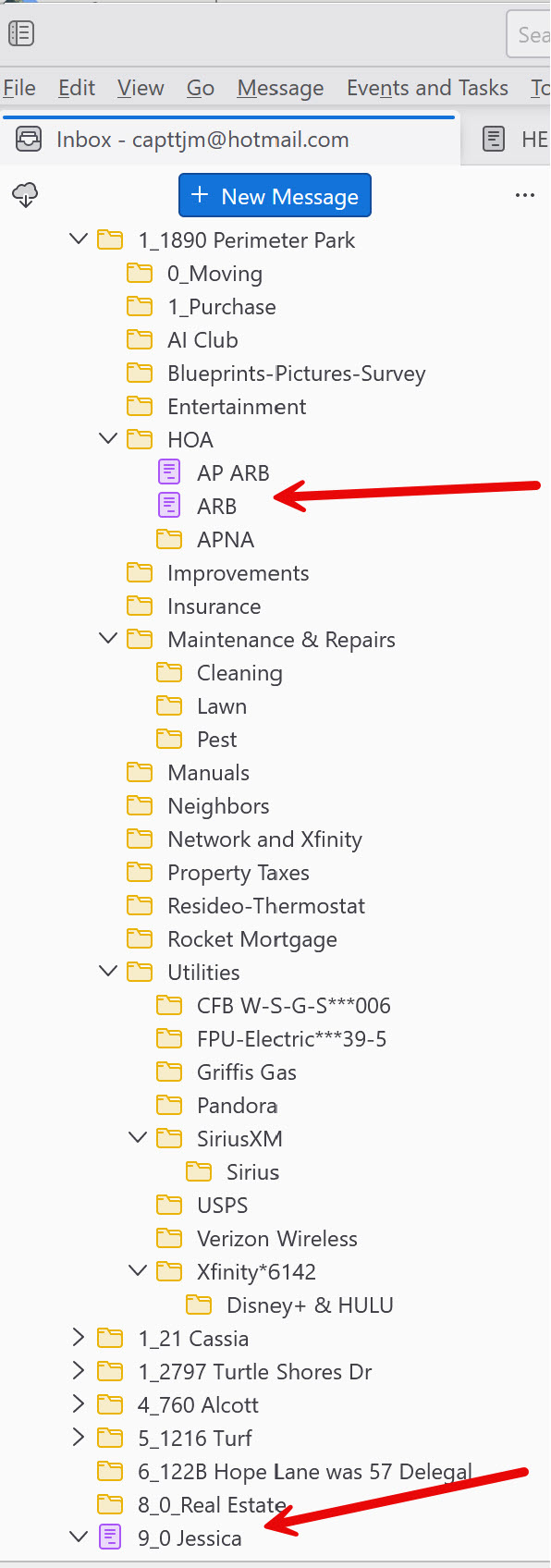
Have you checked the drafts setting for all accounts you have in Thunderbird? As I said before they are drafts folders, so the first thing that needs to happen is to determine that they are not selected in any accounts as drafts folders.
The change seems to occur after I add a new file to the folder or update a file in the folder. The major issue is once a normal folder is corrupted and shows up as purple it can no longer be moved, renamed or deleted.
Do you mean you add a new email to the folder? Please explain how you update a "file in the folder". What should be in these folders in the normal course of events is an email. Something you have received, or perhaps sent. But they are not files, and they are not something that you should be able to "update" they are closer to a book on a bookshelf. Something you refer to, read and it stays exactly the same from the activity.
If you are editing these emails, how do you do that? AN addon perhaps?
Matt Apologies, I seem to have gotten you off on the wrong track when I misspoke and wrote "The change seems to occur after I add a new "file" to the folder or update a file in the folder. I understand it is emails, not files, that are in these folders and they don't get updated... They are either added (new) or deleted. My reference was to when I was copying or moving an email into a specific folder or deleting an email from a folder.
I'm not exactly sure what you are referring to in your question "setting for all accounts you have in Thunderbird". If it is referring to "email accounts, I only have one single account defined to Thunderbird. That is the Hotmail account, <CAPTTJM@HOTMAIL.COM> that that account uses the SMTP server <smtp.office365.com>. I have never set up any other accounts...
The only Purple folder I had until this trouble began was the default DRAFTS folder that that Thunderbird had when I first established the Hotmail Account.
The major issue, as I said earlier, is once a normal folder, is corrupted and, shows up as purple it can no longer be moved, renamed or deleted. Can you thing of a way to change the attributes of these Purple folders so they return to normal. Tx Tom
Changing the attribute is relatively straight forward. Determining why you out of millions are afflicted. That is what is taking time. We can change them back to "normal". The problem will only recur unless we can establish the why. After all, trying to open a message in these folders should now open them in edit mode as occurs for any other draft.
The how is just install an addon and apply it to the affected folders. https://addons.thunderbird.net/en-US/thunderbird/addon/folderflags/?src=ss
Chosen Solution
Matt Thank you... The add-on you suggested did give me the facility to turn off the DRAFT flag in the effected folders. It took me a while, after I downloaded the Add-On file, to figure out exactly how to add / apply it to Thunderbird. Most of the information I initially came across dealt with adding extensions to Firefox, not Thunderbird.
I finally found an article written by [Ryan Lee] the author of the extension to manage fold flags himself... <https://ryanlee.org/software/mozilla/thunderbird/folderflags/>
That article gave me the information I needed to be able to turn the DRAFT flag off and have the folders return to normal. Now as you noted earlier..., I'll have to be more observant and see if I can spot exactly what is causing the DRAFT flag to get turned on in the first place.
Thanks again for your assistance... This has been a learning experience for me. TX Tom