


Search for folder name in Move To menu

When I need to move a message to a folder, I normally right click in the message, select "Move To" and then a folder. I thought there used to be a box at the top of the folder menu that would let you search for a folder. But since upgrading to Supernova, I don't see that. Is there any way to get it back?
All Replies (3)
When you right-click and select Move To, a fly-out appears with your choices, and it's easy to navigate to the folder of your choice. See my screenshot below (click to expand).
Don't you have that fly-out menu?
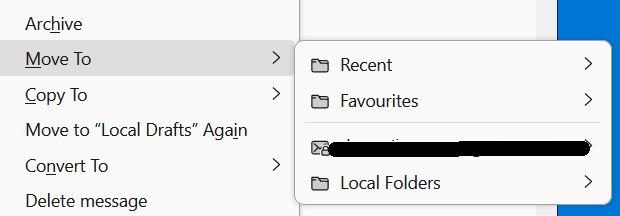
I do have the fly-out, but it used to have a search box on top of it. I have a lot of folders in multiple levels, some of which don't get used much so I forget where they are.
Try v. 2.0.1 of this add-on:
https://addons.thunderbird.net/en-us/thunderbird/addon/quick-folder-move/versions/