


Importing an ldif address book into Thunderbird v91.8.1 64 bit and Win 10

My system wiped Thunderbird 91.8.0 completely. So I downloaded v91.8.1 and started reconstructing my accounts - no major problem.
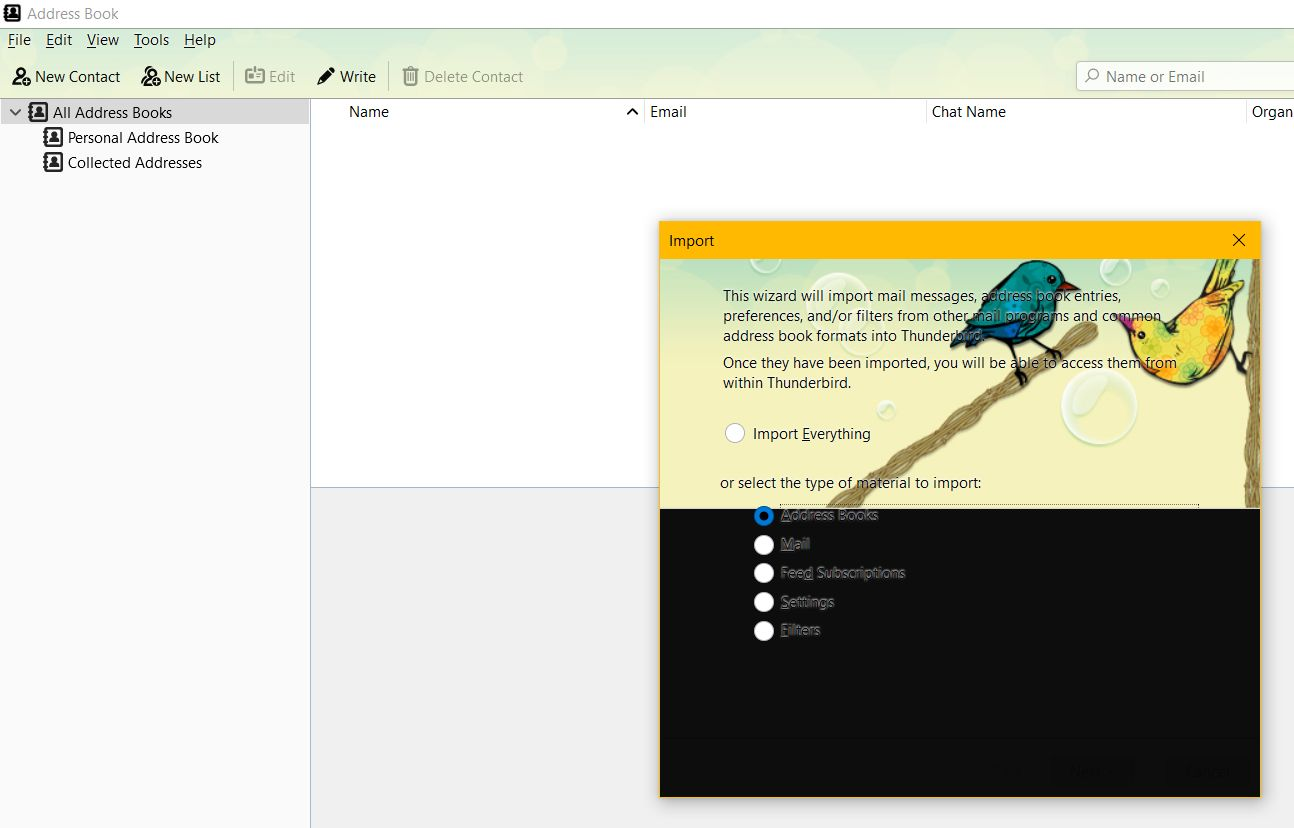
But when I try to import my backup ldif files into the new version it comes up with a screen as attached. I select address book in that but there is nothing to start the import as you can see in the pic attached.
Or is there another way I can import?
Can anyone help me, an elderly user??
Many thanks.
Chosen solution
Select 'Address Books' - there should be a 'Back', 'Next' and 'Cancel' button at the bottom of that window. Normally you would select 'Next' but your image clearly is missing that part.
I can see that you have downloaded and installed a theme addon. It looks like the 'Two little birds'. https://addons.thunderbird.net/en-us/thunderbird/addon/two-litle-birds/ Reviews for this addon theme do say that back areas cover parts of various windows so that buttons are not visible.
Suggest you select another theme like the default 'Light' theme.
Then you may see the Tools > Import window correctly.
All Replies (2)
Chosen Solution
Select 'Address Books' - there should be a 'Back', 'Next' and 'Cancel' button at the bottom of that window. Normally you would select 'Next' but your image clearly is missing that part.
I can see that you have downloaded and installed a theme addon. It looks like the 'Two little birds'. https://addons.thunderbird.net/en-us/thunderbird/addon/two-litle-birds/ Reviews for this addon theme do say that back areas cover parts of various windows so that buttons are not visible.
Suggest you select another theme like the default 'Light' theme.
Then you may see the Tools > Import window correctly.
Brilliance! Works! Thanks heaps.