


Drop down menus on forms only show first 10 options

This was happening in the Developer Firefox version so I thought it was specific to that, but this problem persists even with regular Firefox.
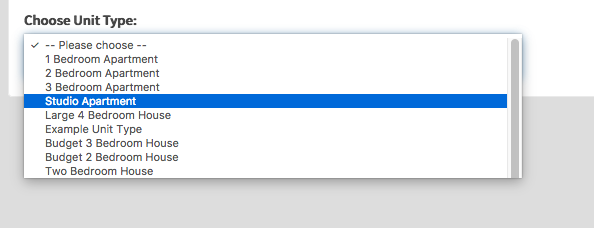
Basically, any select box (drop down menu) in a form will only visibly show 10 options and, although there is a scroll bar which indicates you are able to scroll through the rest, it doesn't work. I have attached a screenshot of what happens with every drop down option menu that has more than 10 options in it. I tried restarting in Safe Mode, disabling plugins (I don't have many anyway) but none of these solve the issue.
I am using version 56.0 on MacOS Sierra, which is says is the most recent.
All Replies (11)
Hi, strange behavior I cannot reproduce in my FF nightly. Does it happen in a unique website or all websites?
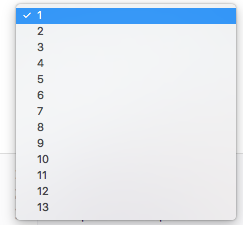
It happens in all of the sites that I personally am working on but also externals sites (I use a site called fiverr.com a lot and there is a particularly long list of options that I can only see 10 of) so I am guessing it's across all.
smorele said
Hi, strange behavior I cannot reproduce in my FF nightly. Does it happen in a unique website or all websites?
Just to clarify, the same thing happens on the nightly build (Quantum) but I don't even see a scroll bar.
if you have a theme, please disable it to test - Add-ons Manager (Ctrl+Shift+A) > Appearance.
Try Options > (General), then deselect Performance and Use hardware acceleration when available, then restart Firefox - Startup, home page, tabs, and download settings.
Tried this, seemed to work on first page load but when I reloaded the issue persisted. I also have never changed the theme from the default.
and what happens with a new profile?
Have tried that now, but no difference :(
Plus all my bookmarks, history and saved passwords aren't in the new profile so it wouldn't have been the most practical solution.
Is you Mac set to always show a scroll bar in case this makes a difference?
- System Preferences -> General -> Show Scroll Bar -> Choose "Always"
cor-el said
Is you Mac set to always show a scroll bar in case this makes a difference?
- System Preferences -> General -> Show Scroll Bar -> Choose "Always"
No, it's set to Auto.