


How do I completely disable TB's attempts to tag/flag/judge email as junk?

I don't want TB to touch my emails with ANY junk classification.
I don't want it to display 'junk' icons.
I don't want it to 'think' a message is junk mail.
How do I permanently, completely and irreversibly disable any and all code in thunderbird that messes up my precious messages and tags them as junk. I'm ok with deleting it's bs database of junk/not junk. It was worthless anyway.
I want it to go away. I never want to see any mentions of 'junk' in my thunderbird setup.
Seriously. Please stop defecating all over my email. There MUST be a way to disable this...
I've seen every google link coming up after typing 'thunderbird disable junk filtering', three pages in. Similar searches too. Any and all advice remains useless. 'Thunderbird thinks this message is junk mail.' is driving me mad.
If there's a function I need to comment out in the code, I'm OK to do it. Just please, drop me a hint, I'm desperate.
</rant>.
All Replies (8)
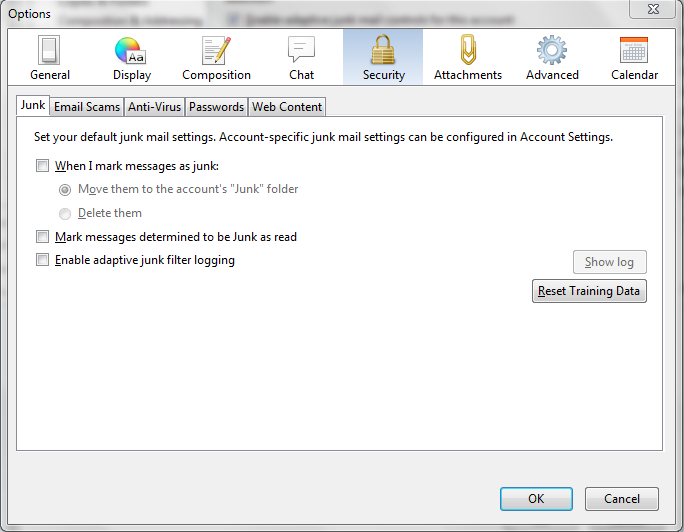
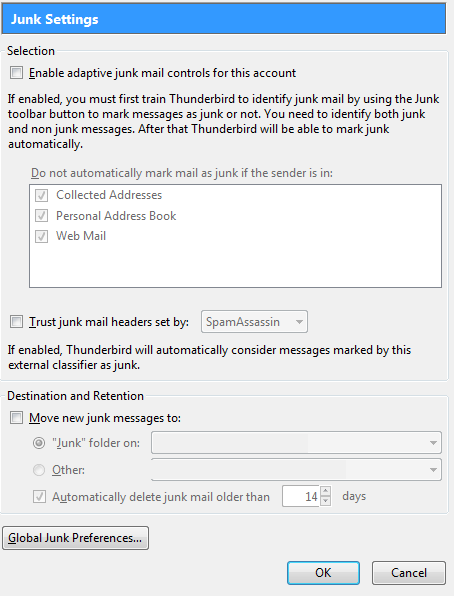
Use the images provided to change your settings.
You'd have to check your settings for each account individually outside of Thunderbird as well, e.g. Hotmail, Gmail, etc since they also provide Junk mail filters that work independently.
First of all, I'm not confusing upstream filtering with TB's adaptive malarchy. But thanks for flagging that up.
The proposed method does _not_ completely disable junk filtering.
Thunderbird still displays 'Thunderbird thinks this message is junk mail.'
I don't want it to think I want it to stop being 'smart' and 'clever'. I want to completely rip out this 'feature' as it's poorly implemented and made me and countless other users lose legitimate email.
There are still options that concern adaptive junk mail controls all over the place. There are still 'flags' being set on new, incoming email. TB is _still_ meddling in my affairs without my consent.
Looks like whoever implemented this 'feature' never envisaged users may want to disable it. Completely and permanently.
But thanks for trying to help.
To add insult to injury, on some IMAP accounts, it finds a 'Junk' or 'Spam' folder and tags it with that annoying, useless orange icon despite 'Adaptive junk filtering' being per-account and globally disabled.
So, developers, how do I make TB _NEVER_ tag _ANYTHING_ as junk?
As said, have source, can patch. Should be a one-line patch, right?
-return notJunk; +return true;
or similar.
I presume you have changed all your accounts Junk settings using both pieces of info supplied by Glamdring7. Do double check that all accounts have had this switched off. 'Tools' > 'Account settings' > 'Junk Settings' for each mail account uncheck 'enable adaptive junk mail controls for this account.
At the bottom under 'Destination and retention uncheck 'Move new junk messages to' click on OK to save all changes.
then in 'Tools' > 'Options' > 'Security' > Junk' tab uncheck 'when I mark messages as junk' uncheck 'Enable adaptivre junk filter logging' click on OK
then right click on Junk folder and choose 'empty Junk' then right click on Junk Folder and select 'compact'.
Thunderbird doesn't use or react to the word "spam" in its identification of junk mail, nor does Thunderbird put it in the subject.
If you see the "spam" in a subject or have a folder called "Spam", this is either due to your email provider or an add-on product (such as SpamPal).
training.dat is a file in your profile folder which has Custom training for Junk Mail Controls.
To see Profile folders you need to make hidden files visible.
http://kb.mozillazine.org/Show_hidden_files_and_folders
Locate Profile folder:
- Help > Troubleshooting Information
- click on 'show folder'
- a new window opens showing the Profile Folder.
- Close Thunderbird now.
- delete this file: training.dat
- close window - top right X
- Open Thunderbird.
This will switch off Thunderbird Junk Controls. However, there may be some filtering performed by the server, so you will need to check that out by accessing your webmail account.
Hi Toad-Hall,
Thanks for providing the instructions.
I have double-checked all the settings. They are correct. That includes unchecking 'Enable adaptive junk mail controls for this account' and 'Destination and Retention'. All settings in the Junk tab in preferences are also unchecked.
I am assuming that clicking 'Reset Training Data' will clear training.dat.
$ find ~/.thunderbird -name training.dat
returns no files.
I can't 'empty Junk' folder as it contains valuable data (aside from the obvious spam).
I am aware TB does not react to word 'spam' and I am very well aware of subject and header tagging in Spamassassin (server-side) this is, again, NOT the case.
I do not see subject being tagged. I am not using any add-ons or plugins. This is TB only.
There is only one account, on a server that I control and there is absolutely no spam filtering on that system. Such 'clean' (i.e. unprocessed by spam filters) emails are then dropped into a clean inbox.
It then often happens that clicking on an email results in the following message being displayed above it in TB:
"Thunderbird thinks this message is junk mail." [Not Junk]
Guess what.
I have absolutely no wish for TB to 'think' anything. I have expressed my disinterest with TB's ability to process unwanted mail. This is particularly bad UX -- I've ran circles to disable a function that doesn't work for me and even still, I see this 'feature' poking it's head from time to time. Some emails show up with the dreaded orange 'fire' icon, some get silently moved to junk.
In controlled tests the move is initiated by TB.
I have eliminated everything but TB in this erroneous behaviour. I would really like to be able to simply patch this out of the client because right this moment, I don't have a few grand to replace my current system with one that runs Mail.app.
TB is a good email client, don't get me wrong. But it's overzealousness in managing the spam problem made it flawed to the point of me not trusting it with my inboxes.
Thanks for hearing me out.
donotwantaccount modificouno o
In addition to ensuring all your mail accounts have diabled the adaptive junk mail filtering, make sure you have also turned off adaptive junk mail controls in Local Folders > Junk Settings as well as the mail accounts.
re:'I can't 'empty Junk' folder as it contains valuable data ' I was under the impression that disabling the adaptive junk controls, stopped this filtering/checking on new incoming mail although it would not change anything currently marked as junk.
However, I'm not certain, but if there are emails marked as junk could this keep the junk settings alive? hence why I suggested you deleted/emptied the Junk and compacted that folder to rule that notion out.
Perhaps it might a good idea to put valuable emails in a suitable folder. I would not assume that a Junk folder is the best place for emails that are not Junk. Then you can clear this folder which has emails marked as junk.
when you have no emails marked as junk and the Junk folder is empty and compacted, then make sure the training.dat is empty.
re: $ find ~/.thunderbird -name training.dat --- returns no files. If you have clicked on 'Reset Training Data' it should clear everything, but check that it is totally empty and you must have Thunderbird closed before you do any changes to the Profile folder.
Profile folders and files are hidden files, so you need to make hidden files visible first.
Select the thunderbird file and press Ctrl-H. more info : http://www.upubuntu.com/2011/11/how-to-show-create-hidden-files-or.html
Then when you start up Thunderbird, the Junk Controls should be completely disabled.
Just had a thought....do you have any pop mail account set up as a Global Inbox account? If yes, disable this temporarily (set to store inside own Inbox) and then unset your Junk settings. There was a bug requiring this workaround, but it was fixed from version 17.
Close and restart Thunderbird after changing all the settings.
RE: Junk controls. I set up my Junk controls, trained the Junk to recognise junk and not junk and have not had any issues. From my point of view it works very well.
re: To Disable or enable Thunderbird's email scam detection and warning system
'Tools' > 'Options' > 'Security' > E-mail Scams tab.
Uncheck/check the box and click on OK.
You could try creating a new Profile and make sure that all the Junk Settings are not enabled from the start.
If switching off absolutely everything in all accounts, Local Folders etc still brings up the warning. please post as a bug here: https://bugzilla.mozilla.org/
Toad-Hall modificouno o
Thanks for arguing your point of view.
I refuse to exercise cargo-cult operations (creating new profiles and disabling more and more interlinked 'features') just to prove the software is buggy.
re: If switching off absolutely everything in all accounts, Local Folders etc still brings up the warning. please post as a bug here: https://bugzilla.mozilla.org/
Umm, no.
I have already wasted enough energy to report this UX disaster on this 'forum', a format I detest.
Thank you for your time, up to you what you do with it. The cynic in me guesses this will be ignored and the problem will remain.
On a side note, if one thinks about it, just the length of this exchange shows there's a problem. It's 2014 and there is no excuse for a mature piece of software to behave like this. I can almost envisage being asked to source a goat and 5 black candles as the next debugging step.
There are quite a few people asking on public forums 'How do I completely disable Thunderbird junk mail' and since only 1% moans, the problem is 100x more severe.
Please consider talking to a developer that sits relatively low on the spectrum and can muster a shred of empathy.
TB lacks a clear, complete and reliable way of disabling junk/scam detection and people's mail gets mangled. Single tickbox, that's all. Let users completely disable this 'feature' while you refactor it so it doesn't suck any more.
And then keep the option available as not everyone wants email viewer to make arbitrary decisions based on heuristics.
Regards, -- grumpy old user.
donotwantaccount modificouno o
Thunderbird is a free program and if bugs are found it is appreciated that the person with the bug reports it.
As you have no intention of doing this, you cannot expect it to be looked at or fixed. It does not matter if there are others with an issue, if no one reports it then it remains an issue.
re 'Thank you for your time, up to you what you do with it. The cynic in me guesses this will be ignored and the problem will remain.'
My time as a volunteer is freely given trying to help people with issues. You can choose to use that information eg: create a new Profile or not. Had you tried it and it worked, then it would be good for you and anyone else reading this and needing a solution.
The cynic in you is correct because you are refusing to tell the developers that there is an issue. It is not ignored by anyone other than you. I cannot report it as my system works fine and only a person with details on what OS TB version and error reports etc etc can give them the needed details. But if you choose to not report it then you cannot complain.