


Using 140.10.2esr send issue

Ever since the latest update, when I hit send for an email. It says it cannot send, I cancel, hit send again and it goes through. I have to try sending EVERY email twice.
Réiteach roghnaithe
That was it. I'm a Gov't worker and we are on a DCN. It was connecting automatically on this computer. I had previously had it turned off, so not sure how that setting got changed. In any event, that was the issue and I'm all set now. Thank you sooooo much for your help.
Read this answer in context 👍 0All Replies (4)
Do you have an antivirus? Still have the problem if you disable it? What error message do you get the first time? (verbatim please)
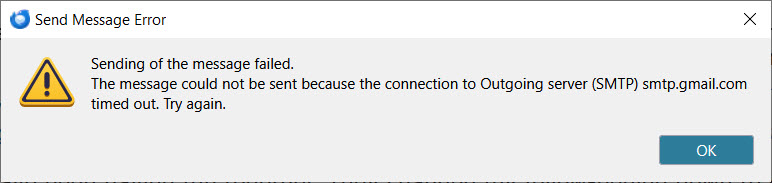
It still does it with the antivirus disabled. Here is the message I get: (see attached picture)
"Sending of the message failed. the message could not be sent because the connection to the Outgoing Server (SMTP) smtp.gmail.com timed out. Try Again."
As soon as I hit OK, then hit Send again, it sends. It does this on every email I send and my location doesn't seem to be the problem, as I'm getting the same response both at work and at home, which is 20 miles from my office.
It has only doing this since the last Thunderbird update.
Do you have the option in settings to enable DNS over HTTPS enabled? Try changing it and see if that makes any difference at all.
Do you have an antivirus that scans outgoing emails?
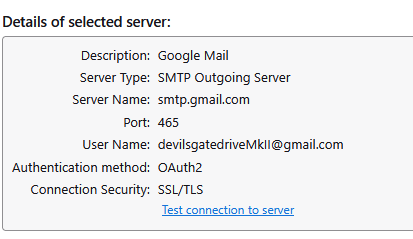
Are your settings in outgoing server (SMTP) set to the same as these
Réiteach Roghnaithe
That was it. I'm a Gov't worker and we are on a DCN. It was connecting automatically on this computer. I had previously had it turned off, so not sure how that setting got changed. In any event, that was the issue and I'm all set now. Thank you sooooo much for your help.