My Account
I have had this account several years and never had a problem, today just now I have two different email accounts. I use my account [edited] @gmail.com for verifying but I use my desktop computer and that email is [edited] @outlook.com. I noticed that that email was entered incorrectly. I was afraid that email may have been hacked. I did not see and option for me to make the correction.
Athraithe ag James ar
All Replies (2)

No one on here can fix or access your account or your online email accounts. If the resets doesn't work those are lost accounts at this point.
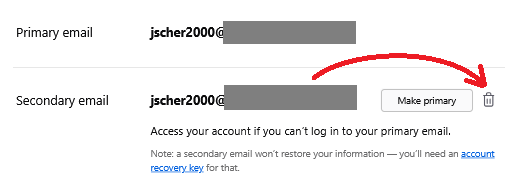
Hi Lillie, are you saying that the typo address is a "secondary" email address on your Mozilla account? If so, you should be able to remove it (see image attached).
Most likely, the owner of that address (if any) wasn't able to connect to your account because they wouldn't know your password.
For more background: Add a secondary email address to Mozilla accounts