


untrusted connection

I am using xp os when iam open fire fox ever time it's asking the the connection was untrusted that msg was showing ever time and Facebook chat also was disabled My system Time and date is correct My Firefox Data pleas resoul My problem
Application Basics
       Name
       Firefox
       Version
       20.0.1
       User Agent
       Mozilla/5.0 (Windows NT 5.1; rv:20.0) Gecko/20100101 Firefox/20.0
Build Configuration
about:buildconfig
Extensions
Name
Version
Enabled
ID
Important Modified Preferences
Name
Value
       browser.cache.disk.capacity
       358400
       browser.cache.disk.smart_size.first_run
       false
       browser.cache.disk.smart_size.use_old_max
       false
       browser.cache.disk.smart_size_cached_value
       358400
       browser.places.smartBookmarksVersion
       4
       browser.startup.homepage_override.buildID
       20130409194949
       browser.startup.homepage_override.mstone
       20.0.1
       dom.w3c_touch_events.expose
       false
       extensions.lastAppVersion
       20.0.1
       network.cookie.prefsMigrated
       true
       places.history.expiration.transient_current_max_pages
       26593
       plugin.disable_full_page_plugin_for_types
       application/pdf
       privacy.cpd.offlineApps
       true
       privacy.cpd.siteSettings
       true
       privacy.sanitize.migrateFx3Prefs
       true
       privacy.sanitize.timeSpan
       0
       security.default_personal_cert
       Select Automatically
Graphics
       Adapter Drivers
       vga framebuf vga256 vga64k
       Adapter RAM
       Unknown
       Device ID
       0x0000
       Direct2D Enabled
       Blocked for your graphics card because of unresolved driver issues.
       DirectWrite Enabled
       false (0.0.0.0)
       GPU #2 Active
       false
       GPU Accelerated Windows
       0/1 Basic Blocked for your graphics card because of unresolved driver issues.
       Vendor ID
       0x0000
       WebGL Renderer
       Blocked for your graphics card because of unresolved driver issues.
       AzureCanvasBackend
       cairo
       AzureContentBackend
       none
       AzureFallbackCanvasBackend
       none
JavaScript
       Incremental GC
       true
Accessibility
       Activated
       false
       Prevent Accessibility
       0
Library Versions
Expected minimum version
Version in use
       NSPR
       4.9.5
       4.9.5
       NSS
       3.14.3.0 Basic ECC
       3.14.3.0 Basic ECC
       NSSSMIME
       3.14.3.0 Basic ECC
       3.14.3.0 Basic ECC
       NSSSSL
       3.14.3.0 Basic ECC
       3.14.3.0 Basic ECC
       NSSUTIL
       3.14.3.0
       3.14.3.0
Alle antwurden (2)
hello venkey64, could you tell us which error code is shown under technical details on the error message and when you inspect the certificate which issuer information it does contain (see screenshot)?
"This Connection is Untrusted" error message appears - What to do
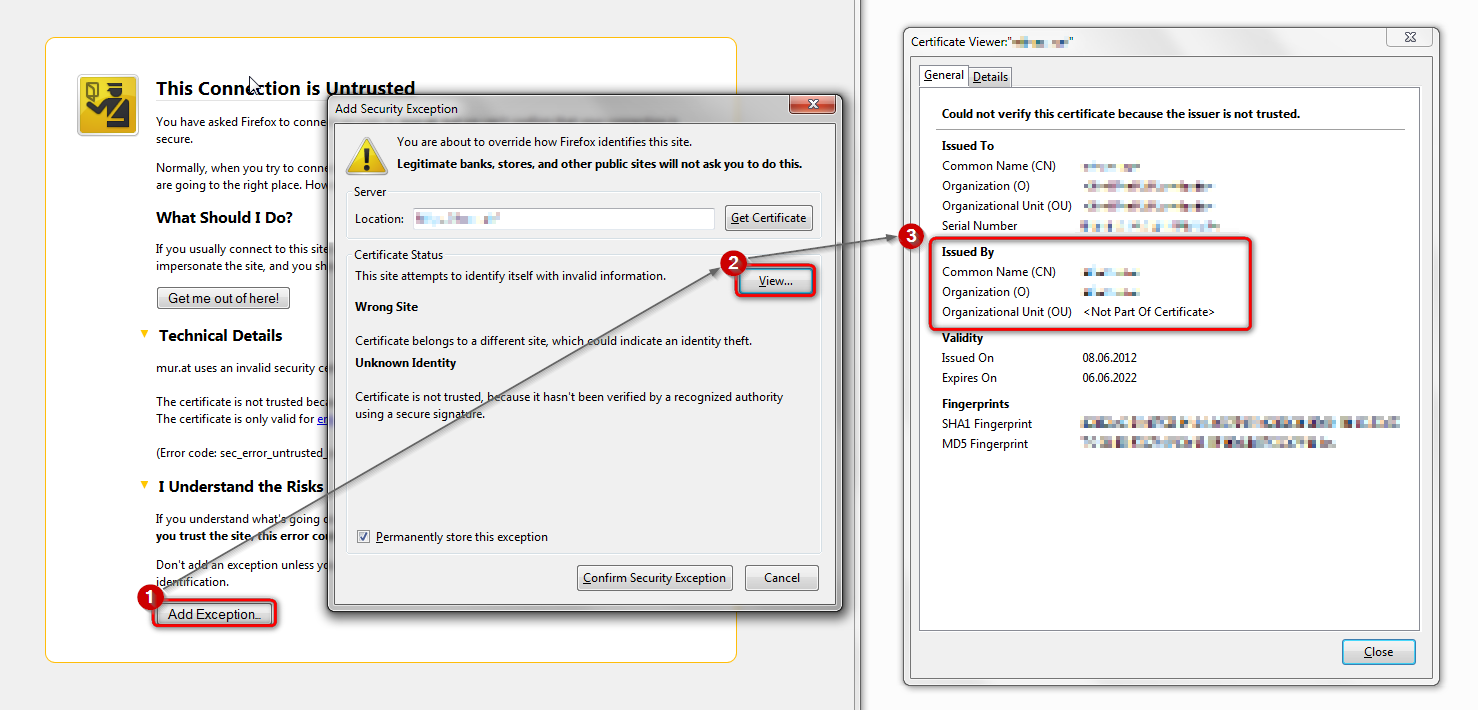
Check out why the site is untrusted (click "Technical Details to expand that section) and if this is caused by a missing intermediate certificate then see if you can install this intermediate certificate from another source.
You can retrieve the certificate and check details like who issued certificates and expiration dates of certificates.
- Click the link at the bottom of the error page: "I Understand the Risks"
Let Firefox retrieve the certificate: "Add Exception" -> "Get Certificate".
- Click the "View..." button and inspect the certificate and check who is the issuer of the certificate.
You can see more Details like intermediate certificates that are used in the Details pane.
If "I Understand the Risks" is missing then this page may be opened in an (i)frame and in that case try the right-click context menu and use "This Frame: Open Frame in New Tab".
Note that some firewalls monitor (secure) connections and that programs like Sendori or FiddlerRoot can intercept connections and send their own certificate instead of the website's certificate.