


Login action buttons no longer work and some pages not displaying correctly after upgrade.

After recent update, some web pages not displaying correctly and Login buttons on some sites do not work. I've updated my plugins and restarted computer, but problems remains. Is this Java, Javascript or something else? Same pages are working fine in IE.
Alle antwurden (1)

Please update the firefox to the latest version of firefox 26
Start Firefox in Safe Mode to check if one of the extensions (Firefox/Tools > Add-ons > Extensions) or if hardware acceleration is causing the problem (switch to the DEFAULT theme: Firefox/Tools > Add-ons > Appearance).
To Enable SafeMode
- You can open Firefox 4.0+ in Safe Mode by holding the Shift key when you open the Firefox desktop or Start menu shortcut.
- Or open the Help menu and click on the Restart with Add-ons Disabled... menu item while Firefox is running.
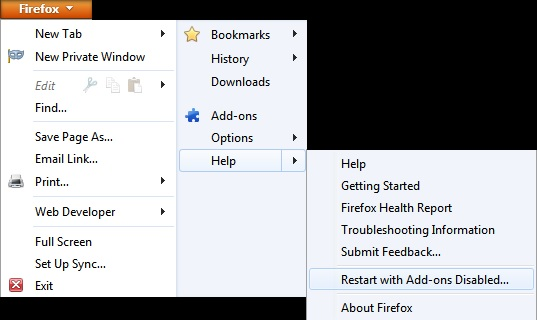
Once you get the pop-up, just select "'Start in Safe Mode"
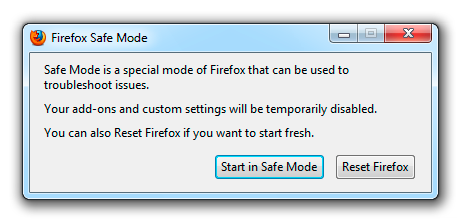
If it works in Safe Mode and in normal mode with all extensions (Tools > Add-ons > Extensions) disabled then try to find which extension is causing it by enabling one extension at a time until the problem reappears.
Close and restart Firefox after each change via "Firefox > Exit" (Windows: Firefox/File > Exit; Mac: "Firefox > Quit Firefox"; Linux: "Firefox/File > Quit")