Some website's fonts are defective

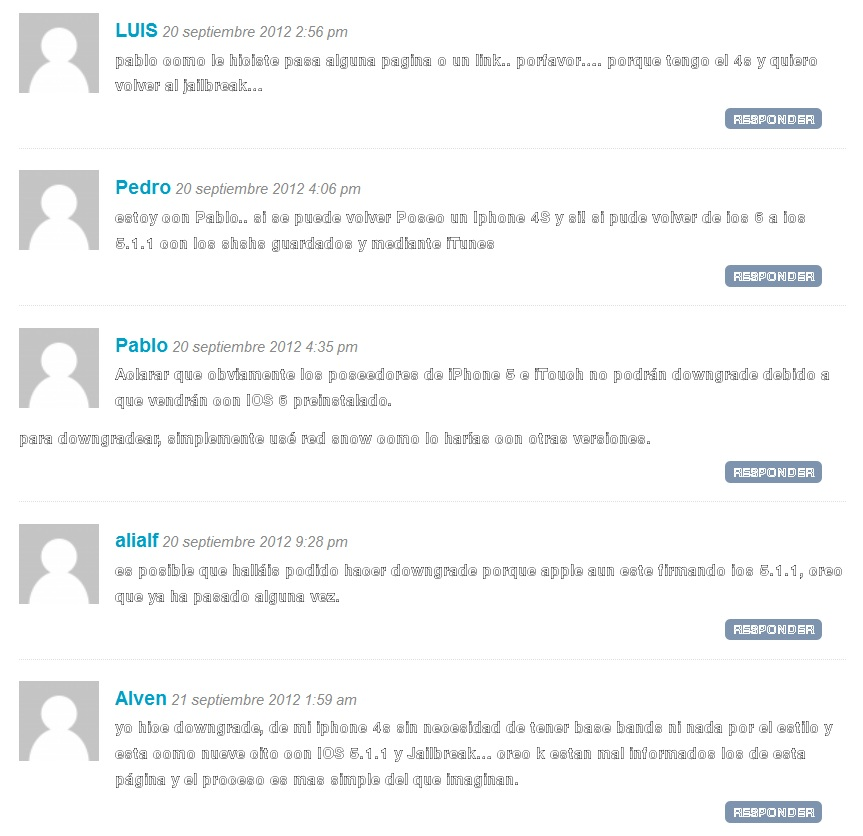
Some website's fonts look like characters with a black border and white or empty interior. This is practically illegible and happens to lots of websites. Everything looks like "HelvNueOutline" font. I have screen shots if necessary. Thanks.
Alle antwurden (2)
This can be a problem with the font that is used to display the text.
You can use this extension to see which fonts are used for text that is selected (right-click context menu: Show fonts in selection).
You can do a font test to see if you can identify corrupted font(s).
You can try different default fonts and temporarily disable website fonts to test the selected default font.
- Tools > Options > Content : Fonts & Colors > Advanced
- [ ] "Allow pages to choose their own fonts, instead of my selections above"
Bewurke troch cor-el op
Thank yoy very much. For the moment it has been solved by disabling website fonts on firefox. Hope will continue working.
Thanks
PD. Here some images of the problem